n8n AI Video Background Jobs Automation

๐Ÿ”„ Async Video Polling Engine - Background Job Handler for AI Video Generation

The async backbone that makes AI video generation production-ready โšก๐ŸŽฌ

Download Template JSON ยท n8n compatible ยท Free
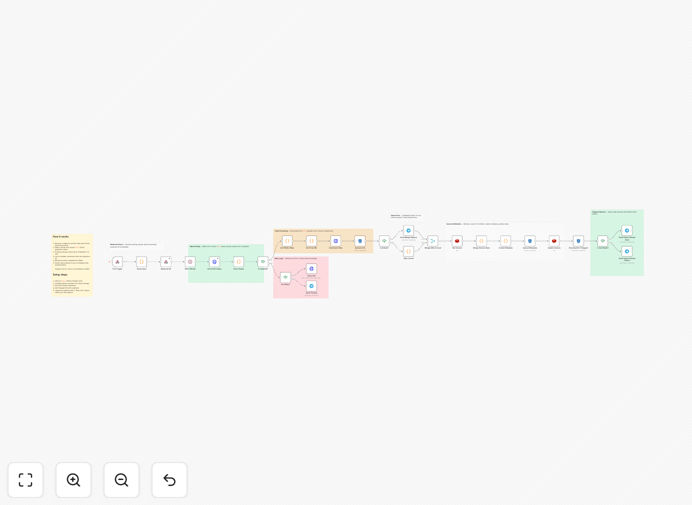
Async Video Polling Engine workflow diagram

What This Workflow Does

AI video generation platforms like Veo, Sora, and Seedance often require minutes or hours to process video creation requests. This creates a challenge for production workflows that need to handle these asynchronous jobs efficiently.

Our polling engine solves this by automatically checking job status, handling retries for failed requests, and processing completed videos without manual intervention. It acts as a reliable background worker that ensures your video generation pipeline runs smoothly 24/7.

How It Works

1. Job Submission Tracking

The workflow begins by receiving new video generation requests from your application or content management system. Each job gets logged with a unique identifier and timestamp.

2. Intelligent Polling Mechanism

At configured intervals (typically every 5-15 minutes), the system checks the status of pending jobs by querying the AI video platform's API. This happens automatically in the background.

3. Status Handling

For each job, the workflow detects whether it's still processing, completed successfully, or failed. Completed videos trigger downstream processing while failed jobs initiate retry sequences.

4. Result Processing

When videos are ready, the workflow automatically downloads them, applies any post-processing (like watermarking or format conversion), and delivers them to your designated storage or CMS.

Who This Is For

This solution is ideal for:

  • Content studios producing AI-generated videos at scale
  • Marketing teams automating video ad creation
  • SaaS platforms offering video generation features
  • Media companies integrating AI video into publishing workflows

Pro tip: Combine this with our AI Video Batch Processing template to handle high-volume generation with automated quality checks.

What You'll Need

  1. An n8n instance (cloud or self-hosted)
  2. API access to your AI video platform (Veo, Sora, Seedance, etc.)
  3. A storage solution for processed videos (S3, Google Drive, etc.)
  4. Webhook or API endpoint to receive job submissions

Quick Setup Guide

  1. Download and import the JSON template into your n8n instance
  2. Configure your AI video platform API credentials
  3. Set your polling interval and retry parameters
  4. Connect your storage system for processed videos
  5. Test with sample jobs and monitor the execution logs

Key Benefits

โณ 80% time savings by eliminating manual status checks and follow-ups for video generation jobs.

๐Ÿš€ 24/7 operation ensures videos get processed even outside business hours without human oversight.

๐Ÿ”„ Automated retries handle temporary API failures and network issues gracefully.

๐Ÿ“Š Centralized tracking gives visibility into all video generation jobs through a single dashboard.

Frequently Asked Questions

Common questions about AI video generation automation

Automation transforms AI video production from a manual, time-consuming process to a scalable system. By handling status checks, error recovery, and file processing automatically, teams can focus on creative direction rather than operational overhead.

For example, a marketing team generating 50 product videos weekly saves 15+ hours previously spent checking render status and manually downloading files. The automation also ensures no videos get stuck in processing limbo due to missed status updates.

  • Reduces human error in tracking multiple jobs
  • Enables parallel processing at scale
  • Provides audit trails for all video jobs

The optimal polling interval depends on your AI platform's typical processing times. For most systems, checking every 5-15 minutes balances responsiveness with API rate limits.

Shorter intervals (1-2 minutes) make sense for platforms that complete videos quickly, while longer intervals (15-30 minutes) work better for complex renders. Our template includes adaptive polling that can adjust based on historical completion times.

  • Start with 5-minute intervals for general use
  • Monitor API usage to avoid hitting rate limits
  • Consider exponential backoff for retries

Our workflow implements a robust retry mechanism with exponential backoff. When a job fails, it automatically retries up to a configured limit, with increasing delays between attempts.

For permanent failures, the system can notify administrators via email or Slack while moving the job to a quarantine area. This prevents one failed job from blocking others in the queue and provides clear visibility into issues needing manual intervention.

  • 3-5 retries with increasing delays recommended
  • Separate temporary vs permanent failures
  • Include original parameters for easy reprocessing

Yes, the template supports multi-platform operation through a modular design. You can configure separate processing branches for different AI video services while maintaining centralized tracking.

A common use case is using different platforms for different video styles - for example, Seedance for talking-head videos and Veo for product animations. The workflow routes jobs appropriately and consolidates all completed files to your central storage.

  • Platform-specific API adapters
  • Unified status dashboard
  • Consistent output handling

The workflow can chain various post-processing steps like adding watermarks, trimming durations, converting formats, or overlaying additional audio tracks. These happen automatically after the AI generation completes.

For example, an e-learning platform might automatically add branded intros/outros to all AI-generated course videos. The processing happens in sequence - first the AI generation, then the post-production steps - with the final file saved to the designated location.

  • FFmpeg integration for advanced editing
  • Parallel processing for high volume
  • Quality validation checks

The system includes built-in monitoring that tracks success rates, processing times, and error patterns. Key metrics get logged to dashboards and can trigger alerts when thresholds are breached.

We recommend setting up Slack/email alerts for consecutive failures, unusually long processing times, or quota limits being approached. The template includes sample alert configurations that you can customize for your specific needs.

  • Track average processing time per platform
  • Monitor API usage against limits
  • Alert on abnormal patterns

Absolutely! GrowwStacks specializes in building tailored automation solutions for AI video production. Our engineers can create custom workflows that integrate with your specific tech stack and business processes.

We've built systems for clients ranging from media companies generating thousands of videos weekly to startups adding AI video to their SaaS platforms. The free template gives you a starting point - we can expand it to handle your exact requirements, scale, and use cases.

  • End-to-end video pipeline automation
  • Custom integrations with your CMS/CRM
  • Enterprise-grade monitoring and reliability

Need a Custom AI Video Automation Built?

This free template is a starting point. Our team builds fully tailored automation systems for your specific needs.