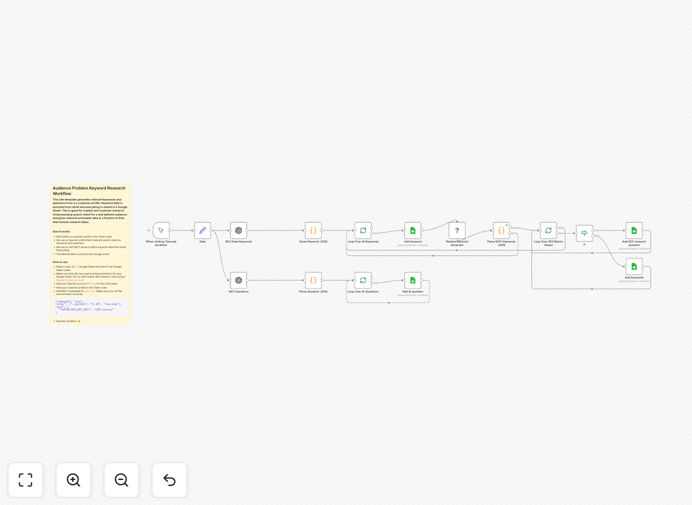
What This Workflow Does
Manual audience and keyword research is time-consuming, inconsistent, and often misses hidden opportunities. This automation solves that by systematically generating, validating, and organizing search intent data.
The workflow takes a defined customer profile (demographics, pain points, goals) and uses OpenAI's language model to hypothesize what that person would search for online. It then connects to Ahrefs (via an MCP server) to fetch real SEO metrics like search volume and keyword difficulty for those terms. Finally, all this enriched data is structured and written to a Google Sheet, creating a ready-to-use keyword database for your content, SEO, or product teams.
Instead of spending days on spreadsheets and guesswork, you get a validated list of high-intent keywords in minutes, allowing you to move faster and make data-driven decisions about your market.
How It Works
1. Define Your Customer Profile
The workflow starts with a "Data" node where you input the characteristics of your target audience. This includes their job title, industry, challenges, goals, and even the solutions they might be seeking.
2. AI-Generated Search Intent
An OpenAI node processes this profile. Using a tailored prompt, it generates a list of relevant keywords and specific questions your ideal customer is likely typing into search engines. This taps into the AI's understanding of language and context.
3. SEO Data Enrichment
Each generated keyword is sent to an SEO MCP server connected to Ahrefs' free tools. This step adds crucial business context: monthly search volume, keyword difficulty score, and competitive data. It separates high-potential terms from low-volume or overly competitive ones.
4. Structured Output to Google Sheets
The final step organizes the complete dataset—customer profile, AI-generated keyword, Ahrefs metrics—into rows in a Google Sheet. This creates a permanent, sortable, and shareable record of your research.
Pro tip: Run this workflow for multiple slightly different customer profiles (e.g., "Marketing Manager at a SaaS company" vs. "Head of Growth at a SaaS company") to uncover nuanced keyword variations and content gaps.
Who This Is For
This template is ideal for marketing teams, SEO specialists, content strategists, product managers, and founders. If you need to understand a new market, launch a product, create targeted content, or simply validate business ideas through search demand, this automation provides the data foundation.
It's especially valuable for agencies serving multiple clients in different niches, startups entering competitive markets, and established businesses looking to expand into new audience segments without extensive manual research overhead.
What You'll Need
- A self-hosted n8n instance: This workflow uses community nodes (MCP client) which require the self-hosted version of n8n.
- OpenAI API credentials: You'll need an API key to access the GPT models for keyword generation.
- SEO MCP Server setup: Access to an seo-mcp server configured with Ahrefs' free tooling credentials.
- Google Sheets access: A Google Sheet template (provided in the workflow description) with edit permissions granted to n8n.
- Basic n8n knowledge: Understanding how to import workflows and configure credentials.
Quick Setup Guide
- Download and Import: Click the download button above to get the JSON file. In your n8n instance, go to Workflows > Import from File and select the downloaded template.
- Prepare Your Google Sheet: Duplicate the template sheet linked in the workflow description. Note its ID and share it with your n8n service account email (for Cloud) or ensure proper authentication (for self-hosted).
- Configure Credentials: In n8n, set up credentials for OpenAI (API Key) and the SEO MCP server. Update the Google Sheets nodes with your new sheet's ID and range.
- Define Your Audience: Edit the "Data" node at the start of the workflow. Input the details of the customer profile you want to research.
- Test and Run: Execute the workflow once in manual mode. Check the Google Sheet to ensure data is populating correctly. Then, you can schedule it or trigger it as needed.
Key Benefits
Turn weeks of research into minutes. What traditionally takes a specialist 20-40 hours to complete manually can be accomplished in a single automated run, freeing your team for strategic work.
Eliminate guesswork with data validation. Combining AI hypothesis with actual Ahrefs search data ensures you're not chasing imaginary keywords. You invest effort in terms with proven search volume.
Create a scalable research system. Once set up, you can research dozens of audience profiles with a single click, building a comprehensive keyword universe for your entire business or client portfolio.
Improve content and product-market fit. By understanding the exact language and questions your audience uses, you can create content that directly answers their needs and develop products that solve their stated problems.
Centralize insights for team collaboration. The Google Sheets output acts as a single source of truth that marketing, SEO, and product teams can access, filter, and act upon together, improving alignment.