Google Sheets AI (GPT-4o) Slack HR Automation n8n

Automate Interview Feedback Audits with AI & Slack

Free n8n workflow to score interviewer feedback quality, detect bias, and deliver real-time coaching via Slack—straight from your Google Sheets.

Download Template JSON · n8n compatible · Free
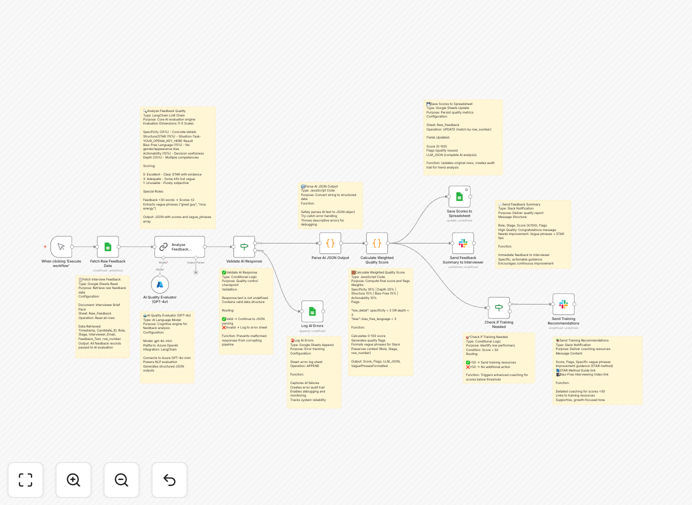
Visual diagram of the interview feedback automation workflow connecting Google Sheets, AI analysis, and Slack notifications

What This Workflow Does

Hiring quality depends heavily on the quality of interviewer feedback. Yet most teams collect vague, inconsistent notes in spreadsheets with no objective scoring. This creates hiring bias, poor candidate decisions, and legal risks.

This automation solves that by turning subjective feedback into structured, scored data. It pulls raw notes from Google Sheets, uses AI (GPT-4o-mini) to evaluate them across five dimensions—specificity, STAR method compliance, bias-free language, actionability, and depth—then calculates a weighted quality score. Low-scoring interviewers automatically receive Slack coaching with improvement tips, while all scores are logged back to Sheets for audit trails.

The result: consistent, bias‑reduced hiring decisions, continuous interviewer development, and a defensible hiring process—all running automatically.

How It Works

1. Fetch Raw Feedback

The workflow starts by reading all recent interview feedback entries from a designated Google Sheet. Each row contains the role, interview stage, interviewer email, and the free‑text feedback notes.

2. AI Quality Evaluation

Each feedback text is sent to Azure OpenAI's GPT‑4o‑mini model via a structured prompt. The AI analyzes the text against a predefined rubric and returns a JSON scorecard for five dimensions, each scored 0‑10.

3. Validate & Parse

The AI response is validated to ensure it's properly formatted. If invalid, the error is logged to a separate sheet for monitoring. Valid JSON is parsed into structured data for scoring.

4. Calculate Weighted Score

A code node applies custom weights to each dimension (e.g., specificity weighted higher than depth) to compute a final quality score out of 100. It also generates flags for vague phrases and extracts improvement suggestions.

5. Save & Notify

The score, flags, and AI JSON are written back to the original Google Sheets row. Then, a personalized Slack message is sent to the interviewer with their score, flagged phrases, and tailored tips—like STAR method guidance.

6. Training Recommendations

If the score falls below a configurable threshold (default 50), the workflow routes to a separate branch that sends additional training resources—bias‑free interviewing guides, STAR templates—to help the interviewer improve.

Who This Is For

This template is ideal for scaling companies that hire frequently and need to standardize their process. HR and recruitment teams will benefit most, especially those using Google Sheets for tracking and Slack for internal communication. It's also valuable for companies subject to compliance audits or those prioritizing diversity and inclusion, as the automated bias detection creates objective records.

Tech startups, consulting firms, and any business with more than 10 interviewers will see immediate ROI through reduced manual review time and improved hiring outcomes.

What You'll Need

  1. A Google Sheets spreadsheet with columns for Role, Stage, Interviewer Email, Feedback Text, and row_number.
  2. Azure OpenAI API credentials (or another compatible LLM provider) for the GPT‑4o‑mini model.
  3. Slack API credentials (bot token) with permissions to send messages to users.
  4. An n8n instance (cloud or self‑hosted) to run the workflow.
  5. Basic familiarity with n8n to configure the node credentials.

Pro tip: Start with a small sample of historical feedback to test the scoring rubric. Adjust the AI prompt and dimension weights based on what ‘good’ feedback looks like in your organization before running at scale.

Quick Setup Guide

  1. Download the template using the button above and import it into your n8n instance.
  2. Configure the Google Sheets node with your spreadsheet ID and sheet name for the raw feedback.
  3. Set up the AI node with your Azure OpenAI endpoint, API key, and deployment name.
  4. Connect the Slack node using a bot token with chat:write permissions.
  5. Adjust the threshold in the “Check if Training Needed” node if you want to change the score that triggers extra resources.
  6. Run the workflow manually once to test with a few rows, then schedule it (e.g., daily) to automate ongoing audits.

Key Benefits

Cut manual feedback review time by 70–80%. What used to take hours each week now happens automatically, freeing your HR team for strategic work.

Reduce hiring bias with objective, AI‑driven scoring. The system flags vague or biased language, promoting fairer evaluations and a more inclusive hiring process.

Improve interviewer skills with real‑time, personalized coaching. Slack notifications provide immediate, actionable feedback, helping interviewers improve before the next candidate.

Create an audit‑ready paper trail. Every score and flag is stored in Google Sheets, providing defensible documentation for compliance reviews or legal inquiries.

Scale your hiring process without adding HR headcount. Automate quality control as you grow, ensuring consistency even with more interviewers and more roles.

Frequently Asked Questions

Common questions about interview feedback automation and AI‑powered hiring audits

Structured feedback is critical because it removes bias, ensures consistency across candidates, and provides actionable data for hiring decisions. Without it, teams rely on gut feelings, which leads to poor hires, legal risks, and a weak employer brand.

Automated scoring enforces standards like the STAR method, turning subjective comments into comparable metrics. This allows managers to identify weak interviewers and provide targeted coaching, ultimately raising the quality of hires across the organization.

AI can analyze free‑text feedback for specificity, bias, actionability, and depth instantly. It flags vague phrases, detects unconscious bias, and scores each note against predefined rubrics. This turns subjective comments into objective data, enabling continuous interviewer coaching.

Beyond scoring, AI can suggest improvements, extract key themes across interviews, and even predict candidate fit based on feedback patterns. This intelligence layer transforms a passive record‑keeping exercise into an active talent‑quality system.

This integration creates a closed‑loop system: Sheets stores raw data, AI adds intelligence, and Slack delivers real‑time coaching. It eliminates manual spreadsheets, reduces HR admin time by 70%, and ensures interviewers receive immediate, personalized feedback to improve their skills before the next candidate.

The combination is powerful because it works with tools teams already use. No new software to learn—just smarter connections between existing platforms. This dramatically increases adoption and ROI compared to introducing a standalone feedback system.

STAR stands for Situation, Task, Action, Result. It's a structured response format that forces interviewers to provide concrete examples instead of opinions. Using STAR in feedback makes evaluations evidence‑based, comparable across candidates, and legally defensible.

Automation can check for STAR compliance by looking for descriptions of specific situations, tasks assigned, actions the candidate took, and measurable results. Feedback that follows this pattern is inherently more valuable for hiring decisions and candidate development.

Manually reviewing hundreds of feedback notes can take 10‑15 hours per week. Automation processes them in minutes, flags only the low‑quality entries for human review, and auto‑generates coaching reports. This frees recruiters to focus on candidate experience and strategic hiring initiatives.

The time savings compound as you scale. With 50 interviews a month, manual review becomes a full‑time job. Automation handles the volume effortlessly, ensuring quality control doesn't break as hiring accelerates.

Yes. Automated audits create an objective paper trail showing consistent evaluation criteria were applied. It detects biased language that could lead to discrimination claims and ensures all interviewers are held to the same standard. This documentation is invaluable during internal audits or legal challenges.

For regulated industries or companies with diversity commitments, this automation provides measurable proof of fair hiring practices. It turns compliance from a retrospective scramble into a built‑in feature of your hiring process.

Common mistakes include: collecting only yes/no ratings, allowing vague comments like 'good culture fit', not training interviewers on bias, having no scoring rubric, and failing to provide feedback to interviewers themselves. Automation addresses all these by enforcing structure and enabling continuous improvement.

The biggest mistake is treating feedback as a checkbox rather than a quality signal. By automating analysis, you transform feedback from an administrative task into a strategic asset for improving hiring outcomes and interviewer capability.

Absolutely. GrowwStacks specializes in building tailored automation systems for hiring teams. We can adapt this template to your specific ATS, integrate with your existing HR tools, add custom scoring rubrics, and set up advanced analytics dashboards.

Every company's hiring process is unique. We'll work with you to understand your workflow, compliance requirements, and growth goals, then build a solution that fits perfectly. Book a free consultation to discuss your needs.

  • Seamless integration with Greenhouse, Lever, or Workday
  • Custom AI prompts trained on your feedback examples
  • Executive dashboards showing hiring quality trends

Need a Custom Interview Feedback Automation?

This free template is a starting point. Our team builds fully tailored automation systems for your specific business needs.