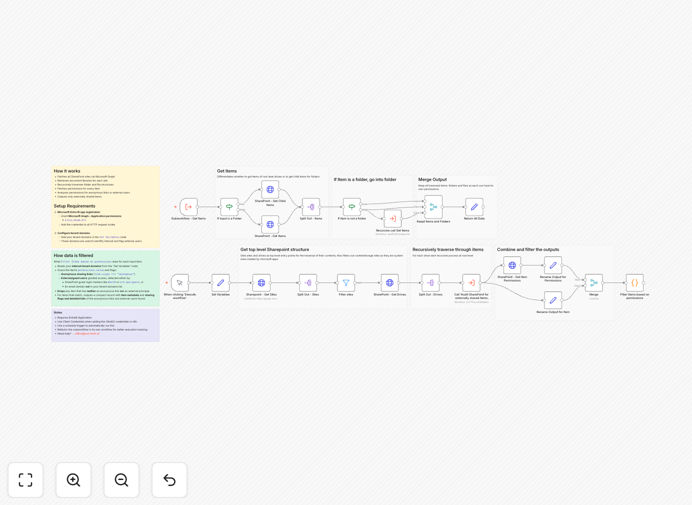
What This Workflow Does
This automation solution helps IT and security teams maintain control over SharePoint Online content by systematically identifying files and folders shared with external users or through anonymous access links. The workflow scans your entire SharePoint environment, providing a detailed report of potential security risks that could lead to data leaks or compliance violations.
By automating what would otherwise be a manual, time-consuming audit process, this template saves security teams 10-15 hours per month while improving accuracy. It's particularly valuable for organizations subject to data protection regulations like GDPR or HIPAA that require strict control over document sharing.
How It Works
1. Tenant Configuration Scan
The workflow begins by verifying your SharePoint tenant settings and identifying all active sites that need to be audited.
2. Recursive Content Traversal
Using Microsoft Graph API, the automation systematically examines every document library, folder and file across all SharePoint sites.
3. Permission Analysis
For each item found, the workflow retrieves and analyzes sharing permissions, identifying external users and anonymous access links.
4. Risk Classification
Detected sharing violations are categorized by severity based on your organization's security policies and compliance requirements.
5. Report Generation
The final output is a comprehensive report detailing all external sharing instances, ready for review by your security team.
Who This Is For
This workflow is ideal for:
- IT security teams managing SharePoint environments
- Compliance officers in regulated industries
- Microsoft 365 administrators
- Data protection officers
- Managed service providers offering SharePoint security
Pro tip: Combine this with our Data Loss Prevention workflows to create a complete security automation system for your Microsoft 365 environment.
What You'll Need
- Microsoft 365 admin credentials
- Azure AD app registration with Graph API permissions
- n8n instance (cloud or self-hosted)
- List of approved internal domains
Quick Setup Guide
- Download the JSON template file
- Import into your n8n instance
- Configure Azure AD app credentials
- Set your internal domain whitelist
- Test with a single SharePoint site first
- Schedule regular executions
Key Benefits
Reduce security review time by 90%: What used to take days of manual checking now runs automatically overnight.
Maintain continuous compliance: Regular automated audits ensure you always know your exposure risk.
Prevent data leaks proactively: Identify and remediate risky sharing before breaches occur.
Customizable to your policies: Easily adjust what constitutes a security violation to match your standards.
Integration-ready: Connect findings to your SIEM, ticketing system or compliance tools.