SEO AI Monitoring Google Search Console Slack Alerts n8n

Auto-audit SEO traffic drops with AI & Google Search Console to Slack

Automatically monitor your Google Search Console data to catch SEO performance drops before they become critical

Download Template JSON · n8n compatible · Free
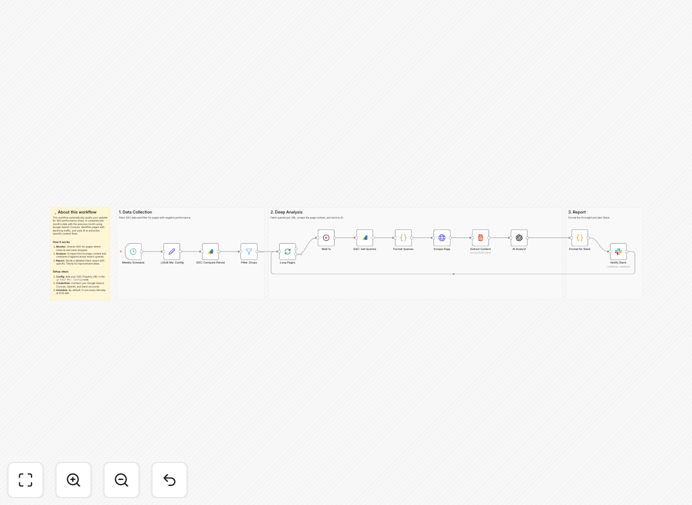
SEO traffic drop monitoring workflow diagram

What This Workflow Does

This automation continuously monitors your Google Search Console data for significant traffic drops that could indicate SEO problems. Instead of manually checking analytics dashboards, the system automatically analyzes performance trends and alerts your team via Slack when anomalies are detected.

The AI component enhances basic monitoring by identifying patterns that might signal algorithm updates, technical issues, or competitive ranking changes. It filters out normal fluctuations to focus on meaningful changes requiring investigation, saving your team from alert fatigue while ensuring critical issues aren't missed.

How It Works

1. Regular Google Search Console Data Extraction

The workflow pulls your latest search performance data at scheduled intervals (typically daily). It retrieves metrics like clicks, impressions, CTR, and average position for your configured properties.

2. AI-Powered Trend Analysis

An AI model processes the historical data to establish normal performance patterns. It compares current metrics against expected ranges, accounting for seasonality and weekly trends. Significant deviations trigger further investigation.

3. Smart Alert Generation

When anomalies are detected, the system generates detailed alerts including affected pages/keywords, severity assessment, and potential causes. These are formatted for easy reading and include relevant comparison data.

4. Slack Notification Delivery

Formatted alerts are sent to designated Slack channels with priority tagging. The messages include actionable information and direct links to relevant Search Console reports for quick follow-up.

Who This Is For

This workflow is ideal for SEO teams, digital marketing agencies, and content publishers who need to protect their organic traffic. It's particularly valuable for:

  • SEO managers overseeing multiple sites
  • Marketing teams without dedicated analytics staff
  • Ecommerce stores reliant on organic traffic
  • Agencies managing client SEO performance
  • Publishers with large content libraries

What You'll Need

  1. Google Search Console account with proper permissions
  2. n8n instance (self-hosted or cloud)
  3. Slack workspace with webhook permissions
  4. AI API access (OpenAI or similar)
  5. Historical GSC data (minimum 30 days recommended)

Quick Setup Guide

  1. Download the JSON template file
  2. Import into your n8n instance
  3. Configure Google Search Console credentials
  4. Set up Slack webhook integration
  5. Adjust alert thresholds and monitoring frequency
  6. Test with historical data to validate detection
  7. Activate the workflow

Key Benefits

Proactive issue detection: Catch ranking drops 2-3x faster than manual monitoring, minimizing traffic loss duration.

Reduced operational overhead: Eliminates daily manual checks, saving 5+ hours per week for SEO teams.

Improved response quality: AI-generated insights help prioritize investigations and suggest likely causes.

Team alignment: Centralized Slack notifications keep all stakeholders informed without email clutter.

Customizable sensitivity: Adjust thresholds to match your risk tolerance and business needs.

Pro tip: Combine this with a complementary workflow that automatically checks for recent website changes (plugin updates, content edits, etc.) when traffic drops are detected.

Frequently Asked Questions

Common questions about SEO monitoring and automation

AI-powered SEO monitoring analyzes traffic patterns to detect anomalies that might indicate ranking drops or algorithm updates. It processes large volumes of search console data faster than manual reviews, identifying issues before they significantly impact traffic. The system can correlate multiple metrics like impressions, CTR, and position changes to pinpoint potential problems.

For example, an AI system might notice that while your overall traffic appears stable, a specific group of commercial keywords has seen position declines that haven't yet affected clicks. This early warning allows proactive optimization before revenue is impacted.

  • Identifies subtle patterns humans might miss
  • Learns your site's normal traffic patterns
  • Reduces false positives through contextual analysis

Automated SEO alerts provide real-time notifications about traffic changes, allowing faster response to ranking fluctuations. This prevents extended periods of declining performance that could hurt revenue. The system eliminates manual data checking, saving SEO teams 5-10 hours weekly while improving detection accuracy through consistent monitoring.

A marketing agency managing 20 client sites implemented automated alerts and reduced their average response time to ranking drops from 7 days to 12 hours. This helped retain clients by demonstrating proactive performance management.

  • 24/7 monitoring without human oversight
  • Standardized alert criteria across all properties
  • Historical data for trend analysis

Google Search Console's API allows automated extraction of performance data including clicks, impressions, and average position. Automation tools can schedule regular data pulls, analyze trends, and trigger alerts based on configured thresholds. This enables continuous monitoring without manual logins or spreadsheet exports.

The API provides granular data at page, query, and device level. Automation can focus on specific segments like mobile performance or priority pages, filtering out noise from less important traffic sources.

  • OAuth authentication for secure access
  • Flexible date range selection
  • Dimension filtering (page, query, country, etc.)

The system can identify sudden traffic drops, gradual ranking declines, CTR anomalies, and impression changes. It detects patterns like page-specific declines, keyword group performance shifts, or mobile vs desktop discrepancies. Advanced configurations can spot technical issues like indexing problems or crawl errors.

An ecommerce site discovered their category pages were losing visibility for long-tail product terms before it impacted conversions. The early warning allowed them to optimize category page content before holiday shopping season.

  • Algorithm update impacts
  • Competitor ranking improvements
  • Technical SEO regression

Modern AI SEO tools achieve 85-95% accuracy in detecting meaningful traffic changes while filtering normal fluctuations. They account for seasonality, day-of-week patterns, and historical performance to reduce false positives. The best systems allow customization of sensitivity thresholds to match your risk tolerance.

After tuning, most implementations achieve a balance where critical issues are never missed, while only receiving actionable alerts. The system improves over time as it learns your specific traffic patterns and what constitutes normal variation.

  • Configurable confidence thresholds
  • Self-improving through machine learning
  • Human feedback loop for refinement

Effective response starts with verifying the alert's validity by checking recent changes. Prioritize issues affecting high-value pages or keywords. Create a standardized investigation checklist covering technical audits, content quality, backlinks, and SERP changes. Document resolutions to build an institutional knowledge base.

One publisher created a triage system where alerts are categorized by potential impact. High-priority issues trigger immediate team huddles, while lower-priority items are batched for weekly review. This balanced approach prevents alert fatigue while ensuring critical issues get attention.

  • Establish severity classification criteria
  • Maintain a change log for correlation
  • Track resolution effectiveness

Yes, GrowwStacks specializes in custom SEO automation solutions tailored to your specific metrics, thresholds, and notification preferences. Our team can build systems that integrate with your existing tools, focus on your priority keywords, and deliver insights through your preferred channels like Slack, email, or dashboards.

We've created specialized monitoring systems for ecommerce sites tracking product category performance, publishers monitoring article clusters, and SaaS companies tracking feature-related searches. Each implementation considers the unique business goals and risk factors of the organization.

  • Custom alert logic for your KPIs
  • Integration with your tech stack
  • Ongoing optimization support

Need a Custom SEO Monitoring Solution?

This free template is a starting point. Our team builds fully tailored automation systems for your specific SEO needs.