What This Workflow Does
This automation solves a major pain point for content creators, marketers, and social media managers: manually editing long videos into short, engaging clips for platforms like TikTok, Instagram Reels, and YouTube Shorts. The process is time-consuming, inconsistent, and often misses the most viral-worthy moments.
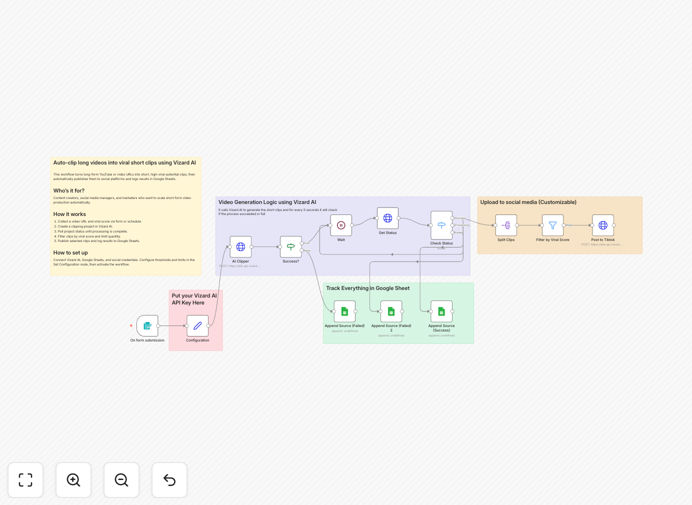
The workflow automatically takes any long-form video URL (like a YouTube video, webinar recording, or podcast episode), sends it to Vizard AI for intelligent clipping, filters the generated clips based on a "viral score," publishes the best clips to your social channels, and logs all results in Google Sheets for performance tracking. It transforms hours of manual work into a fully automated, scalable content pipeline.
You can trigger it via a form submission, a scheduled timer, or whenever a new video is added to a playlist. It ensures your social feeds are consistently populated with high-potential short clips without any daily manual intervention.
How It Works
Step 1: Trigger & Input Collection
The workflow starts by collecting a video URL and a target "viral score" threshold. This can come from a manual form (for ad-hoc processing), a schedule (for regular content batches), or an automated trigger when a new video is added to a designated source.
Step 2: Vizard AI Clipping Project Creation
The video URL is sent to Vizard AI, which analyzes the entire video to identify high-engagement segments. It creates a clipping project, using AI to detect key moments based on audio peaks, visual action, text overlays, and viewer retention patterns.
Step 3: Status Polling & Clip Retrieval
The workflow periodically checks the Vizard AI project status until processing is complete. Once ready, it retrieves all generated short clips along with their AI-assigned viral scores and metadata.
Step 4: Filtering & Selection
Using a "Filter" node, clips are evaluated against your configured viral score threshold. You can also set a maximum number of clips to publish per video to avoid flooding your channels. Only the highest-scoring, most promising clips proceed.
Step 5: Social Media Publishing
The selected clips are automatically published to your configured social platforms. The workflow can add platform-specific captions, hashtags, and scheduling. It handles the upload process to Instagram, TikTok, YouTube Shorts, LinkedIn, or Twitter.
Step 6: Results Logging in Google Sheets
Every action—from project creation to clip publication—is logged in a Google Sheets spreadsheet. This creates a clear audit trail, tracks performance metrics over time, and allows for easy analysis of which source videos yield the best short clips.
Who This Is For
This template is ideal for businesses and individuals who produce video content and want to maximize its reach through short-form platforms.
- Content Creators & Influencers: Automatically repurpose long YouTube videos, podcasts, or live streams into daily Reels/TikToks.
- Marketing Teams: Scale social content production from webinars, product demos, or customer testimonials without hiring video editors.
- Social Media Managers: Maintain a consistent posting schedule with high-quality clips, reducing manual editing workload.
- Educators & Course Creators: Turn lengthy tutorial segments into bite-sized educational clips for social promotion.
- Businesses with Regular Video Output: Companies that record weekly meetings, presentations, or events can automatically generate promotional snippets.
What You'll Need
- n8n Instance: A running n8n environment (cloud or self-hosted).
- Vizard AI Account: API access to Vizard AI for video clipping.
- Social Media Platform Accounts: Access tokens/credentials for the platforms you want to publish to (Instagram, TikTok, YouTube, etc.).
- Google Sheets: A spreadsheet ready to receive log data.
- Source Video URLs: A method to provide video links (manual input, scheduled list, or automated feed).
Quick Setup Guide
- Import the Template: Download the JSON file and import it into your n8n workspace.
- Configure Credentials: Set up your Vizard AI API key, social media platform credentials, and Google Sheets connection in the respective n8n nodes.
- Adjust Thresholds: In the "Set Configuration" node, define your minimum viral score and maximum number of clips to publish per video.
- Set the Trigger: Choose your starting trigger—a form, schedule, or webhook—and connect it to your video source.
- Test & Activate: Run the workflow with a sample video URL to verify clipping, filtering, and publishing work correctly. Then activate it for automated execution.
Pro tip: Start with a higher viral score threshold (e.g., 85) to publish only the best clips initially. As you gather performance data, you can adjust the threshold to optimize output volume versus quality.
Key Benefits
Save 10–20 hours per week per creator. Eliminate the manual process of watching, editing, and uploading short clips. The AI handles identification and clipping; automation handles publishing and logging.
Increase content output consistency. Social algorithms favor consistent posting. This workflow ensures you never miss a day, automatically generating clips from your backlog even when you're busy.
Improve clip quality with AI insights. Human editors might miss subtle viral moments. Vizard AI analyzes audio, visual, and engagement patterns to select clips with higher predicted performance.
Centralize performance tracking. All data logs to Google Sheets, giving you a single dashboard to analyze which source videos, topics, or styles generate the best short clips over time.
Scale without scaling costs. Repurpose existing long-form content into new social assets without additional production costs. Turn one webinar into dozens of promotional clips automatically.