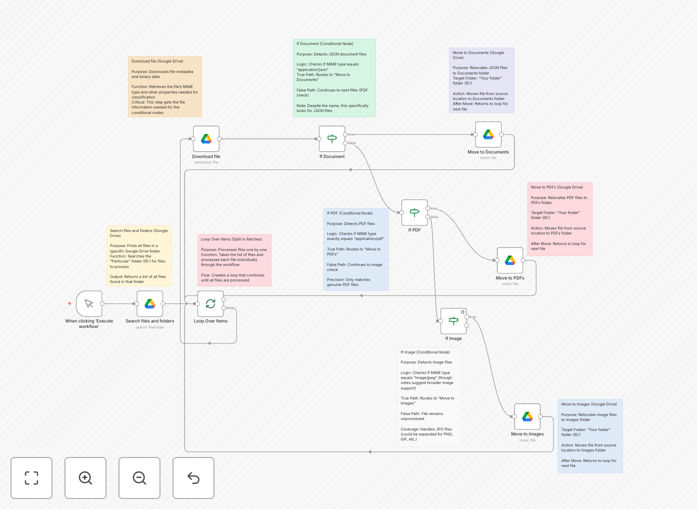
What This Workflow Does
This automation solves the common problem of cluttered Google Drive folders by automatically detecting and classifying uploaded files based on their type. It intelligently moves PDFs, images, and documents into designated folders, maintaining an organized file structure without manual intervention.
The workflow is particularly valuable for teams that receive frequent file uploads from multiple sources. It eliminates hours of manual sorting while ensuring consistent file organization across departments. The template preserves all file metadata during transfer and includes error handling for reliable operation.
How It Works
1. File Detection
The workflow monitors a specified Google Drive folder for new uploads. When files are detected, it retrieves their MIME types for accurate classification.
2. Classification Logic
Using conditional nodes, files are categorized into three main types: PDFs, images (JPG/PNG), and documents (JSON/DOCX). The system can be easily extended to handle additional file types.
3. Organized Transfer
Files are moved to their designated destination folders while preserving all metadata. The workflow includes batch processing to handle large volumes efficiently.
Who This Is For
This template is ideal for:
- Teams receiving frequent file uploads from clients or colleagues
- Administrators managing shared Drive spaces
- Businesses needing consistent file organization policies
- Educators collecting student assignments
- Legal professionals organizing case documents
What You'll Need
- A Google Drive account with files to organize
- Basic familiarity with n8n (no coding required)
- Google Drive API access (OAuth2 setup instructions included)
- Destination folders created in Google Drive
Quick Setup Guide
- Download the template file
- Import into your n8n instance
- Connect your Google Drive account
- Specify source and destination folders
- Test with sample files
- Activate the workflow
Pro tip: Create a shared "Uploads" folder where team members can drop files, and let the automation handle the organization behind the scenes.
Key Benefits
Save 5-10 hours monthly by eliminating manual file sorting. This workflow processes hundreds of files in minutes.
Reduce human error with consistent, rules-based organization that follows your exact specifications every time.
Improve team productivity by giving everyone instant access to well-organized files in predictable locations.
Scale effortlessly as your file volume grows - the batch processing handles large workloads reliably.
Customize without coding by simply adjusting the workflow nodes to match your specific file types and folder structure.