What This Workflow Does
Manual document creation is a drain on productivity. HR teams spend hours drafting contracts, finance departments manually generate invoices, and operations staff copy-paste data into templates. This workflow eliminates that repetitive work by automating the entire process.
It pulls data from a Google Sheets spreadsheet—like employee details, client information, or project specs—and uses it to populate a PDF template. The generated document (contract, invoice, pay slip, etc.) is then saved to Google Drive and emailed directly to the recipient. A tracking column in the spreadsheet marks each row as "done," ensuring nothing is missed.
This automation turns a multi-step, error-prone manual task into a single, reliable system. It ensures consistency, reduces administrative overhead, and lets your team focus on higher-value work instead of paperwork.
How It Works
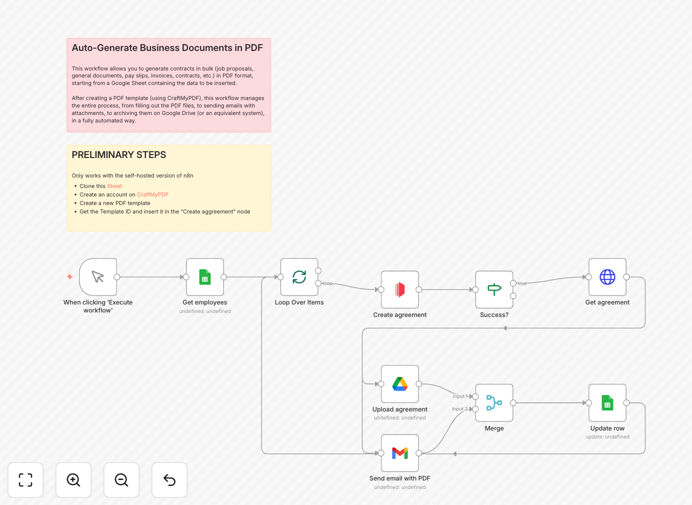
1. Trigger & Data Fetch
The workflow starts either manually or on a schedule. It connects to your Google Sheet and fetches rows where the "DONE" column is empty. Each row contains the personalized data needed for a document—names, addresses, amounts, dates.
2. PDF Generation Loop
Each row is processed individually. The system sends the data to a PDF generation service (like CraftMyPDF), merging field values into your pre-designed template. A conditional check ensures the PDF was created successfully before proceeding.
3. Storage & Distribution
The generated PDF is fetched and uploaded to a designated Google Drive folder, organized by client or date. Simultaneously, an email is composed using Gmail, attaching the PDF and sending it to the recipient listed in the spreadsheet.
4. Tracking & Completion
Once the document is sent and stored, the original spreadsheet row is updated with a "DONE" marker. This prevents duplicate processing and provides a clear audit trail. The loop continues until all pending rows are completed.
Pro tip: Use a "status" column in your sheet (e.g., "Pending," "Sent," "Error") to give more granular control and enable error handling workflows.
Who This Is For
This template is ideal for businesses that regularly produce personalized documents from structured data. HR departments onboarding new employees can automate contract and offer letter generation. Finance teams can batch-create invoices or pay slips from monthly billing data. Service businesses can generate proposals or quotes from lead sheets. Legal and compliance teams can produce standardized agreements.
If your team spends more than an hour a week manually creating documents from spreadsheet data, this automation will save significant time and reduce errors.
What You'll Need
- A Google Sheets spreadsheet with columns for recipient data (name, email, address, amount, etc.) and a "DONE" or "Status" column.
- A PDF template designed in a service like CraftMyPDF, DocSpring, or a similar tool that accepts JSON data.
- Google OAuth credentials configured for Sheets, Drive, and Gmail access.
- Access to a PDF generation API (CraftMyPDF account or equivalent).
- An n8n instance (self-hosted or cloud) to run the workflow.
Quick Setup Guide
1. Import the template JSON into your n8n workspace.
2. Replace the sample Google Sheet ID with your actual spreadsheet ID and define the data range.
3. Configure the PDF generation node with your template ID and map spreadsheet columns to template fields.
4. Set up Google Drive and Gmail nodes with your OAuth credentials and specify folder paths and email subjects.
5. Test with one row of data to verify PDF creation, storage, and email delivery.
6. Schedule the workflow (daily, weekly) or trigger it manually whenever new data is added to your sheet.
Pro tip: Add a "Error Handling" branch after the PDF generation step to catch failures and log them back to the sheet, ensuring no data slips through unnoticed.
Key Benefits
Save 5–10 hours per week on document admin. Eliminate manual drafting, formatting, and emailing. One automation replaces hours of repetitive clerical work.
Ensure 100% accuracy and consistency. Automated field mapping prevents typos, missing information, and formatting errors that happen with manual copy-paste.
Scale effortlessly with batch processing. Process 10, 100, or 1000 documents in one run without additional effort—ideal for payroll runs or bulk client onboarding.
Improve compliance and record-keeping. Every document is automatically saved to Google Drive with a consistent naming convention, creating a secure, searchable archive.
Deliver faster service to clients and employees. Documents are generated and sent immediately when data is ready, improving response times and satisfaction.