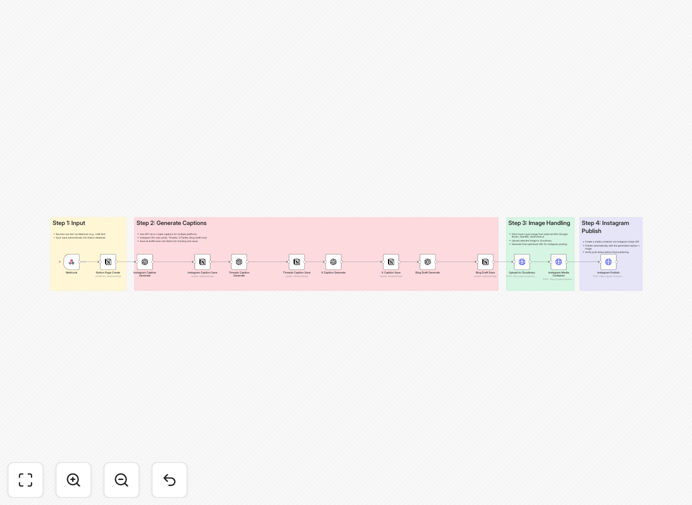
What This Workflow Does
Manual social media management is a massive time sink. Between brainstorming captions, finding images, formatting for each platform, and hitting 'post,' teams can waste dozens of hours each month. This workflow eliminates that grind by creating a seamless, automated pipeline from idea to published post.
It captures raw text input—from a team chat, a form submission, or a content calendar—and transforms it into polished, platform-optimized content. Using GPT-4, it generates distinct captions for Instagram, Threads, X (Twitter), and blog posts, respecting each platform's tone and character limits. All drafts are stored centrally in Notion for review, while Instagram posts are published automatically via the official API. The result is a consistent, professional social media presence that runs on autopilot.
How It Works
The automation follows a logical, multi-step process that mimics a human content manager's workflow but at machine speed.
1. Content Capture & Storage
A Webhook node receives the initial content trigger. This could be a message from a LINE Bot, a new row in a Google Sheet, or a submission from an internal idea form. The raw text is immediately saved into a designated Notion database, creating a permanent record and a single source of truth for all content.
2. AI-Powered Content Generation
The workflow passes the core idea to GPT-4 (via OpenAI or LangChain node). Using tailored prompts, it generates four unique captions: one for Instagram (with hashtags and emojis), one for Threads (conversational), one for X/Twitter (concise), and one longer-form draft for a blog. This ensures your message is adapted perfectly for each audience.
3. Image Sourcing & Optimization
Simultaneously, the workflow queries external APIs like Google Books or OpenLibrary to fetch a relevant cover image or visual based on keywords. The selected image is uploaded to Cloudinary, which generates an optimized, CDN-hosted URL—essential for fast Instagram loading and reliable delivery.
4. Automated Publishing & Draft Management
The Instagram caption and image URL are sent to the Instagram Graph API, which creates a media container and publishes the post to your connected Business account. The captions for Threads, X, and the blog are saved back to the Notion database as drafts, ready for your team to review and manually post when appropriate. This hybrid approach gives you full automation where it matters most, with human oversight where you want it.
Who This Is For
This template is ideal for small marketing teams, solo entrepreneurs, content creators, and agencies managing multiple client accounts. If you're spending more than 5 hours a week on social media tasks, this automation will pay for itself in time savings. It's especially valuable for businesses that publish regularly across platforms and want to maintain a consistent brand voice without the manual effort.
What You'll Need
- A Notion account with a database set up for content storage (properties for captions, status, platform).
- A Cloudinary account for image hosting and optimization (free tier available).
- An Instagram Business account connected to the Meta Developer Platform, with the Graph API enabled.
- Access to GPT-4 via an OpenAI API key or through n8n's LangChain integration.
- Basic familiarity with n8n to configure credentials and map data fields.
Pro tip: Use a dedicated "Content Ideas" channel in Slack or Microsoft Teams as your Webhook trigger. This lets your team submit post ideas in seconds, kicking off the entire automation pipeline.
Quick Setup Guide
Import and configure this workflow in under 30 minutes.
- Import the template: Download the JSON file above and import it into your n8n instance.
- Configure Notion: Create a database in Notion and note its ID. Update the Notion node in the workflow with your database ID and property names (e.g., "Instagram Caption," "Status").
- Set up Cloudinary: Add your Cloudinary cloud name and upload preset to the HTTP Request node that handles image uploads.
- Connect Instagram: Set your Instagram access token as an environment variable (IG_ACCESS_TOKEN) in n8n. Ensure your Instagram account is a Business account linked to a Facebook Page.
- Add your OpenAI key: Enter your OpenAI API key in the GPT-4 node settings.
- Test the flow: Trigger the Webhook manually with a sample text string and verify that a post appears in your Notion database and, if configured, on Instagram.
Key Benefits
Save 10–15 hours per week on content creation. What used to be a multi-step manual process is now fully automated, freeing your team to focus on strategy and engagement.
Ensure brand consistency across platforms. GPT-4 generates captions that match your specified tone and style guidelines, reducing variability and maintaining a professional image.
Never miss a posting schedule again. Automation runs 24/7, turning ideas into published content without delays, even outside business hours.
Centralize all content in Notion. Have a single, searchable repository for every post—published or draft—making collaboration and content repurposing effortless.
Scale your social presence without adding headcount. Handle increased posting frequency or additional platforms without increasing manual workload, allowing your business to grow efficiently.