What This Workflow Does
Manual developer billing is a time-consuming, error-prone process that often leads to revenue leakage and compliance issues. This intelligent automation solves that by connecting Jira, Gmail, and n8n into a seamless workflow that handles everything from time aggregation to invoice delivery.
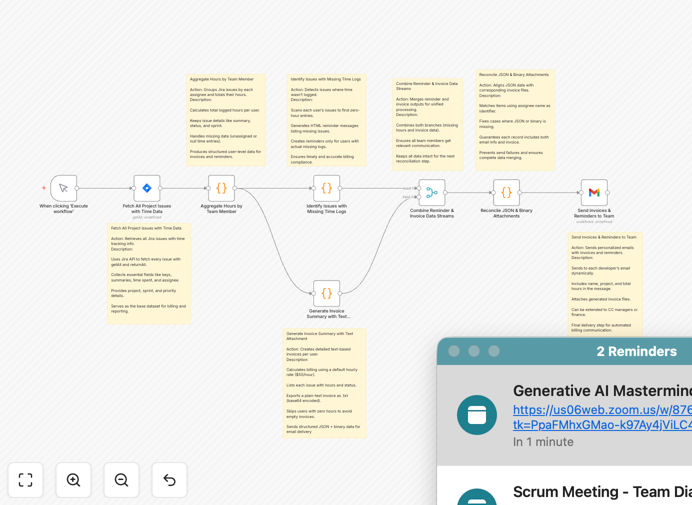
The system fetches all project issues from Jira, calculates logged hours per team member, identifies missing time entries, and automatically generates professional invoice summaries with text attachments. It then emails these invoices to each developer while sending compliance reminders for unlogged work—ensuring accurate billing and eliminating manual follow-ups.
For finance teams and project managers, this means transparent, auditable records and hours saved each month. For developers, it means timely reminders and clear documentation of billable work without administrative overhead.
How It Works
1. Fetch Jira Project Data
The workflow connects to your Jira instance and retrieves all project issues with their time tracking data. It extracts assignee information, time spent (converted from seconds to hours), sprint details, priority levels, and issue summaries—creating a comprehensive dataset for billing calculations.
2. Aggregate Hours by Developer
Using n8n's data aggregation capabilities, the system groups issues by assignee and calculates total hours logged per person. It outputs detailed per-user data including name, email, total hours, and a complete breakdown of their work items with status and priority information.
3. Identify Missing Time Entries
The workflow scans the aggregated data to find issues where time equals zero hours—indicating unlogged work. For each developer with missing entries, it generates personalized HTML reminders listing the specific tickets, their summaries, sprint information, and status.
4. Generate Invoice Summaries
For developers with logged hours, the system creates professional text-based invoice documents. These include itemized issue breakdowns, applied hourly rates (configurable, default $50/hour), total hours, billing amounts, and timestamps—all formatted as downloadable attachments.
5. Merge Data Streams & Send Communications
The workflow intelligently combines invoice data and reminder streams, ensuring all developers receive appropriate communication. It then sends personalized emails via Gmail with relevant subject lines, body content summarizing their hours, and attached invoice files where applicable.
Who This Is For
This automation is ideal for tech agencies billing clients by developer hours, software development teams needing accurate time tracking, project managers overseeing multiple sprints, and finance departments requiring transparent billing documentation.
It's particularly valuable for organizations managing distributed teams, contractors, or multiple concurrent projects where manual time tracking becomes unmanageable. If you're spending more than 5 hours monthly reconciling Jira time logs with invoices, this workflow will pay for itself in efficiency gains.
What You'll Need
- Jira Software Cloud with API access credentials (OAuth 2.0 recommended)
- Gmail account with OAuth 2.0 configured for sending automated emails
- n8n instance (self-hosted or cloud) with workflow execution permissions
- Configured hourly billing rates for your developers or projects
- Basic understanding of your Jira project structure and issue fields
Pro tip: Before deploying, test with a small Jira project containing sample time entries to verify calculations match your expected billing format.
Quick Setup Guide
- Download the template using the button above and import it into your n8n instance.
- Configure Jira credentials in the first node, specifying your instance URL and authentication method.
- Set up Gmail OAuth 2.0 connection for the email sending node.
- Adjust the hourly rate in the "Generate Invoice" function node (default is $50/hour).
- Test with a single developer by modifying the Jira query to filter for specific assignees.
- Schedule the workflow to run weekly or bi-weekly based on your billing cycle.
Key Benefits
Eliminates manual invoice generation – What used to take hours of spreadsheet work now happens automatically with consistent formatting and accurate calculations.
Ensures 100% time tracking compliance – Automated reminders for missing entries mean developers log time consistently, reducing revenue leakage from unbilled work.
Provides transparent, auditable billing – Every invoice includes detailed issue breakdowns, creating clear documentation for client questions or internal audits.
Saves 10+ hours monthly per project manager – No more chasing developers for time sheets or manually compiling billing reports.
Reduces billing disputes – When invoices directly match Jira work logs, clients can see exactly what they're paying for, building trust and reducing reconciliation time.