GitHub Slack DevOps Automation

Auto-generate GitHub release notes and notify via Slack

Automate your release process with structured changelogs and team notifications

Download Template JSON · n8n compatible · Free
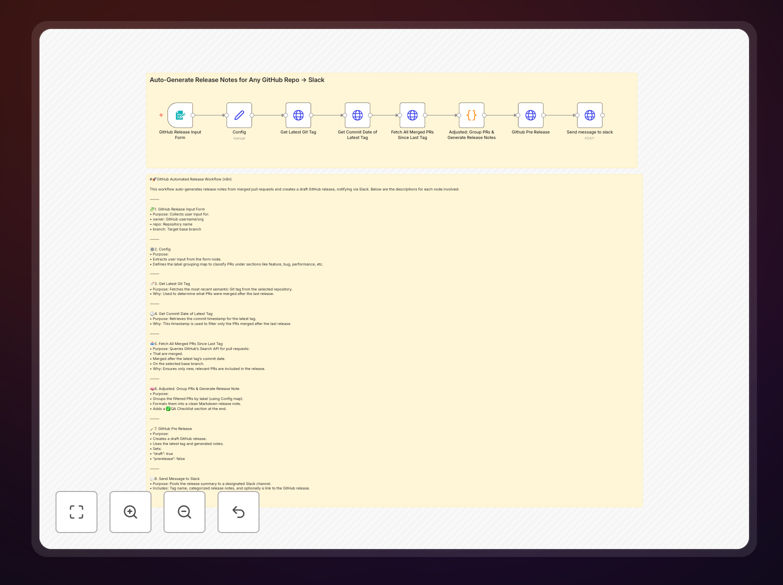
GitHub release notes automation workflow diagram

What This Workflow Does

This automation solves the tedious manual process of compiling GitHub release notes by automatically generating structured changelogs from merged pull requests and notifying your team in Slack. It eliminates hours of copy-pasting PR details while ensuring consistent, well-formatted release documentation.

The workflow intelligently groups PRs by their labels (features, bugs, docs), includes author attribution, and creates draft releases for maintainer review before publishing. The Slack notification provides immediate visibility with direct links to the GitHub release.

How It Works

1. Trigger the workflow

The process starts when you provide the repository name, owner, and target branch through a simple form interface.

2. Fetch latest Git tag

The workflow identifies the most recent semantic version tag to determine which changes need documentation.

3. Collect merged PRs

It queries GitHub's API for all pull requests merged since the last tag, filtering by your specified branch.

4. Organize and format

PRs are grouped by their labels and transformed into clean markdown with proper headings and section organization.

5. Create draft release

A draft GitHub release is created with the generated notes, ready for maintainer review before publishing.

6. Notify team in Slack

A formatted message is sent to your specified Slack channel with release details and direct links.

Who This Is For

This automation is ideal for:

  • Engineering teams managing frequent software releases
  • Open source maintainers wanting professional changelogs
  • DevOps engineers streamlining release processes
  • Technical writers documenting product changes
  • Teams using semantic versioning and GitHub flow

What You'll Need

  1. A GitHub repository with semantic version tags
  2. GitHub personal access token with repo permissions
  3. Slack workspace with webhook URL or OAuth access
  4. PRs labeled consistently (feature/bug/docs/etc.)
  5. n8n instance (cloud or self-hosted)

Pro tip: Use GitHub's saved replies feature to create templates for common release note sections that this workflow can incorporate automatically.

Quick Setup Guide

  1. Download and import the JSON template into your n8n instance
  2. Configure GitHub and Slack credentials in n8n
  3. Map your PR labels to release note sections in the config node
  4. Test with a repository that has several merged PRs
  5. Customize the Slack message format if needed
  6. Schedule regular runs or trigger manually before releases

Key Benefits

Save 2-3 hours per release by eliminating manual note compilation and formatting work.

Reduce human errors with consistent, automatically generated changelogs that include all relevant PRs.

Improve team visibility through instant Slack notifications with direct links to draft releases.

Professional documentation with standardized formatting that follows best practices.

Flexible customization to match your exact release workflow and notification needs.

Frequently Asked Questions

Common questions about GitHub-Slack automation and integration

Automating GitHub release notes saves engineering teams hours per release cycle while ensuring consistent documentation. It eliminates manual copy-pasting of PR details and reduces human error in changelog generation.

For teams releasing weekly or even daily, this automation can reclaim dozens of engineering hours monthly that would otherwise be spent on repetitive documentation tasks.

Automated release notes typically include PR titles grouped by category (features, bugs, docs), author attribution, linked PR numbers, and any labels you've configured to highlight important changes.

The template can be extended to include specific PR comments marked with special tags, related issue references, or even code change statistics from the diff.

Slack notifications provide immediate visibility to your team when new releases are drafted. They can include direct links to the GitHub release, key changes, and @mentions for critical updates that need attention.

Teams often configure these notifications to go to specific channels like #engineering or #releases, with different formatting for internal vs. customer-facing updates.

Yes, automation workflows allow full customization of markdown templates. You can add headers, section organization, emoji formatting, and even include specific PR comments that follow certain patterns.

Many teams create templates that match their brand guidelines, with consistent headers, change categories, and even links to related documentation or upgrade instructions.

The workflow can be extended to analyze PR labels or commit messages to suggest the next semantic version (major/minor/patch) based on the types of changes included in the release.

Some teams configure automation to increment version numbers automatically when certain labels are present (like "breaking-change" triggering a major version bump).

The template creates draft releases by default, allowing maintainers to review before publishing. You can add approval steps via Slack reactions or integrate with your existing approval systems.

More advanced implementations might require specific team members to approve via Slack reactions or comments before the release is automatically published.

Our team specializes in building tailored GitHub-Slack automation systems that match your exact release workflow, approval processes, and notification requirements. We can integrate additional tools like Jira, Linear, or your internal systems.

Custom solutions might include:

  • Integration with your CI/CD pipeline
  • Multi-level approval workflows
  • Automatic version number generation
  • Custom reporting on release contents

Need a Custom GitHub-Slack Automation?

This free template is a starting point. Our team builds fully tailored automation systems for your specific business needs.