Social Media AI Telegram Multi-platform Automation

Auto-generate social media posts from URLs with AI, Telegram & multi-platform posting

Turn any link into ready-to-publish social content for Facebook, Instagram, and LinkedIn—fully automated.

Download Template JSON · n8n compatible · Free
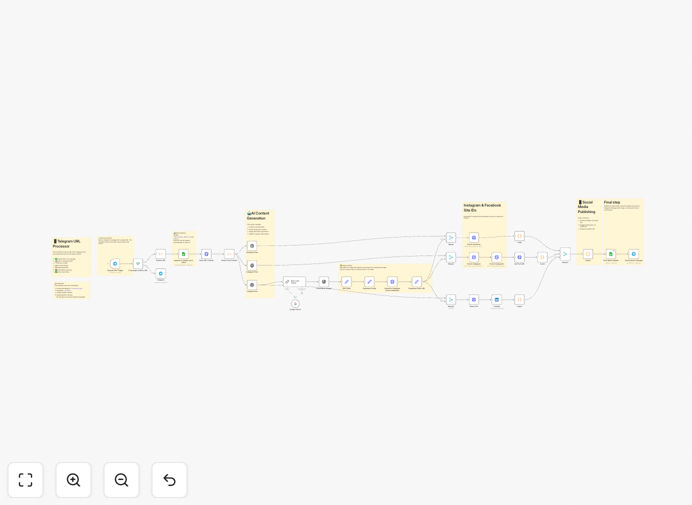
Diagram showing social media automation workflow from Telegram to AI to multiple platforms

What This Workflow Does

Manually creating and posting social media content across multiple platforms is a time-consuming, repetitive task. Marketers and business owners often struggle with consistency, platform-specific formatting, and finding the time to keep their social channels active.

This automation solves that by creating a complete, hands-off content pipeline. Simply send a URL—any article, blog post, or webpage—to a Telegram bot. The workflow automatically fetches the content, uses AI to generate engaging posts tailored for Facebook, Instagram, and LinkedIn, creates a relevant AI image, publishes to all platforms, and logs everything in a Google Sheet. It turns a single link into a coordinated multi-channel social media campaign in minutes.

How It Works

1. Trigger via Telegram

You or your team sends a URL in a message to a dedicated Telegram bot. The workflow monitors this bot and instantly detects when a new link arrives.

2. Content Extraction & Analysis

The system fetches the webpage, extracts the main text and title, and cleans it for processing. It understands the core topic and key points of the content.

3. AI-Powered Copy Generation

Using OpenAI or Google Gemini, the workflow creates three unique posts: one optimized for Facebook's conversational style, one for Instagram's visual focus, and one for LinkedIn's professional tone—all from the same source.

4. AI Image Creation & Storage

An AI image generation node creates a relevant visual based on the content theme. This image is automatically uploaded and stored in Supabase Storage for reliable access.

5. Multi-Platform Publishing

The workflow posts the generated copy and image to your connected Facebook Page, Instagram Business account, and LinkedIn company page simultaneously via their official APIs.

6. Logging & Confirmation

All post URLs, the image link, and timestamps are recorded in a Google Sheets log. A confirmation message with the published links and the generated image is sent back to the Telegram chat, completing the loop.

Who This Is For

This automation is ideal for marketing teams, content creators, small business owners, agencies managing multiple client accounts, and anyone who needs to maintain an active social media presence without the daily grind. It's particularly valuable for:

  • Digital marketers who curate and share industry content regularly.
  • Solo entrepreneurs wearing multiple hats who need efficiency.
  • Content agencies distributing client articles across platforms.
  • Startups aiming to maximize reach with limited resources.

What You'll Need

  1. A Telegram bot token (create one via @BotFather).
  2. API keys for an AI service (OpenAI or Google Gemini).
  3. Facebook Graph API credentials with Page and Instagram Business permissions.
  4. LinkedIn OAuth2 credentials for company page posting.
  5. A Supabase project (free tier works) for image storage.
  6. A Google Sheet for logging, with OAuth2 access granted.
  7. An n8n instance (cloud or self-hosted) to run the workflow.

Pro tip: Start with the free tiers of OpenAI, Supabase, and n8n Cloud. This entire workflow can be built and tested at zero cost before scaling up.

Quick Setup Guide

  1. Download the template using the button above and import it into your n8n instance.
  2. Create credentials in n8n for Telegram, your chosen AI, Facebook Graph, LinkedIn, Supabase, and Google Sheets.
  3. Update node configurations with your specific Page IDs, Sheet ID, and Supabase bucket name (default is 'social-media').
  4. Test the trigger by sending a URL to your Telegram bot. Watch the workflow execute through each step.
  5. Activate the workflow and start automating your social content pipeline immediately.

Key Benefits

Save 5–10 hours per week on social media content creation and posting. What used to be a multi-step manual process now happens automatically while you focus on strategy.

Ensure brand consistency across all platforms with AI-generated copy that maintains your voice while optimizing for each network's unique audience and format requirements.

Eliminate human error in posting schedules, formatting, and platform-specific rules. The automation follows API guidelines perfectly every time.

Scale content output effortlessly without adding team members. Share more articles, increase engagement, and grow your audience without proportional increases in workload.

Gain complete visibility with automated logging in Google Sheets. Track performance, audit posts, and analyze what content works best—all without manual data entry.

Frequently Asked Questions

Common questions about social media automation and integration

AI can analyze any webpage or article and generate engaging, platform-specific copy in seconds. It saves hours of manual writing by understanding the core message, tone, and key points, then tailoring the content for each social network's audience and format.

Instead of staring at a blank screen trying to rewrite the same article for Facebook, Instagram, and LinkedIn, AI produces three unique variations instantly. It can also suggest hashtags, adjust tone, and ensure character limits are respected.

Automation ensures consistent posting, saves significant time, reduces human error, and allows you to batch-process content. It also enables cross-posting to multiple platforms simultaneously, maximizing reach without manual duplication of effort.

Beyond efficiency, automation provides reliability. Your social channels remain active during vacations, busy periods, or when team capacity is limited. It turns social media from a daily chore into a strategic asset that runs in the background.

Yes, a single automation workflow can publish to Facebook, Instagram, LinkedIn, Twitter, and more. The workflow generates unique, optimized copy for each platform's audience and character limits from one source URL, then posts them all at once.

This unified approach ensures your message reaches all your audiences simultaneously while being appropriately adapted. You maintain a cohesive narrative across networks without managing separate posting schedules or content calendars.

You create a Telegram bot and send it any URL. The bot acts as a simple trigger—when it receives a message with a link, the automation workflow starts. It's an easy, mobile-friendly way to submit content without logging into a dashboard.

Team members can share links from their phones during commutes or meetings. The bot becomes a content intake channel that's always accessible, making the automation process frictionless and collaborative.

You need an automation platform like n8n, API access to your social media accounts (Facebook Graph, LinkedIn, etc.), an AI service like OpenAI or Google Gemini, and a Telegram bot token. This template connects them all in a ready-to-use workflow.

Most of these services offer free tiers or trials. The initial setup takes about an hour, after which the system runs indefinitely with minimal maintenance, paying for itself many times over in time savings.

Yes, when set up correctly. Use official API credentials with appropriate permissions. The automation can include review steps or log all actions. It's often more reliable than manual posting and ensures brand consistency across all platforms.

Automation actually reduces risk by eliminating accidental posts, scheduling errors, or platform rule violations. The workflow follows API specifications precisely, and everything is logged for transparency and auditability.

Automating the entire process—from content ideation to publishing—can save 5-10 hours per week for a single marketer. For teams, it eliminates coordination overhead and allows rapid scaling of content output without proportional increases in labor.

Consider the time spent: finding content, reading it, drafting posts, creating images, formatting for each platform, scheduling, and posting. Automation handles all these steps in under a minute per article, freeing you for higher-value strategic work.

Yes, GrowwStacks specializes in building tailored automation systems. We can adapt this template to your specific platforms, branding, approval workflows, and analytics needs, creating a fully custom solution that integrates with your existing tools.

Whether you need additional platforms like TikTok or Pinterest, custom moderation steps, integration with your CMS, or advanced analytics dashboards, we can design and implement exactly what your business requires.

  • Custom branding and tone guidelines for AI generation
  • Integration with your existing content calendar or CRM
  • Advanced performance tracking and reporting

Need a Custom Social Media Automation?

This free template is a starting point. Our team builds fully tailored automation systems for your specific business needs.