n8n GitHub RSS Notifications Automation

Auto-notify on new major n8n releases via RSS, email & telegram

Never miss important n8n updates with automated monitoring of major releases

Download Template JSON · n8n compatible · Free
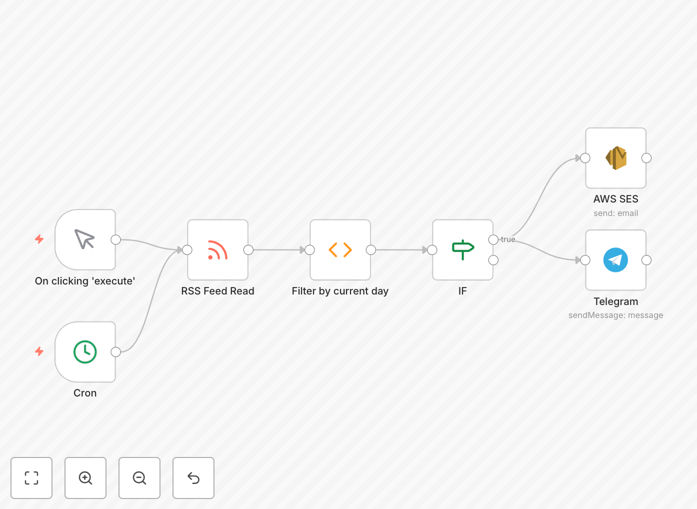
n8n workflow diagram for release notifications

What This Workflow Does

This automation solution monitors n8n's GitHub releases RSS feed for new major version releases (tagged with .0) and sends notifications through multiple channels. It solves the problem of manually checking for updates or being caught off guard by breaking changes in new versions.

The workflow checks the feed daily, filters for major releases, and formats notifications with key details like version number, release notes, and download links. Notifications can be sent via email, Telegram, or other channels you configure, ensuring your team stays informed through their preferred communication methods.
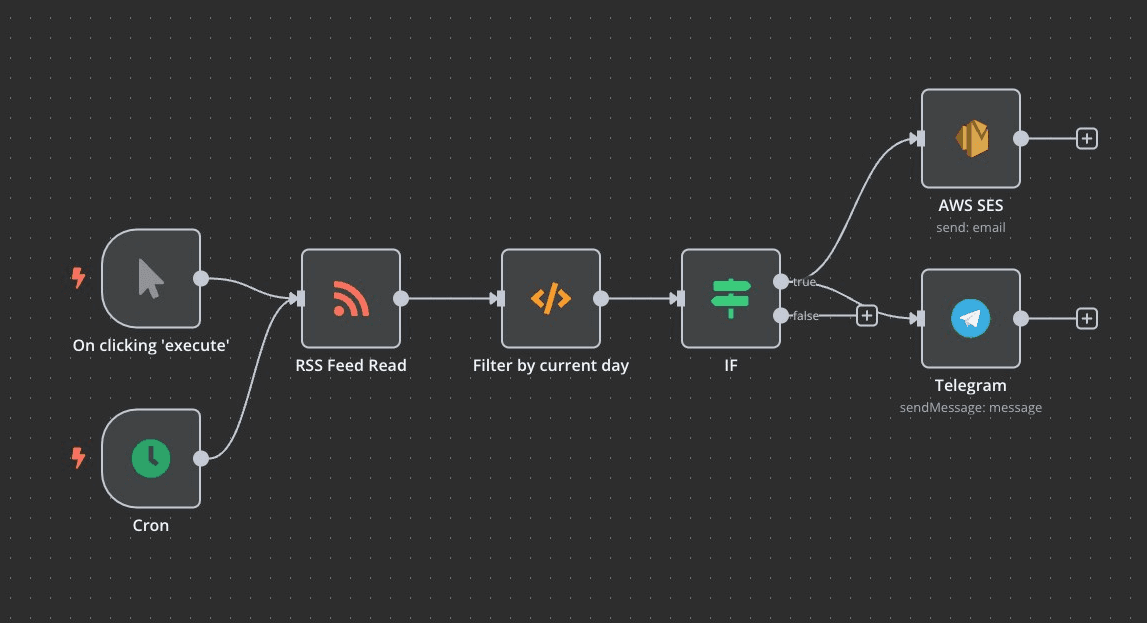
n8n workflow nodes for release monitoring
The workflow checks GitHub's RSS feed and processes release information

How It Works

1. RSS Feed Monitoring

The workflow starts by fetching n8n's GitHub releases RSS feed. This provides a standardized way to monitor updates without hitting API rate limits or requiring authentication.

2. Major Release Filtering

It then parses the feed entries and filters for major releases (versions ending in .0). This ensures you're only notified about significant updates that may require action.

3. Notification Formatting

For each new major release found, the workflow formats a notification with the version number, release date, and a summary of changes. It can include direct links to documentation or download pages.

4. Multi-channel Delivery

Finally, the formatted notifications are sent through your configured channels (email, Telegram, etc.). You can customize which team members receive which types of alerts.

Pro tip: Add a delay before production upgrades to allow time for community bug reports. Schedule the workflow to check weekly after major releases to catch any follow-up patch versions.

Who This Is For

This workflow is ideal for:

  • n8n administrators responsible for keeping instances updated
  • Teams running business-critical workflows on n8n
  • Developers who need to stay current with API changes
  • Organizations with compliance requirements for software updates

What You'll Need

  1. An n8n instance (self-hosted or cloud)
  2. Access to configure workflow triggers
  3. Email server or Telegram bot credentials for notifications
  4. Basic understanding of n8n workflows

Quick Setup Guide

  1. Download the JSON template file
  2. Import it into your n8n instance
  3. Configure your notification channels (email, Telegram, etc.)
  4. Set your preferred schedule (default is daily)
  5. Test with a manual execution
  6. Activate the workflow

Key Benefits

Never miss critical updates that could impact your workflows. Major releases often include security patches and breaking changes that require timely attention.

Reduce manual monitoring time by automating what would otherwise be a regular manual check of n8n's release status.

Customizable notification channels ensure your team gets alerts through their preferred communication methods, whether email, chat apps, or other systems.

Filter out noise by focusing only on major releases (.0 versions) rather than being notified about every minor update or patch.

Proactive upgrade planning allows you to schedule updates during maintenance windows rather than reacting to issues caused by outdated versions.

Frequently Asked Questions

Common questions about n8n release monitoring and automation

Automating n8n release notifications ensures you never miss critical updates that could impact your workflows. Major releases often include security patches, new features, and breaking changes that require attention.

By automating notifications, you can plan upgrades proactively rather than reacting to issues caused by outdated versions. This is particularly important for businesses running production workflows where stability is crucial.

  • Prevents workflow breaks from unexpected API changes
  • Ensures timely security updates
  • Reduces manual monitoring overhead

Focusing on major releases (tagged with .0) filters out minor updates and patches, reducing notification noise. Major releases typically introduce significant changes that may require workflow adjustments.

This selective approach saves time while ensuring you're alerted to impactful changes. For example, n8n's 1.0 release introduced major architectural changes, while 1.1 might just include minor bug fixes.

  • 90% fewer notifications than monitoring all releases
  • Focuses attention on changes that matter most
  • Reduces alert fatigue for your team

RSS provides a standardized way to monitor updates without API rate limits. Unlike polling GitHub's API directly, RSS feeds are lightweight and designed for change detection.

This workflow enhances RSS with email and Telegram notifications for more immediate awareness across your preferred communication channels. RSS serves as the reliable detection mechanism while other channels handle the actual alerts.

  • No authentication required for public repositories
  • More reliable than scraping GitHub's web interface
  • Easier to parse than raw API responses

Review the release notes thoroughly for breaking changes. Test the new version in a staging environment before production deployment. Check if any nodes or workflows you use have been modified.

Schedule the upgrade during a maintenance window if significant changes are present. Many teams wait 1-2 weeks after major releases to allow for any critical bug fixes to be published.

  • Always check the migration guide if provided
  • Test custom nodes and credentials
  • Document any required workflow changes

Yes, this workflow template can be modified to include specific release details that matter most to you. Common customizations include adding direct download links, highlighting breaking changes, or including links to migration guides.

You can also filter notifications based on specific components or features you use. For example, you might only want alerts when core node functionality changes rather than UI updates.

  • Add your company's upgrade policy to notifications
  • Include links to internal documentation
  • Customize the notification format for different teams

The workflow is configured to check daily, which balances timeliness with resource usage. n8n typically releases major versions every few months, so daily checks ensure prompt notification without unnecessary frequent polling.

You can adjust the schedule based on your specific needs and n8n's release cadence. Some organizations check weekly after confirming a major release is stable, while others maintain daily checks for critical security updates.

  • Daily checks for security-conscious organizations
  • Weekly checks for less critical implementations
  • Immediate manual checks when preparing for upgrades

Absolutely! GrowwStacks specializes in building tailored n8n automation solutions. Our team can create custom workflows that integrate n8n with your specific tools and processes.

We'll implement advanced error handling, notification systems, and ensure reliable operation at scale. Whether you need complex business process automation or simple workflow enhancements, we can help maximize the value of n8n for your organization.

  • Custom integrations with your existing systems
  • Enterprise-grade error handling and logging
  • Ongoing support and maintenance options

Need a Custom n8n Integration?

This free template is a starting point. Our team builds fully tailored automation systems for your specific needs.