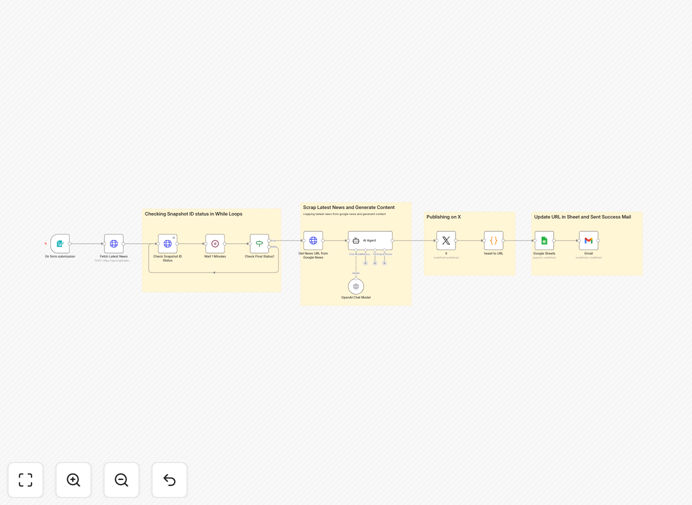
What This Workflow Does
This automation solves the constant pressure to be first with breaking news on social media. Instead of manually scouring news sites and crafting posts, this workflow automatically discovers the latest stories based on your keywords, generates engaging social media content using AI, and publishes directly to X (Twitter) with complete tracking.
It transforms hours of daily monitoring and writing into a fully automated process that runs 24/7. Whether you're a news organization, content creator, or business wanting to establish thought leadership, this system ensures your social channels always have fresh, relevant content without draining your team's time.
How It Works
1. Keyword & Country Input
A simple web form captures the news topic (like "artificial intelligence" or "stock market") and target country for localized news (US, India, UK, or Australia). This triggers the entire automation process.
2. Real-Time News Fetching
The workflow connects to Bright Data's Google News dataset to scrape the latest articles matching your keywords. It monitors the scraping job status and retrieves the data once ready, ensuring you get the most current information available.
3. AI Content Generation
Using OpenAI's GPT-4o model, the system analyzes the news articles and generates engaging social media posts. The AI creates concise messages (under 260 characters), adds relevant hashtags, and tailors the tone for the target platform.
4. Automated X (Twitter) Publishing
The generated content is automatically posted to your X (Twitter) account via the platform's API v2. The workflow captures the published tweet's URL for tracking and creates a complete audit trail of all activity.
5. Tracking & Notification
Every tweet's content and URL are logged to a Google Sheets spreadsheet for performance analysis. A confirmation email with the direct tweet link is sent to your team, providing immediate visibility into what was published.
Who This Is For
This automation is perfect for social media managers at news outlets, content creators in specific niches, marketing teams at technology companies, small business owners wanting to share industry updates, and digital agencies managing multiple client accounts. If you need to maintain an active, informed social media presence but lack the time to constantly monitor and post, this workflow solves that problem.
What You'll Need
- An n8n instance (cloud or self-hosted)
- X (Twitter) developer account with API v2 access
- OpenAI API key with GPT-4o access
- Google account for Sheets and Gmail integration
- Bright Data account (or alternative news API)
- Basic understanding of connecting APIs in n8n
Quick Setup Guide
1. Import the template into your n8n instance using the downloaded JSON file.
2. Configure credentials for X (Twitter), OpenAI, Gmail, Google Sheets, and your news data source.
3. Update the Google Sheet ID in the "Google Sheets" node to point to your tracking spreadsheet.
4. Test with a safe keyword like "technology innovation" to verify the entire flow works correctly.
5. Activate the workflow and share the form URL with your team to start publishing.
Pro tip: Start with a limited set of trusted keywords and review the AI-generated posts for a week before full automation. This helps you refine the AI instructions to better match your brand voice.
Key Benefits
Save 10+ hours weekly on news monitoring and social media writing. What used to be a manual research and composition process now happens automatically in the background.
Increase posting frequency by 5x without adding staff. The system can publish multiple times daily, keeping your audience engaged and establishing your authority as a timely information source.
Ensure 24/7 coverage of breaking news in your industry. Even outside business hours, your automation captures and shares important developments before competitors.
Maintain consistent brand voice across all posts through carefully crafted AI instructions. The system learns from your preferences and applies them to every generated message.
Complete performance tracking with automatic logging to spreadsheets. You get clear data on what content performs best, enabling continuous optimization of your strategy.