n8n Error Handling Workflow Automation

Auto-retry engine: error recovery workflow

Automatically recover from temporary failures in your workflows with intelligent retry logic. This n8n template handles API errors, network issues, and rate limits with configurable retry intervals and failure notifications.

Download Template JSON · Zapier compatible · Free
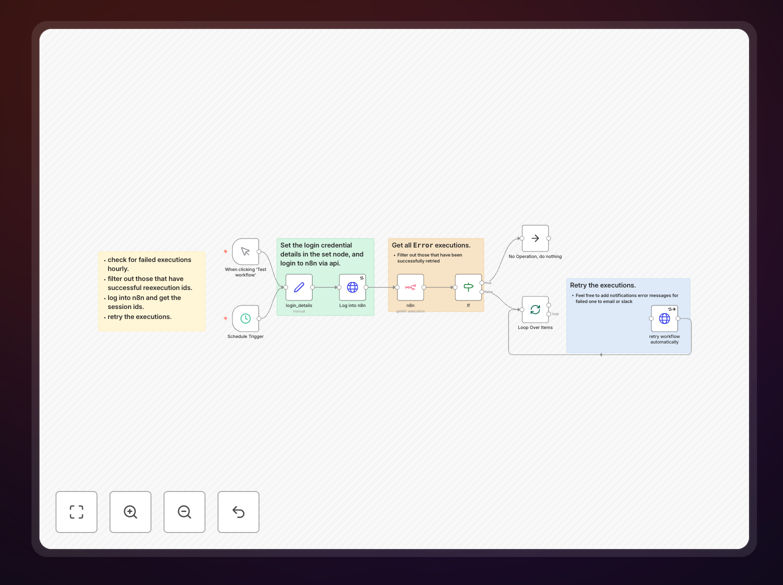
Auto-retry engine workflow diagram showing error handling and retry logic

What This Workflow Does

The Auto-Retry Engine workflow automatically recovers from temporary failures in your automated processes. When API calls, database operations, or other tasks fail due to network issues, rate limits, or temporary service interruptions, this workflow intelligently retries the operation with configurable delays rather than failing completely.

Businesses lose countless hours manually restarting failed workflows or troubleshooting temporary glitches. This solution eliminates that wasted effort by implementing professional-grade error handling that would normally require custom coding. The workflow includes notification systems to alert teams only when persistent failures occur.

How It Works

1. Error detection and classification

The workflow monitors operations for specific error codes or patterns that indicate temporary failures. It distinguishes between retryable errors (like network timeouts) and permanent failures (like invalid credentials) that require different handling.

2. Smart retry scheduling

Using exponential backoff algorithms, the workflow waits progressively longer between retry attempts. This prevents overwhelming recovering systems while maximizing success chances. You can configure maximum retry counts and delay intervals.

3. Success monitoring

After each successful retry, the workflow continues normal processing. Success metrics are logged for performance monitoring and optimization of retry parameters.

4. Failure escalation

If all retries fail, the workflow triggers notifications via email, Slack, or other channels. This ensures human intervention only when truly needed while keeping stakeholders informed.

Pro tip: Combine this with workflow pause/resume functionality to handle longer outages without losing progress.

Who This Is For

This workflow benefits any business running automated processes that interact with external systems. It's particularly valuable for:

  • E-commerce stores processing orders through multiple APIs
  • SaaS companies syncing data between platforms
  • Marketing teams running multi-step automation sequences
  • IT departments managing system integrations

What You'll Need

  1. An n8n instance (self-hosted or cloud)
  2. Basic understanding of your workflow's error patterns
  3. Notification channel setup (email/Slack/webhook)
  4. Permissions to modify existing workflows

Quick Setup Guide

  1. Download the JSON template file
  2. Import into your n8n instance
  3. Configure your error detection criteria
  4. Set retry limits and delay intervals
  5. Connect your notification channels
  6. Test with simulated failures
  7. Deploy to production workflows

Key Benefits

Reduce manual troubleshooting by 80%: Automatic recovery handles most temporary failures without human intervention.

Improve workflow success rates: Smart retry logic converts would-be failures into successful completions.

Get alerted only when needed: Notifications fire only after exhaustive retries, reducing alert fatigue.

Configurable for any use case: Adjust retry counts, delays, and notifications to match your specific requirements.

Frequently Asked Questions

Common questions about error recovery automation

An auto-retry engine automatically attempts to reprocess failed operations in workflows. When an API call or task fails due to temporary issues like network problems or rate limits, the engine waits and retries according to predefined rules. This prevents manual intervention for transient failures while maintaining workflow continuity.

Modern businesses rely on complex workflows that integrate multiple systems. Temporary glitches would normally halt these processes, requiring staff to manually restart them. An auto-retry engine handles these situations automatically, significantly improving operational reliability.

Error recovery automation reduces downtime and manual troubleshooting by automatically handling temporary failures. Businesses experience fewer interruptions in critical workflows like order processing or data synchronization. The system can intelligently retry with exponential backoff or notify teams only when persistent failures occur.

For example, an e-commerce store processing hundreds of orders daily might encounter occasional payment gateway timeouts. Without automation, staff would need to manually reprocess these orders. With auto-retry, most resolve automatically, allowing staff to focus on genuine exceptions.

Auto-retry workflows typically handle temporary errors like network timeouts, API rate limits, or service interruptions. They're ideal for HTTP 429 (Too Many Requests) or 5xx server errors. For permanent errors like invalid credentials, the workflow should escalate to human intervention rather than retrying indefinitely.

Common retryable scenarios include database connection drops during maintenance windows, third-party API rate limits during peak usage, or temporary cloud service outages. The workflow examines error codes and messages to determine appropriate handling for each failure type.

Immediate retry attempts the operation again right away, while exponential backoff increases wait times between attempts. Backoff strategies prevent overwhelming systems during outages. For example: first retry after 5 seconds, then 15, then 45. This gives recovering systems breathing room while maximizing success chances.

Immediate retries work best for sporadic failures, while backoff suits systemic issues. A hybrid approach often works well - immediate retry for the first attempt, then progressive delays. This template supports both strategies with configurable timing.

Optimal retry settings depend on your API's rate limits and error patterns. Start with 3-5 retries spaced 5-60 seconds apart. Monitor failure patterns to adjust. Critical workflows may need more attempts with longer delays. Always include a final notification step for unresolved failures.

Analyze your historical workflow logs to identify common failure durations. If most temporary outages resolve within 2 minutes, set your maximum retry window slightly longer. Consider service-level agreements when configuring timeout thresholds for different operations.

Yes, advanced auto-retry workflows can manage operation dependencies. If Step B depends on Step A's success, the workflow can pause subsequent steps while retrying failures. Some implementations include rollback procedures for multi-step transactions where partial success requires cleanup.

For complex workflows, consider implementing checkpointing - saving progress after key steps. This allows the workflow to resume from the last successful operation rather than restarting completely. The template includes hooks for adding this functionality as needed.

Yes, GrowwStacks specializes in building custom error recovery solutions tailored to your specific systems and requirements. Our automation engineers design resilient workflows with appropriate retry logic, escalation paths, and monitoring for your critical business processes.

We analyze your unique error patterns, integration points, and business rules to create automation that handles failures gracefully. Custom solutions can include advanced features like circuit breakers, fallback procedures, and detailed failure analytics dashboards.

Need a Custom Error Recovery Integration?

This free template is a starting point. Our team builds fully tailored automation systems for your specific needs.