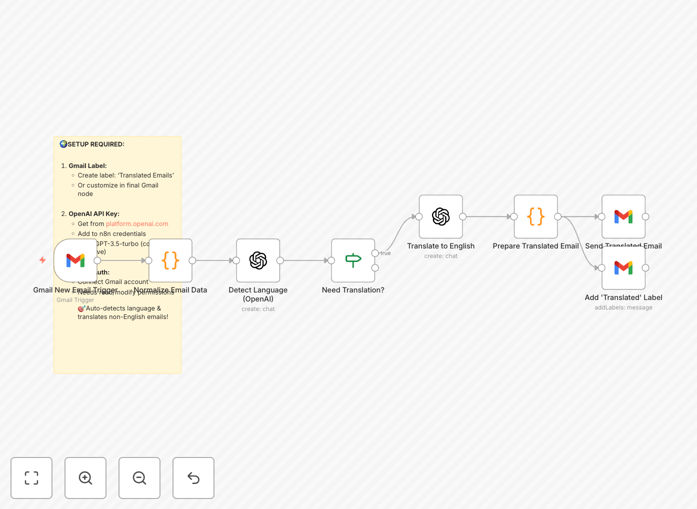
What This Workflow Does
This automation solves the growing challenge of multilingual email communication for global businesses. When non-English emails arrive in your Gmail inbox, the workflow automatically detects the language, translates the content to English using OpenAI's GPT-3.5 (which preserves context better than traditional translation tools), and delivers the translated version to your inbox or team collaboration platform.
The system handles formal business language, industry terminology, and maintains proper email formatting during translation. Unlike simple word-for-word translation services, it understands the intent behind messages and adapts tone appropriately for professional communication.
How It Works
1. New Email Detection
The workflow monitors your Gmail inbox for new messages using Zapier's trigger system. It checks each incoming email against a list of approved senders or domains if you want to filter specific contacts.
2. Language Identification
Before translation, the system analyzes the email content to determine its original language. This prevents unnecessary translation of already-English messages and ensures the correct language pair is used.
3. AI-Powered Translation
The email content is sent to OpenAI's API where GPT-3.5 performs context-aware translation. The AI preserves important formatting like bullet points, signatures, and dates while converting the message to natural-sounding English.
4. Delivery & Notification
The translated email is returned to your workflow, where you can choose to either replace the original message, create a new labeled version, or send it to a team collaboration tool like Slack or Microsoft Teams.
Pro tip: Configure the workflow to add a disclaimer about automated translation when sending replies to customers. This manages expectations about potential minor inaccuracies.
Who This Is For
This automation is ideal for:
- Customer support teams handling international inquiries
- Global sales teams communicating with prospects worldwide
- Remote teams with members who speak different languages
- Executives receiving business proposals from foreign partners
- E-commerce stores serving multilingual customer bases
What You'll Need
- A Gmail or Google Workspace account
- An OpenAI API key (GPT-3.5 or higher)
- A Zapier account with available tasks
- Optional: Slack/MS Teams if forwarding translations to teams
Quick Setup Guide
- Download the JSON template file
- Import into your Zapier account
- Connect your Gmail and OpenAI accounts
- Configure language detection sensitivity
- Set your preferred delivery method (inbox, label, or team channel)
- Test with sample non-English emails
- Activate the workflow
Key Benefits
Faster response times: Reduce email processing time from hours/days (waiting for human translation) to near-instantaneous.
Improved customer experience: International clients feel valued when you can communicate in their language, even if you're responding in English.
Cost efficiency: Eliminate expensive human translation services for routine email communication.
Team productivity: Remove language barriers that slow down global collaboration and decision-making.
Scalability: Handle increasing international communication volume without proportional staffing increases.