What This Workflow Does
This automation solves the massive time drain of creating and publishing video content manually. Most businesses struggle to produce consistent, high-quality videos because the process involves scripting, visual creation, voiceover recording, editing, and platform-specific publishing—each step taking hours.
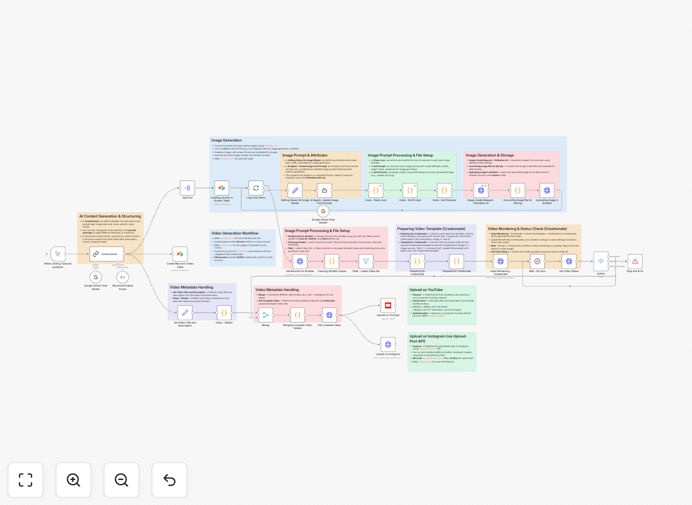
The workflow creates a complete "content factory" that transforms a single text prompt into a fully produced video ready for multiple social platforms. It uses Google Gemini AI to generate viral-worthy scripts, creates matching AI visuals, adds professional voiceovers, and publishes automatically to YouTube and Instagram. What traditionally takes a team days to accomplish now happens in minutes with zero manual intervention.
Beyond just saving time, this system ensures brand consistency, optimizes content for each platform's algorithm, and allows you to scale your video output exponentially without increasing creative resources.
How It Works
1. AI Script Generation
The workflow starts when you provide a topic or prompt. Google Gemini AI, acting as a "content brain," generates a complete video script with title, description, and structured scenes designed for maximum engagement.
2. Content Management in Airtable
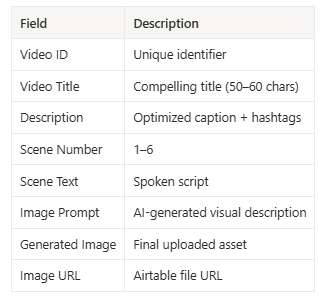
The entire script is broken down into scenes and stored systematically in Airtable, which acts as your central content management system. Each scene includes text, image prompts, and metadata for tracking.
3. AI Image Generation
The workflow loops through each scene, enhances the image prompts using AI, and sends them to an image generation API. High-quality, platform-optimized visuals are created for every scene and automatically uploaded back to Airtable.
4. Automated Video Rendering
Once all images are ready, the script text and image URLs are sent to Creatomate, which assembles the final video using your pre-designed template, complete with AI-generated voiceovers synchronized to each scene.
5. Multi-Platform Publishing
After rendering completes, the workflow retrieves the final video file and publishes it simultaneously to your connected YouTube channel and Instagram account, with platform-optimized descriptions and tags.
Pro tip: Start with 2-3 video templates in Creatomate for different content types (educational, promotional, storytelling) and let the workflow choose the appropriate template based on your initial prompt keywords.
Who This Is For
This automation is ideal for content creators, social media managers, digital marketing agencies, and businesses looking to scale their video presence. Specifically:
Content Creators & YouTubers who need to produce regular content but lack editing resources. Social Media Managers managing multiple accounts across platforms. Digital Marketing Agencies serving clients who need consistent video content. E-commerce Brands creating product videos and tutorials. Entrepreneurs & Solopreneurs building personal brands through video content.
If you're spending more than 5 hours per week on video creation or struggling to maintain a consistent posting schedule, this automation will transform your content strategy.
What You'll Need
- n8n instance (Cloud or self-hosted) with the LangChain integration package installed
- Google Gemini AI account with Vertex AI API access and API key
- Creatomate account for video rendering with API key and template ID
- Airtable base set up with the provided schema for content management
- YouTube channel with API access enabled via Google Cloud Console
- Upload-Post.com account (or similar) for Instagram publishing API access
Quick Setup Guide
- Import the template into your n8n instance using the downloaded JSON file
- Connect your Google Gemini API in the Chat Model nodes with your credentials
- Set up your Airtable base using the schema shown above and connect it in the Airtable nodes
- Configure Creatomate by adding your API key to the header authorization and updating the template ID
- Connect social accounts by authorizing YouTube via OAuth2 and adding your Upload-Post API key for Instagram
- Test with a simple prompt like "Create a 60-second video about productivity tips for remote workers"
Key Benefits
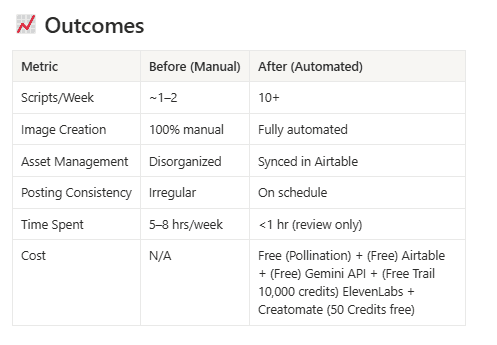
Save 20-30 hours per video by automating the entire production pipeline from concept to published content across platforms.
Scale content output 5-10x without increasing team size, allowing you to maintain daily or weekly posting schedules consistently.
Ensure brand consistency across all videos through template standardization and AI adherence to your brand guidelines.
Optimize for each platform automatically with format adjustments, ideal lengths, and platform-specific best practices built into the workflow.
Reduce creative burnout by handling repetitive production tasks, freeing your team for strategy, engagement, and high-value creative work.