n8n GPT-4o-mini Google Sheets Slack API Documentation

Automate API FAQ quality testing with GPT-4o-mini, Google Sheets & Slack alerts

Ensure your API documentation stays accurate with automated AI-powered FAQ validation

Download Template JSON · n8n compatible · Free
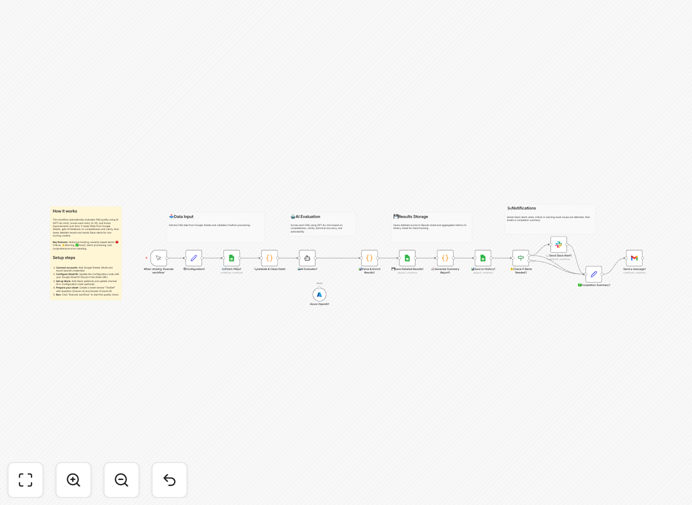
API FAQ testing automation workflow diagram

What This Workflow Does

This automation solves a critical challenge for technical teams: maintaining accurate API documentation. Outdated or incorrect FAQs can lead to frustrated developers, increased support tickets, and slower API adoption.

The workflow automatically tests your API documentation FAQs against current API behavior using GPT-4o-mini's analysis capabilities. It flags inconsistencies, outdated responses, or potential improvements, then logs results in Google Sheets and alerts your team via Slack.

How It Works

1. FAQ Content Extraction

The workflow pulls your current API FAQs from your documentation source (could be a CMS, knowledge base, or spreadsheet). This ensures you're always testing against your published content.

2. AI-Powered Validation

GPT-4o-mini analyzes each FAQ question/answer pair against your actual API specifications. It checks for technical accuracy, completeness, and clarity - flagging any potential issues.

3. Results Logging

Detailed validation results are recorded in Google Sheets with timestamps, severity ratings, and suggested improvements. This creates an audit trail of documentation quality over time.

4. Team Alerting

Critical issues trigger Slack notifications to your technical writing or developer relations team, ensuring prompt attention to documentation problems.

Who This Is For

This workflow is ideal for:

  • API product teams managing developer documentation
  • Technical writers maintaining API references
  • Developer relations teams supporting API adoption
  • Engineering teams with frequent API updates

What You'll Need

  1. An n8n instance (cloud or self-hosted)
  2. Access to GPT-4o-mini API
  3. Google Sheets with edit permissions
  4. A Slack workspace with webhook access
  5. Your API documentation source (URL or data access)

Quick Setup Guide

  1. Download and import the JSON template into your n8n instance
  2. Configure connections to your documentation source
  3. Set up Google Sheets and Slack credentials
  4. Adjust validation parameters in the GPT-4o-mini node
  5. Test with a small subset of FAQs before full deployment

Key Benefits

Reduce developer frustration: Catch documentation errors before they impact API consumers, improving developer experience.

Save technical writing time: Automate the tedious manual process of validating hundreds of FAQ entries.

Improve API adoption: Better documentation leads to faster onboarding and fewer support requests.

Maintain consistency: Ensure all FAQs meet your quality standards as your API evolves.

Frequently Asked Questions

Common questions about API documentation automation

Best practice is to run documentation tests whenever your API changes significantly. For rapidly evolving APIs, weekly testing is recommended. This workflow can be scheduled to run automatically at your preferred frequency.

Many teams align documentation testing with their API release cycles. For example, running tests before major version releases and after hotfix deployments ensures documentation stays synchronized with actual API behavior.

AI excels at identifying technical inconsistencies, outdated examples, and ambiguous explanations. It can flag when response formats change, when error codes are missing from docs, or when parameter descriptions don't match actual API requirements.

For example, if your API starts returning a new error code but your documentation hasn't been updated, the AI will detect this discrepancy. It's particularly good at catching subtle changes that might slip past manual reviews.

Yes, the workflow can be configured to test documentation against multiple API versions simultaneously. You can set up separate validation rules for each major version, ensuring developers get accurate information regardless of which API version they're using.

This is especially valuable for teams maintaining backward compatibility. The system can verify that deprecated features are properly marked in docs while new features are accurately described.

Automated testing is faster, more consistent, and less error-prone than manual reviews. While human oversight is still valuable for overall content quality, automation handles the tedious verification of technical details with perfect recall.

A typical manual review might take hours to check hundreds of FAQ entries, while this workflow completes the task in minutes. It also never gets fatigued or overlooks details due to repetitive work.

Key metrics include accuracy rate (percentage of correct FAQs), time-to-fix (how long issues remain), and severity distribution (critical vs minor issues). This workflow automatically tracks these in Google Sheets for trend analysis.

Over time, these metrics help identify documentation pain points. For example, if certain API endpoints consistently generate documentation errors, it might indicate your API design needs simplification.

Absolutely. The GPT-4o-mini validation parameters are fully configurable. You can adjust strictness levels, define custom validation criteria, and even create different rules for different types of documentation content.

Many teams start with basic accuracy checks, then add specialized rules for their API conventions. For example, you might require all error responses to include mitigation steps or all parameters to have format examples.

Yes! GrowwStacks specializes in building tailored documentation automation systems. We can create custom workflows that integrate with your specific tech stack, follow your documentation standards, and meet your team's unique requirements.

Our solutions go beyond basic FAQ testing - we can automate entire documentation pipelines, from change detection to publishing. Book a free consultation to discuss how we can streamline your API documentation processes.

Need a Custom API Documentation Automation?

This free template is a starting point. Our team builds fully tailored automation systems for your specific needs.