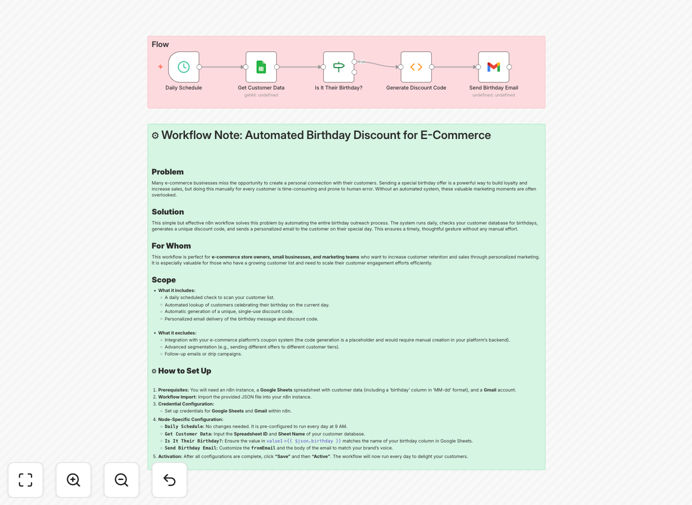
What This Workflow Does
Forgetting a customer's birthday means missing a golden opportunity to strengthen relationships and drive sales. Manual tracking in spreadsheets is error-prone, and sending generic promotions lacks the personal touch that builds loyalty. This automation solves both problems by creating a systematic, heartfelt connection with every customer on their special day.
The workflow automatically checks your Google Sheets customer database daily, identifies anyone with a birthday that day, generates a unique discount code, and sends a personalized celebratory email via Gmail. It transforms a simple date field in your spreadsheet into a powerful marketing engine that makes customers feel genuinely valued, leading to increased engagement, higher conversion rates, and improved customer lifetime value.
How It Works
The automation runs on a reliable schedule, ensuring no birthday is ever overlooked while freeing your team from repetitive administrative tasks.
Step 1: Daily Customer Data Check
Each morning, the workflow connects to your Google Sheets database and retrieves the latest customer information, including email addresses and birthdates stored in MM-DD format. This ensures you're always working with current data without manual exports or updates.
Step 2: Birthday Matching Logic
The system compares each customer's birthdate against the current date. Using conditional logic, it filters only those customers celebrating their birthday today, creating a targeted list for personalized communication.
Step 3: Discount Code Generation
For each matching customer, the workflow creates a unique discount code (like BDAY-[CUSTOMER-INITIALS]-[DATE]). This can be customized to integrate directly with your e-commerce platform's coupon system or used as a simple code for manual verification.
Step 4: Personalized Email Delivery
The system composes and sends a beautifully formatted birthday email via Gmail, inserting the customer's name and their unique discount code. The email timing can be optimized for morning delivery when customers are most likely to engage.
Who This Is For
This automation is ideal for e-commerce store owners, marketing managers at direct-to-consumer brands, subscription box businesses, and any company with a customer database that includes birthdates. It's particularly valuable for businesses with 100-10,000 customers where personal relationships drive repeat purchases but manual outreach isn't scalable.
Perfect for Shopify, WooCommerce, or custom e-commerce platforms that want to implement sophisticated loyalty programs without complex CRM investments. Also excellent for service businesses like salons, fitness studios, or consultants who want to maintain personal connections with clients.
What You'll Need
- A Google Sheets spreadsheet with customer data including email addresses and birthdays (formatted as MM-DD)
- A Gmail account for sending automated emails (can be a dedicated marketing email address)
- An n8n instance (cloud or self-hosted) to run the workflow
- Basic understanding of your e-commerce platform's discount/coupon system (optional for advanced integration)
- Approximately 15 minutes for initial setup and testing
Pro tip: Start with a small segment of your most loyal customers for testing. This lets you refine the email content and discount value based on real response data before rolling out to your entire list.
Quick Setup Guide
Follow these simple steps to implement this birthday automation in your business:
- Import the template into your n8n instance using the downloaded JSON file.
- Connect your Google Sheets credentials to the "Get Customer Data" node and specify your spreadsheet ID and sheet name.
- Connect your Gmail account to the "Send Birthday Email" node and authorize the connection.
- Customize the email template with your brand voice, appropriate discount percentage, and any terms and conditions.
- Test with a controlled group by temporarily modifying the date check to match test customers' birthdays.
- Activate the workflow and set it to run daily at your preferred time (morning is recommended).
Key Benefits
Eliminates manual errors and forgotten birthdays. The automation runs consistently 365 days a year, ensuring every customer receives timely recognition regardless of holidays, weekends, or team availability.
Increases customer loyalty and lifetime value. Personalized birthday communications make customers feel valued as individuals rather than just transactions, significantly improving retention rates and encouraging higher spending.
Drives measurable sales increases. Birthday emails typically achieve 2-3x higher conversion rates than standard promotional emails, directly impacting your revenue with minimal additional marketing cost.
Saves 5-10 hours monthly on manual outreach. Automating what was previously a tedious manual process frees your team to focus on strategic initiatives rather than administrative tasks.
Creates scalable personalization. What starts as birthday automation can expand to anniversary celebrations, re-engagement campaigns, and other timed communications using the same foundational system.