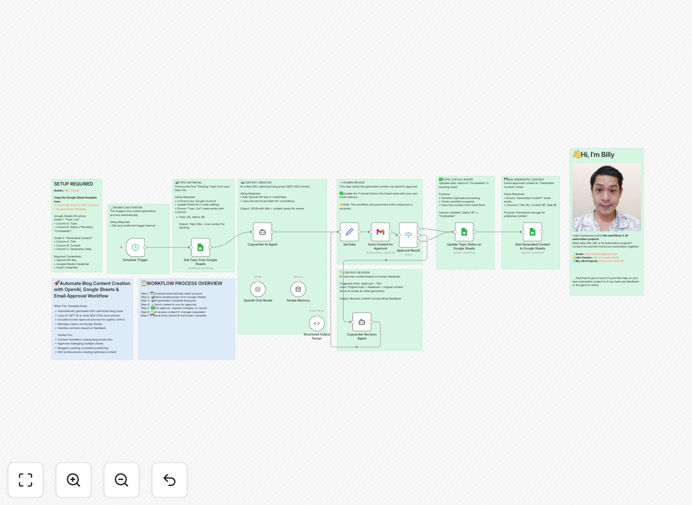
What This Workflow Does
Manual blog content creation is a major bottleneck for marketers, solopreneurs, and small teams. Between researching topics, writing drafts, editing, and scheduling, a single article can consume hours. This workflow eliminates that friction by automating the entire pipeline.
It turns a Google Sheets topic list into polished, SEO-ready blog posts using OpenAI, then routes them through a human approval system via email. You maintain full creative control while removing the repetitive writing work. The system manages your content calendar, prevents duplicate topics, and archives all generated drafts for easy reference.
Think of it as your AI-powered content assistant: it handles the heavy lifting of research and drafting, while you focus on strategy, editing, and publishing. This is especially powerful for scaling content marketing efforts without hiring a full-time writer.
How It Works
The workflow orchestrates three core systems: your content brief (Google Sheets), the AI writer (OpenAI), and your approval inbox (Gmail).
1. Topic Retrieval from Google Sheets
A scheduled trigger checks your designated Google Sheet for topics marked "Pending." It pulls the topic, target keywords, and any specific instructions you've added. This keeps your content pipeline organized and visible to your entire team.
2. AI Content Generation with OpenAI
The workflow sends the topic to OpenAI's GPT-4 with a structured prompt designed for SEO and readability. It generates a complete 800–1200 word article with headings, subheadings, and a call‑to‑action. You can customize the prompt for your brand voice and content guidelines.
3. Email Approval & Human Review
The draft is emailed to you (or your editor) with three action buttons: Approve, Revise, or Cancel. This human‑in‑the‑loop step ensures quality and alignment with your strategy before anything gets published.
4. Revision Handling & Final Storage
If you request revisions, the feedback is sent back to the AI for regeneration. Approved content is saved to a "Generated Content" sheet in Google Sheets, ready for you to copy‑paste into your CMS. The original topic's status updates to "Completed" to prevent reprocessing.
Who This Is For
This template is ideal for businesses and individuals who produce regular written content but are constrained by time, budget, or team size.
- Digital Marketing Agencies: Scale content production for multiple clients without linearly increasing writer costs.
- SEO Consultants & Specialists: Rapidly produce keyword‑optimized articles to improve client site rankings.
- Solopreneurs & Small Business Owners: Maintain an active blog to drive organic traffic, even with no writing team.
- Content Teams with Limited Bandwidth: Augment your human writers by having AI handle first drafts of routine posts.
- Startups Building Their Content Foundation: Quickly create foundational website and blog content during early‑stage growth.
Pro tip: Use this workflow to batch‑create a month's worth of content in one sitting. Schedule the trigger to run weekly, and you'll have a steady stream of drafts ready for review.
What You'll Need
- An n8n instance (cloud or self‑hosted).
- An OpenAI API key with GPT‑4 access.
- A Google Sheets document with "Topic List" and "Generated Content" sheets (template provided).
- A Gmail account (or SMTP service) to send approval emails.
- Basic familiarity with n8n's interface to configure credentials.
Quick Setup Guide
Follow these steps to get your automated content engine running in under 15 minutes.
- Download the template using the button above and import it into your n8n workspace.
- Duplicate the Google Sheets template from this link and add your first topics.
- Configure credentials in n8n for Google Sheets, OpenAI, and Gmail.
- Update the email recipient in the "Send Approval Email" node to your address.
- Adjust the schedule trigger to run daily, weekly, or on‑demand based on your content needs.
- Test with one topic marked "Pending" to see the full cycle from sheet to inbox.
Key Benefits
Scale content production 10x: What used to take a writer 4–5 hours per article now happens automatically in minutes. Free up your team for higher‑value tasks like strategy and promotion.
Maintain consistent quality & brand voice: By using customized AI prompts and a human approval gate, you ensure every piece meets your standards before it's saved.
Never run out of ideas: Keep a running list of topics in Google Sheets. The workflow pulls the next one automatically, so you always have content in the pipeline.
Centralize your content operations: All topics, drafts, and final copies live in one accessible Google Sheet. No more lost documents or confusing folder structures.
Eliminate manual copy‑pasting: The approved article is saved directly to your sheet, ready for you to publish. Reduce human error and save administrative time.