n8n Google Drive Slack Notion GPT-4o-mini

Automate client onboarding across Google Drive, Slack, Notion & Gmail with GPT-4o-mini

Eliminate repetitive onboarding tasks with this automated workflow that connects your essential tools with AI assistance

Download Template JSON · n8n compatible · Free
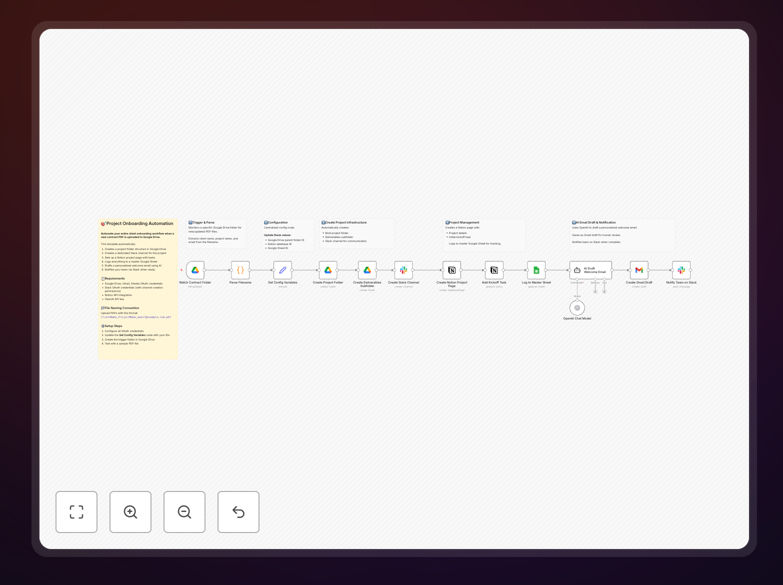
Client onboarding automation workflow diagram

What This Workflow Does

This automated workflow eliminates the repetitive manual tasks involved in client onboarding by connecting Google Drive, Slack, Notion, and Gmail with AI assistance from GPT-4o-mini. It creates a seamless process where new client information automatically triggers the creation of folders, documents, team notifications, and personalized welcome communications.

Traditional onboarding often involves copying the same templates, sending multiple emails, manually creating folders, and notifying team members across different platforms. This workflow consolidates all these steps into a single automated sequence, saving hours per client while ensuring consistency and reducing human error.

How It Works

1. Trigger from new client information

The workflow begins when new client data is received, typically through a form submission, email, or direct entry in Notion. This triggers the automation sequence that handles all subsequent steps.

2. Document and folder creation

The system automatically creates a dedicated client folder in Google Drive with standardized subfolders for contracts, deliverables, and communications. It generates initial documents like contracts, project briefs, and onboarding checklists using your templates.

3. Team notification in Slack

Relevant team members receive automated Slack notifications with client details and links to the newly created resources. Different departments can get customized messages with only the information they need.

4. Notion database updates

Client information is automatically added to your Notion CRM or project management system, creating a new client record with all relevant details and linking to the Google Drive resources.

5. AI-enhanced welcome communication

GPT-4o-mini helps generate personalized welcome emails or messages based on the client's specific needs and information, maintaining your brand voice while adding customized touches.

Who This Is For

This template is ideal for agencies, consultancies, freelancers, and project-based teams who onboard multiple clients regularly. It's particularly valuable for:

  • Marketing and creative agencies managing multiple client projects
  • Consulting firms with standardized onboarding processes
  • Freelancers who want to appear more professional and organized
  • Teams using Notion for CRM and project management
  • Businesses that want to leverage AI for personalized communications

What You'll Need

  1. An n8n instance (cloud or self-hosted)
  2. Google Workspace account with Drive access
  3. Slack workspace with appropriate permissions
  4. Notion account with database setup
  5. Gmail or Google Workspace email
  6. Access to GPT-4o-mini API

Quick Setup Guide

  1. Download the JSON template file
  2. Import it into your n8n instance
  3. Connect your Google Drive, Slack, Notion, and Gmail accounts
  4. Configure your folder structure and document templates
  5. Set up your Notion database properties
  6. Connect to GPT-4o-mini API
  7. Test with a sample client record

Key Benefits

Save 3-5 hours per client onboarding by eliminating manual document creation, folder setup, and communication tasks.

Reduce onboarding errors by 90% with standardized automated processes that follow the same steps every time.

Improve client first impressions with faster response times and personalized communications powered by AI.

Centralize client information across all your platforms automatically, eliminating duplicate data entry.

Scale your onboarding process effortlessly as you take on more clients without adding administrative overhead.

Pro tip: Use this workflow in combination with a client intake form to fully automate the initial information collection process.

Frequently Asked Questions

Common questions about client onboarding automation

Automation transforms client onboarding by eliminating repetitive manual tasks while ensuring consistency. It reduces human error in document creation, speeds up the entire process, and allows team members to focus on high-value interactions rather than administrative work.

For example, a marketing agency might reduce their onboarding time from 2 days to 2 hours while ensuring every client receives the same quality of setup and documentation. Automated systems also create audit trails and maintain version control for all onboarding documents.

  • Standardizes processes across all clients
  • Reduces time-to-value for new engagements
  • Creates professional first impressions

An effective automated onboarding system typically includes document generation, folder structure creation, team notifications, CRM updates, and personalized communications. These components work together to create a seamless experience for both the client and your team.

The most sophisticated systems integrate AI to analyze client needs and customize the onboarding materials accordingly. For instance, an AI component might identify that a client needs particular compliance documentation based on their industry and automatically include it in their onboarding package.

  • Document templates with merge fields
  • Predefined folder structures
  • Integration with communication platforms

AI brings personalization and intelligence to automated onboarding by analyzing client data to generate customized content, predict needs, and even handle initial queries. It can maintain brand voice while tailoring communications to each client's specific situation.

A real-world example is an AI system that reviews a client's submitted information and generates a personalized project roadmap highlighting the most relevant services based on their goals and challenges. This creates immediate value in the onboarding experience.

  • Generates personalized welcome content
  • Identifies potential service opportunities
  • Maintains consistent brand voice

Automated onboarding significantly improves time-to-productivity, client satisfaction scores, and team efficiency metrics. It reduces the lag between contract signing and project kickoff while ensuring all prerequisites are completed consistently.

Businesses typically see a 40-60% reduction in onboarding time and a 30% improvement in client satisfaction during the first 30 days. Team members report spending 70% less time on administrative tasks related to new client setup.

  • Faster revenue realization
  • Higher client retention rates
  • Improved team utilization

The key is using automation for administrative tasks while reserving human interaction for strategic touchpoints. AI can handle initial communications and documentation while your team focuses on relationship-building calls and customized strategy sessions.

A best practice is to schedule a personal video call after the automated onboarding materials have been delivered. This gives clients time to review information while ensuring they still feel personally attended to by your team.

  • Use AI for routine communications
  • Schedule personal check-ins
  • Customize based on client type

Common pitfalls include over-automating at the expense of personalization, failing to test all scenarios, and not updating templates regularly. Another mistake is not having clear handoff points between automated and human interactions.

For example, some businesses automate everything including the initial welcome, which can make clients feel processed rather than valued. The most effective systems balance efficiency with thoughtful human contact at strategic moments.

  • Test with real client scenarios
  • Review and update templates quarterly
  • Identify key human touchpoints

Absolutely! GrowwStacks specializes in building custom onboarding automations tailored to your specific business processes, tools, and client types. We analyze your current workflow and design a system that matches your exact requirements.

Our team has created customized onboarding solutions for agencies, SaaS companies, professional services firms, and more. We can integrate with your existing tech stack and design workflows that reflect your unique brand and service delivery model.

  • Tailored to your business model
  • Integrates with your current tools
  • Includes training and support

Need a Custom Client Onboarding Integration?

This free template is a starting point. Our team builds fully tailored automation systems for your specific needs.