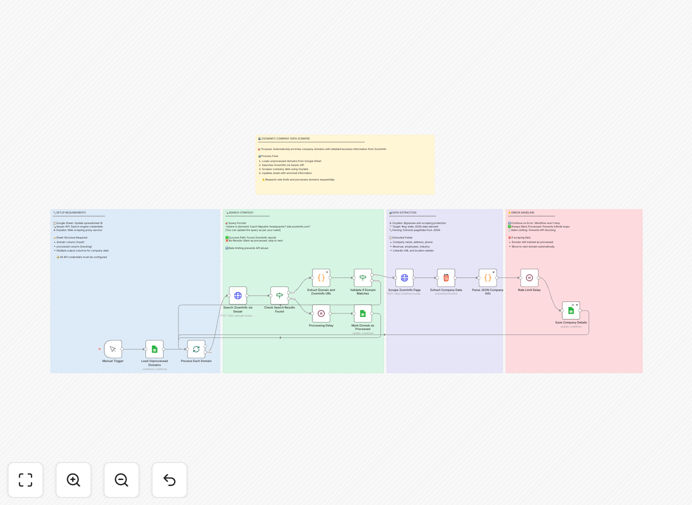
What This Workflow Does
Manual company research is one of the biggest time-wasters in sales and business development. Teams spend hours copying data between browser tabs, spreadsheets, and CRMs, often with inconsistent results. This workflow solves that problem by automating the entire company data enrichment process.
Starting with a simple list of company domains, the system searches for ZoomInfo profiles using Serper API, scrapes detailed company information through Oxylabs to bypass anti-scraping measures, and organizes everything into structured Google Sheets. The result is a complete business intelligence database with revenue figures, employee counts, contact information, industry classifications, and geographic details—all updated automatically and marked to prevent duplicate processing.
How It Works
1. Load Unprocessed Domains
The workflow begins by checking your Google Sheet for domains marked as unprocessed. It reads these in batches to manage API rate limits effectively and ensure smooth operation even with large lists.
2. Search ZoomInfo via Serper
For each domain, the system constructs targeted search queries to find the corresponding ZoomInfo profile page. Serper API handles the search execution and returns relevant profile URLs while respecting search engine guidelines.
3. Validate and Extract Profile URLs
The workflow validates search results to ensure they're genuine ZoomInfo profiles, not irrelevant pages. It extracts clean URLs for the next scraping stage, filtering out low-confidence matches.
4. Scrape Company Pages with Oxylabs
Using Oxylabs' residential proxy network, the system accesses ZoomInfo pages while appearing as legitimate human traffic. This bypasses anti-bot protections that would normally block automated data collection.
5. Extract Structured Business Data
The workflow parses company pages to extract key business information: official company name, address, phone numbers, revenue ranges, employee headcount, industry classifications, LinkedIn URLs, and geographic details.
6. Update Google Sheets Database
All extracted data is mapped to corresponding columns in your Google Sheet. The system maintains data consistency and adds timestamps for when each company was enriched.
7. Track Processing Status
Each successfully processed domain is marked as complete to prevent reprocessing. Failed attempts are logged with error details for manual review, ensuring data integrity.
Who This Is For
This automation delivers the most value to B2B sales teams building prospect lists, marketing agencies running account-based campaigns, business development professionals researching partnership opportunities, venture capital firms analyzing investment targets, and market researchers compiling competitive intelligence. If your work involves understanding companies at scale—whether for sales outreach, partnership development, or market analysis—this workflow will save you dozens of hours each month.
What You'll Need
- Serper API account with available search credits for querying ZoomInfo profiles
- Oxylabs subscription for web scraping with residential proxies to bypass anti-bot measures
- Google Sheets API access configured with OAuth2 authentication
- Google Sheets template with pre-configured columns for company data fields
- Basic n8n instance (cloud or self-hosted) to run the workflow
Pro tip: Start with a small batch of 10-20 domains to verify your API configurations work correctly before processing larger lists. This helps identify any authentication or rate limit issues early.
Quick Setup Guide
1. Copy the Google Sheets template to your Google Drive to create your working database with all necessary columns pre-configured.
2. Configure API credentials in the HTTP Request nodes: add your Serper API key in the search node and set up Oxylabs username/password in the scraping node.
3. Set up Google Sheets authentication using OAuth2 within n8n to allow the workflow to read from and write to your spreadsheet.
4. Update the Google Sheets document ID in all Google Sheets nodes to point to your copied template.
5. Add your domain list to the sheet with the 'processed' column empty or set to FALSE for domains needing enrichment.
6. Run the workflow manually to test with a few domains, then schedule it for regular automated updates.
Key Benefits
Save 10+ hours per week on manual research by automating what would otherwise require constant browser tab switching and data entry. Sales teams can focus on selling instead of data collection.
Improve data accuracy and consistency by applying the same extraction rules to every company. Eliminate human error from copy-paste mistakes and ensure your database maintains uniform formatting.
Scale your prospecting efforts effortlessly from dozens to thousands of companies without additional manual work. The workflow processes companies in batches with built-in rate limiting.
Maintain always-current company intelligence by scheduling regular updates. Set the workflow to run weekly or monthly to refresh employee counts, revenue figures, and contact information.
Integrate seamlessly with existing sales processes through Google Sheets, which most teams already use. Export enriched data to your CRM or use it directly for segmentation and outreach planning.