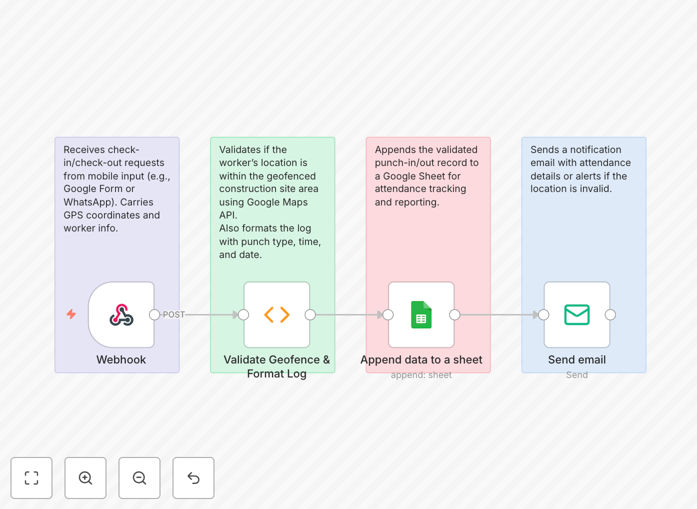
What This Workflow Does
Manual attendance tracking on construction sites is time-consuming, error-prone, and vulnerable to "buddy punching" where workers clock in for absent colleagues. This n8n workflow solves these problems by automating attendance tracking using geofencing technology.
The system creates a virtual boundary around your construction site (for example, in Thaltej, Ahmedabad with coordinates 23.0489, 72.5118). When workers enter or exit this 100-meter radius, their attendance is automatically logged without any manual intervention. The data flows directly into Google Sheets for easy reporting and management, while email notifications keep supervisors informed of any issues.
This automation eliminates paper timesheets, reduces administrative overhead by 70-80%, and provides accurate, real-time attendance data for payroll processing and project management.
How It Works
Step 1: GPS Tracking App Triggers Webhook
Workers carry smartphones with a GPS tracking app (like allGeo or Truein) that monitors their location. When they enter or exit the predefined geofence around your construction site, the app sends a webhook notification to n8n with their user ID, coordinates, and event type (enter/exit).
Step 2: Geofence Validation & Data Processing
The n8n workflow receives the webhook payload and validates the coordinates against your site's location using the Haversine formula. It checks if the worker is within the 100-meter radius and processes only valid entries, filtering out false triggers from nearby areas.
Step 3: Attendance Log Creation
The system converts "enter" events to "Punch In" and "exit" events to "Punch Out," then timestamps each entry with the current date and time. This creates a clean, structured attendance record ready for storage.
Step 4: Google Sheets Integration
Each validated attendance record is automatically appended to your Google Sheets attendance log. The sheet organizes data by User ID, Punch Type, Punch Date, and Punch Time, creating a searchable, filterable database of all worker movements.
Step 5: Error Notification System
If the workflow encounters invalid data, GPS errors, or integration issues, it automatically sends email alerts to designated supervisors. This ensures problems are addressed immediately rather than causing payroll discrepancies.
Pro tip: Start with a larger geofence radius (150-200 meters) during initial testing to account for GPS variance, then tighten it to 100 meters once you confirm accurate tracking.
Who This Is For
This automation is ideal for construction companies, contractors, and project managers who need accurate labor tracking across single or multiple sites. It's particularly valuable for:
- General contractors managing teams of 10+ workers
- Construction firms with multiple active job sites
- Companies struggling with manual timesheet errors and payroll disputes
- Projects requiring precise labor cost allocation for client billing
- Businesses needing to comply with labor regulations and documentation requirements
What You'll Need
- n8n instance: Either self-hosted or n8n.cloud account
- GPS tracking app: Mobile app like allGeo, Truein, or custom solution with webhook capability
- Google Workspace account: For Google Sheets integration (free tier works)
- Email service: Gmail, SendGrid, or other SMTP service for alerts
- Worker smartphones: Android or iOS devices with GPS enabled
- A GPS tracking app that supports webhook integration (allGeo, Truein, or custom solution)
- Google Workspace account for Google Sheets access
- Email service credentials (Gmail, SendGrid, or other SMTP provider)
- Basic n8n instance (cloud or self-hosted)
Quick Setup Guide
- Import the workflow into your n8n instance using the downloaded JSON file.
- Configure your construction site coordinates in the Function node, updating latitude and longitude to your specific location.
- Set up Google Sheets OAuth2 credentials in n8n and connect to your attendance spreadsheet.
- Configure your GPS tracking app to send webhooks to your n8n webhook URL when workers enter/exit the geofence.
- Test with a small team before rolling out to all workers, verifying that entries appear correctly in Google Sheets.
- Train supervisors on monitoring the attendance logs and responding to error notifications.
Key Benefits
Eliminate manual timesheet processing that typically consumes 10-15 hours per week for a medium-sized construction company. The automation handles everything from clock-in to data storage.
Reduce payroll errors by up to 95% by removing human data entry mistakes and preventing buddy punching. Accurate time tracking means correct wage calculation every pay period.
Gain real-time visibility into which workers are on-site at any given moment. This improves safety compliance, enables better resource allocation, and provides documentation for client billing.
Scale across multiple sites without additional administrative overhead. The same system can monitor workers at different locations simultaneously, with data organized by site in Google Sheets.
Improve compliance and documentation for labor regulations and project requirements. Automated logs provide auditable records of worker presence and hours worked.