What This Workflow Does
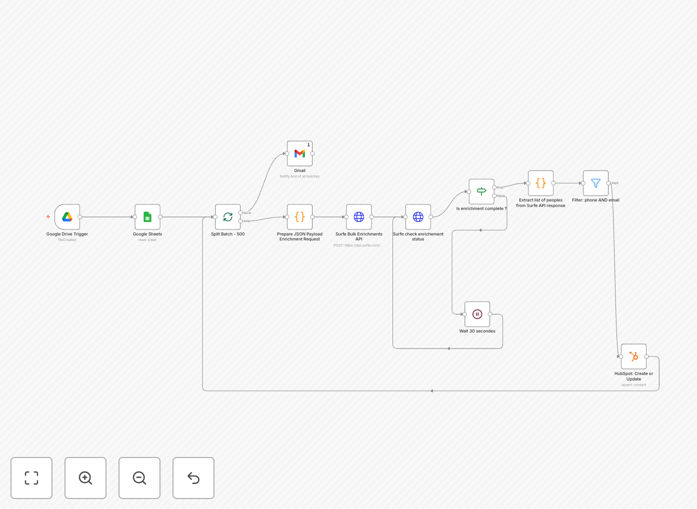
This automation solves the tedious manual process of researching and updating contact information in your CRM. Sales teams often waste hours looking up LinkedIn profiles, verifying email addresses, and tracking down direct phone numbers - this workflow eliminates that repetitive work.
The system monitors a designated Google Sheet for new contacts, enriches each record with Surfe's professional contact database, then syncs the complete profiles to HubSpot. What typically takes 5-10 minutes per contact now happens automatically in seconds.
How It Works
1. Spreadsheet Trigger
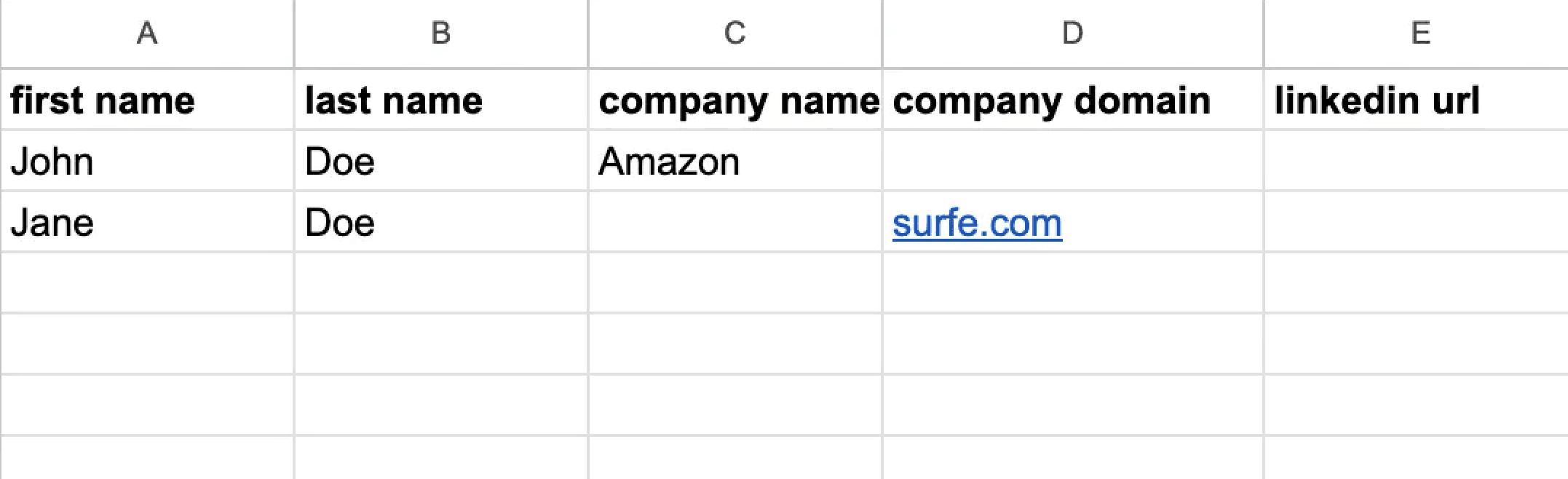
The workflow monitors a specific Google Sheet for new rows added. You can configure it to watch your lead intake form responses or any spreadsheet where contacts are collected.
2. Bulk API Enrichment
Each new contact gets sent to Surfe's enrichment API, which returns professional email addresses, direct phone numbers, LinkedIn profiles, company details, and other valuable sales intelligence.
3. CRM Sync
The enriched data automatically maps to corresponding HubSpot contact properties, creating new records or updating existing ones. The workflow handles field mappings and data formatting automatically.
Pro tip: Configure the workflow to flag contacts where key data (like email or LinkedIn) couldn't be verified, allowing for manual review when needed.
Who This Is For
This automation delivers the most value for:
- Sales teams managing high volumes of inbound leads
- Outbound prospecting teams building targeted account lists
- Marketing teams running lead gen campaigns that feed into CRM
- Recruiters sourcing candidates from multiple channels
What You'll Need
- Surfe API account (free tier available)
- Google Sheets with contact data
- HubSpot account
- Zapier account to host the workflow
Quick Setup Guide
- Download the template file
- Import into your Zapier account
- Connect your Google Sheets, Surfe, and HubSpot accounts
- Specify which spreadsheet to monitor
- Map Surfe data fields to HubSpot properties
- Activate the workflow
Key Benefits
Save 5-10 minutes per contact: What took manual research now happens instantly, freeing sales teams to focus on selling rather than data entry.
Improve outreach success rates: More accurate contact information means higher email deliverability and call connection rates.
Keep CRM data fresh: Automatic updates ensure your team always works with the most current information available.
Scale prospecting efforts: Process hundreds of contacts simultaneously without additional manual work.
Reduce human error: Eliminate mistakes from manual data entry and copy/paste between systems.