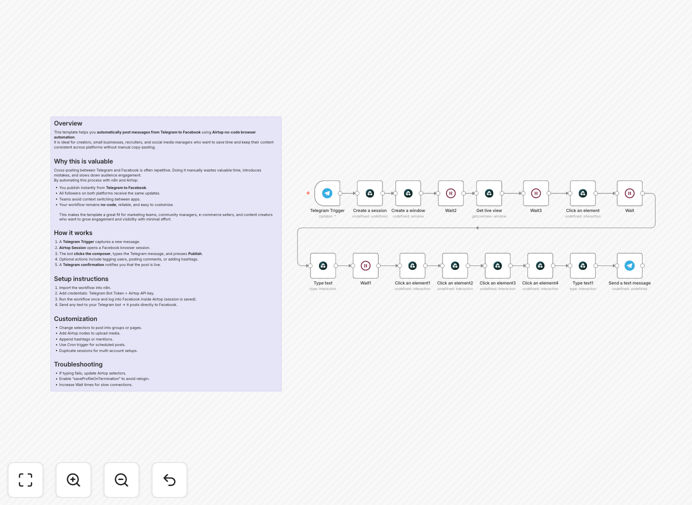
What This Workflow Does
This automation solves a common pain point for content creators, community managers, and businesses: manually copying messages from Telegram channels or groups to Facebook pages. The workflow listens for new messages in your Telegram bot, then uses Airtop's browser automation to log into Facebook and publish the content automatically.
Instead of switching between apps and manually posting the same content twice, this system creates a seamless bridge between platforms. Every announcement, update, or content piece you share on Telegram instantly appears on your Facebook page, ensuring consistent messaging and saving you 15-30 minutes per day on repetitive social media management tasks.
The automation is particularly valuable for businesses running Telegram channels for announcements while maintaining an active Facebook presence for broader audience engagement. It eliminates the "I forgot to cross-post" problem and ensures your content strategy executes consistently across platforms.
How It Works
The workflow follows a logical sequence that mimics how you would manually cross-post, but automated for speed and reliability.
Step 1: Telegram Trigger Listens for Messages
The workflow starts with a Telegram Trigger node that monitors your configured bot for incoming messages. You can set it to watch specific channels, groups, or direct messages. When a new message arrives, the workflow captures the text content, any media attachments, and sender information.
Step 2: Content Processing & Formatting
Before posting to Facebook, the message goes through optional processing nodes. You can add hashtags, reformat the text for Facebook's audience, extract links, or filter messages based on keywords. This step ensures the content is optimized for each platform's best practices.
Step 3: Airtop Browser Automation
The core of the automation uses Airtop nodes to control a browser session. It navigates to Facebook, logs in (saving the session for future use), clicks into the post composer, types your formatted message, and hits publish. The automation includes smart wait times between actions to ensure page elements load properly.
Step 4: Confirmation & Error Handling
After successful posting, the workflow sends a confirmation back to your Telegram with a success message. If anything fails—like Facebook's interface changes or network issues—error handling nodes catch the problem and can retry or notify you immediately, preventing silent failures.
Pro tip: Add a "Schedule Trigger" node before the Telegram trigger to only run this automation during business hours, preventing accidental overnight posts from international Telegram groups.
Who This Is For
This automation template is ideal for several types of users:
Social Media Managers who handle multiple platforms and need to maintain consistent posting schedules without doubling their workload. It's perfect for agencies managing client accounts across Telegram and Facebook.
Content Creators & Influencers with active Telegram channels who want to expand their reach to Facebook audiences without manual duplication. The automation ensures no content falls through the cracks between platforms.
Community Managers running Telegram groups for announcements, updates, or discussions who need to mirror important information to their organization's Facebook page for broader visibility.
Small Business Owners using Telegram for customer communication or updates who want to automatically share those updates on their business Facebook page to engage different audience segments.
What You'll Need
- n8n instance – either self-hosted or n8n.cloud account
- Telegram Bot Token – create via @BotFather on Telegram
- Airtop account – for browser automation capabilities
- Facebook account with posting permissions to your target page or group
- Basic understanding of how to import JSON workflows into n8n
Quick Setup Guide
Getting this automation running takes about 15 minutes if you have your accounts ready:
- Download the template using the button above and import it into your n8n instance
- Configure Telegram credentials in the Telegram Trigger node with your bot token
- Set up Airtop connection with your API key in the Airtop nodes
- Test the Facebook login – on first run, you'll need to log in manually through the browser session
- Adjust selectors if needed – check that the CSS selectors for Facebook's post composer match your interface
- Activate the workflow and send a test message to your Telegram bot
The workflow will automatically save your Facebook login session, so you only need to authenticate once. After that, it runs completely autonomously.
Pro tip: Before going live, run the workflow in test mode with a private Facebook page to verify formatting and timing. Adjust wait times between browser actions if your connection is slower than average.
Key Benefits
Save 5+ hours monthly on manual cross-posting between Telegram and Facebook. What used to be a daily 10-minute task becomes completely automated, freeing you for higher-value content creation and engagement.
Ensure 100% consistency in your cross-platform messaging. Manual processes inevitably lead to missed posts or inconsistent formatting. This automation guarantees every Telegram message that meets your criteria appears on Facebook exactly as configured.
Expand your audience reach without additional effort. Telegram and Facebook attract different demographics. Automatic cross-posting ensures you're reaching both audiences with the same core message, maximizing your content's impact.
Reduce human error from copying, pasting, and reformatting. The automation handles all formatting consistently, eliminating typos, broken links, or forgotten hashtags that can happen with manual posting.
Create a scalable system that grows with your channels. As your Telegram following increases, the automation handles the increased posting volume effortlessly, unlike manual methods that become unsustainable.