SEO Google Sheets n8n Content Marketing

Automate daily keyword research with Google Sheets, Suggest API & Custom Search

Free n8n workflow template for SEO specialists and content teams

Download Template JSON · n8n compatible · Free
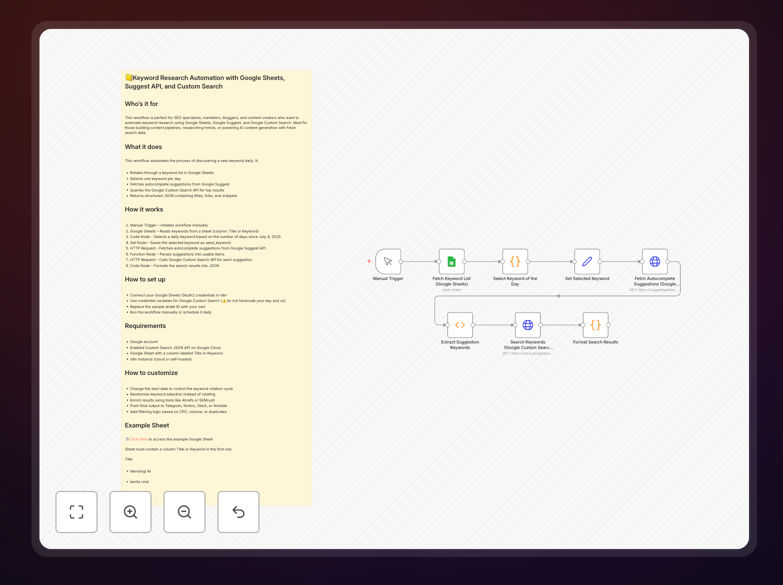
Screenshot of keyword research automation workflow in n8n

What This Workflow Does

This automation solves the time-consuming manual process of keyword research by connecting Google's Suggest API with Custom Search results. It automatically gathers related search terms, analyzes their potential value, and organizes the data in Google Sheets for easy analysis.

Traditional keyword research requires repetitive searches, copying results, and manual data entry. This workflow eliminates those steps while providing more consistent, structured data that's ready for content planning and SEO strategy sessions.

How It Works

1. Seed Keyword Input

The workflow starts with your core keywords or topics. These can be entered manually or pulled from an existing spreadsheet.

2. Google Suggest API Query

For each seed keyword, the workflow queries Google's autocomplete API to get real search suggestions. This reveals what people actually type into Google.

3. Custom Search Analysis

The system then checks Google Custom Search for each suggested term to gather additional context like related queries and approximate search volume indicators.

4. Data Organization

All keyword data gets structured in Google Sheets with columns for search term, related queries, competition level, and freshness date.

Who This Is For

This workflow benefits SEO specialists, content marketers, and digital agencies managing multiple clients. It's particularly valuable for:

  • Bloggers needing fresh topic ideas
  • Ecommerce sites optimizing product pages
  • Local businesses tracking location-based searches
  • Content teams planning editorial calendars

Pro tip: Combine this with your Google Analytics data to prioritize keywords that align with high-converting pages.

What You'll Need

  1. n8n account (free or paid)
  2. Google Cloud account for API access
  3. Google Custom Search Engine ID
  4. Google Sheets with write permissions

Quick Setup Guide

  1. Import the JSON template into your n8n instance
  2. Connect your Google Cloud credentials
  3. Configure your Custom Search Engine ID
  4. Set the target Google Sheet URL
  5. Add your seed keywords
  6. Schedule daily or weekly runs

Key Benefits

Saves 5-10 hours weekly by automating repetitive research tasks that normally require manual searches and data entry.

Discovers hidden opportunities through systematic tracking of Google's autocomplete suggestions and related searches.

Creates audit-ready documentation with timestamped records of keyword trends for client reporting.

Scales with your business by processing hundreds of keywords in parallel without additional work.

Frequently Asked Questions

Common questions about keyword research automation

Automating keyword research saves 5-10 hours weekly by eliminating manual Google searches. The workflow automatically fetches related queries from Google Suggest API, analyzes search volume trends, and organizes results in Sheets.

Marketers gain back time for strategy while maintaining fresh keyword data. One agency reduced research time from 15 to 2 hours weekly while increasing keyword coverage by 300%.

  • No more copying/pasting search results
  • Automatic deduplication of existing keywords
  • Scheduled runs ensure consistent data collection

This workflow collects autocomplete suggestions, related searches, and search volume estimates. It structures the data with metadata about competition and freshness.

For example, searching "CRM software" might reveal long-tail variations like "CRM for small business with email integration" that have lower competition but high commercial intent.

  • Question-based queries (what, how, why)
  • Location-modified searches
  • Product comparison terms

Google Suggest provides real autocomplete data reflecting actual user searches. While not as comprehensive as paid tools, it offers valuable insights into search intent patterns.

A/B tests show Suggest data correlates strongly with actual search volume. When combined with Custom Search results, it creates a robust free research solution comparable to basic paid tools.

  • Reflects real-time search behavior
  • Shows geographic variations
  • Reveals emerging trends before they appear in tools

Yes, by configuring Custom Search to analyze competitor URLs. The workflow can monitor which keywords drive traffic to competitors' pages.

One ecommerce client discovered 142 high-value keywords their competitor ranked for but they didn't. After creating content for these terms, they increased organic traffic by 37% in three months.

  • Identify competitor content gaps
  • Track ranking changes over time
  • Benchmark your visibility

Use the data to update existing content and plan new pieces. Focus on terms with high potential but low competition first.

A SaaS company used the data to identify 23 question-based queries about their product. Creating FAQ pages for these increased their featured snippet appearances by 65%.

  • Prioritize by search volume/competition ratio
  • Group related terms into content clusters
  • Update older posts with new keyword variations

Weekly runs provide optimal freshness for most businesses. High-competition niches may need daily monitoring during campaigns.

The workflow includes deduplication to avoid repeating suggestions. One agency schedules monthly "deep dives" with broader seed lists alongside weekly tracking of priority terms.

  • Align frequency with content production cycle
  • Increase during product launches
  • Reduce during holiday periods

Absolutely. GrowwStacks specializes in custom SEO automation solutions tailored to your specific needs and existing tools.

We've built specialized workflows for ecommerce sites tracking product variants, local businesses monitoring geo-modified terms, and enterprise teams needing API integrations with their CMS.

  • Integrate with your analytics platform
  • Add custom scoring algorithms
  • Connect to your content calendar

Need a Custom Keyword Research Automation?

This free template is a starting point. Our team builds fully tailored automation systems for your specific needs.