Gmail Google Calendar GPT-4o AI Automation Productivity

Automate Email & Calendar Management with AI

Free n8n template that uses GPT-4o AI to manage your Gmail inbox, schedule meetings, draft replies, and classify emails—saving 5–10 hours weekly.

Download Template JSON · n8n compatible · Free
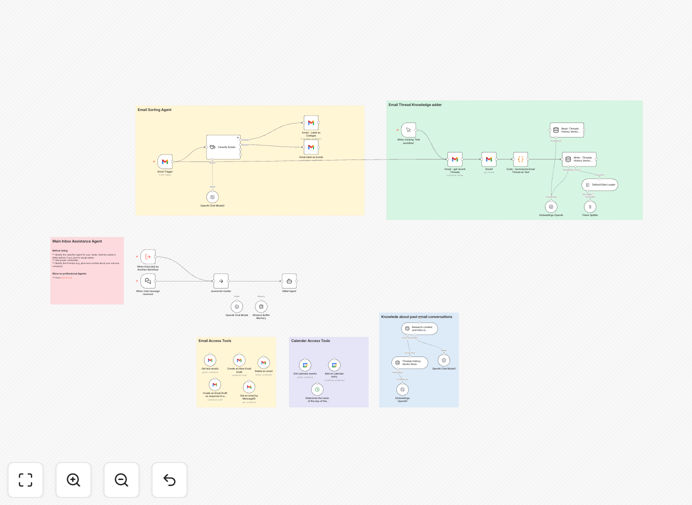
AI-powered email and calendar automation workflow interface showing Gmail, Google Calendar, and GPT-4o AI integration

What This Workflow Does

This AI-powered automation transforms how you handle email and calendar management by combining Gmail, Google Calendar, and GPT-4o AI into a intelligent personal assistant. It solves the constant time drain of manually sorting through emails, scheduling meetings, and drafting responses—tasks that typically consume 5–10 hours per week for busy professionals.

The system automatically analyzes incoming emails, classifies them by priority and topic, suggests context-aware replies, checks your calendar for availability, and proposes optimal meeting times. It maintains conversation history using vector storage, ensuring the AI remembers previous interactions and provides consistent, personalized communication.

How It Works

1. Email Monitoring & Classification

The workflow continuously monitors your Gmail inbox for new messages. When an email arrives, GPT-4o AI analyzes the content, sender, and context to assign priority labels (urgent, important, routine) and categorize by topic (client inquiry, internal communication, newsletter, etc.).

2. Intelligent Response Drafting

Based on the email classification and conversation history, the AI generates professional reply suggestions. It considers your preferred tone, past interactions with the sender, and any specific instructions you've provided, creating drafts that sound authentically like you.

3. Calendar Integration & Scheduling

For emails requiring meetings, the system checks your Google Calendar for available slots, considers timezone differences, and proposes optimal meeting times. It can automatically send calendar invites with all necessary details, eliminating scheduling back-and-forth.

4. Context Retention & Learning

Using vector database technology, the workflow maintains a "memory" of previous conversations. This allows the AI to reference past decisions, preferences, and agreements, creating a continuous thread of understanding that improves over time.

Who This Is For

This automation is ideal for busy professionals, executives, sales teams, consultants, and small business owners who spend significant time on email management. It's particularly valuable for:

  • Entrepreneurs managing multiple client communications
  • Sales teams needing prompt follow-ups on leads
  • Consultants scheduling frequent client meetings
  • Executives with overflowing inboxes requiring prioritization
  • Remote teams coordinating across time zones

What You'll Need

  1. n8n instance (cloud or self-hosted)
  2. Gmail account with API access enabled
  3. Google Calendar credentials
  4. OpenAI API key for GPT-4o access
  5. Basic understanding of n8n workflow import

Pro tip: Start with a secondary Gmail account for testing before connecting your primary business email. This lets you verify the automation works correctly without risking important communications.

Quick Setup Guide

  1. Download the template using the button above
  2. Import the JSON file into your n8n instance
  3. Configure your Gmail and Google Calendar credentials in n8n
  4. Add your OpenAI API key to the GPT-4o nodes
  5. Test with a few sample emails to verify classification accuracy
  6. Adjust priority labels and response templates to match your preferences
  7. Activate the workflow and monitor initial interactions

Key Benefits

Save 5–10 hours weekly by eliminating manual email sorting and meeting scheduling. The AI handles routine communications, letting you focus on high-value work instead of administrative tasks.

Never miss important emails with intelligent priority classification. Urgent client requests get immediate attention while newsletters are automatically categorized for later review.

Maintain professional communication with AI-drafted responses that match your tone and style. The system ensures timely replies even during busy periods or outside business hours.

Eliminate scheduling conflicts through direct Google Calendar integration. The automation checks real-time availability and handles timezone conversions automatically.

Continuous improvement as the AI learns from your interactions. The vector memory system retains conversation context, making the assistant more personalized and effective over time.

Frequently Asked Questions

Common questions about AI email and calendar automation

Automating email and calendar management saves 5–10 hours per week by eliminating manual inbox sorting, meeting scheduling, and follow-up tasks. It reduces missed appointments, ensures timely responses, and prioritizes important communications using AI classification.

Businesses improve client response times, reduce administrative overhead, and maintain consistent professional communication without constant manual oversight. The automation also provides valuable analytics about communication patterns and time allocation.

AI analyzes email content, sender importance, urgency keywords, and historical interactions to assign priority labels automatically. For response drafting, AI understands context, tone, and intent to generate professional, personalized reply suggestions that maintain conversation flow.

This ensures urgent client inquiries get immediate attention while routine emails are batched or auto-replied, dramatically improving communication efficiency. The AI can also learn your specific preferences over time, making its suggestions increasingly accurate.

Yes, automated calendar scheduling integrates directly with Google Calendar to check real-time availability before proposing meeting times. The system analyzes existing appointments, buffer times, and preferred meeting hours to suggest conflict-free slots.

It can also handle timezone conversions automatically and send calendar invites with all necessary details, eliminating the back-and-forth emails that often lead to scheduling errors. The automation respects your working hours and personal preferences for meeting timing.

When automating email with AI, ensure sensitive data isn't exposed to third-party AI models without proper anonymization. Use enterprise-grade authentication for Gmail and Google Calendar APIs, implement access controls so the AI only processes necessary information, and maintain audit logs of all automated actions.

For highly confidential communications, consider on-premise AI solutions or private cloud deployments rather than public AI APIs. Regular security reviews and compliance checks are essential when handling business communications through automation.

Context retention uses vector databases to store conversation histories, allowing the AI to reference previous email threads, decisions, and preferences. When a new email arrives, the system retrieves relevant past interactions to maintain continuity—remembering project details, previous agreements, or specific client preferences.

This creates a 'memory' for the assistant, making interactions feel personalized and reducing repetitive explanations. The system can recall important details from weeks or months earlier, creating seamless ongoing conversations.

Rule-based filters use static criteria like sender addresses or keywords, requiring constant manual updates as patterns change. AI-powered classification learns from email content, context, and user behavior to dynamically categorize emails by priority, topic, or required action.

AI can identify nuanced patterns—like distinguishing urgent client requests from routine newsletters—without predefined rules, adapting as communication patterns evolve. This makes AI classification more accurate and maintenance-free compared to traditional filters.

Yes, GrowwStacks specializes in building custom email and calendar automation systems tailored to your specific business workflows. We analyze your current communication patterns, integrate with your existing tools, and design AI assistants that match your brand voice and operational needs.

Our team handles everything from initial consultation to deployment and ongoing optimization, ensuring the automation delivers maximum time savings and efficiency gains. We can incorporate unique requirements like industry-specific terminology, compliance protocols, or multi-team coordination.

  • Tailored AI training on your communication style
  • Integration with your existing CRM and tools
  • Ongoing support and optimization

Need a Custom Email & Calendar Automation?

This free template is a starting point. Our team builds fully tailored automation systems for your specific business needs.