Gmail Google Calendar OpenAI GPT-4 Google Sheets Email Automation

Automate Email Triage & Meeting Scheduling with AI

Free n8n workflow template that acts as your personal inbox assistant—automatically filters, classifies, and responds to emails 24/7.

Download Template JSON · n8n compatible · Free
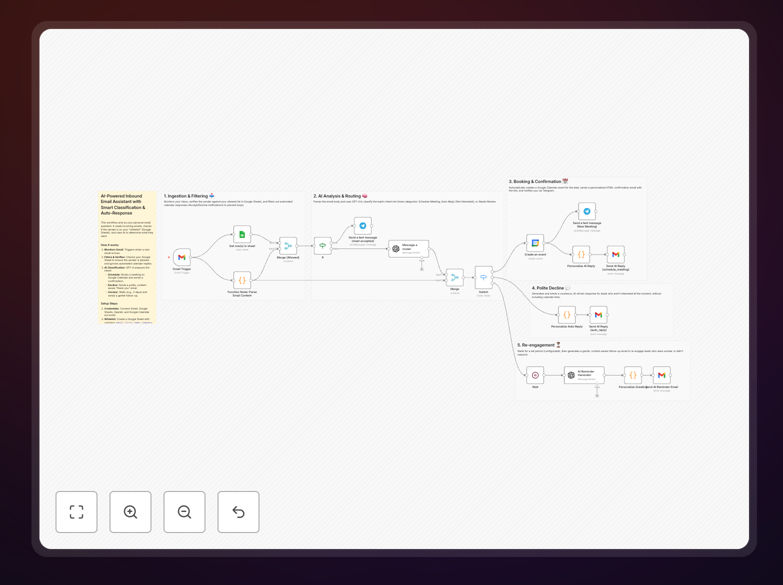
AI email triage automation workflow diagram showing Gmail, GPT-4, and Google Calendar integration

What This Workflow Does

This workflow solves the universal problem of inbox overload. Instead of manually reading and responding to every email, it uses AI to automatically understand what each sender wants and takes appropriate action. For sales inquiries, it schedules meetings instantly. For general questions, it sends personalized responses. For unclear emails, it follows up at the right time.

The system acts as a 24/7 virtual assistant that never misses an opportunity. It filters out noise, focuses on important conversations, and ensures every potential lead receives immediate attention—something impossible to achieve manually at scale. By automating the initial triage and response, you reclaim hours each week while improving your conversion rates.

How It Works

1. Email Monitoring & Whitelist Filtering

The workflow continuously monitors your Gmail inbox for new messages. First, it checks if the sender is on your approved "whitelist" (stored in Google Sheets) to ensure it only processes emails from genuine leads or contacts. It also automatically ignores automated calendar responses to prevent infinite loops.

2. AI Intent Classification

Each email's content is sent to OpenAI's GPT-4 model, which analyzes the text to determine the sender's intent. The AI classifies emails into categories like "wants to schedule meeting," "needs information," "not interested," or "requires human review." This understanding goes beyond simple keyword matching to grasp context and nuance.

3. Automated Action Execution

Based on the AI's classification, the workflow takes one of three paths. For meeting requests, it creates a Google Calendar event with available time slots and sends a confirmation email with the meeting link. For non-interested leads, it sends a polite, brand-appropriate "thank you" response. For ambiguous emails, it waits a configured period then sends a gentle follow-up to re-engage.

Who This Is For

This automation is ideal for freelancers, consultants, sales professionals, and small business owners who manage their own inbound inquiries. Sales teams can use it to qualify leads instantly. Customer support teams can triage tickets. Agencies managing multiple clients can ensure consistent response times. Anyone spending more than an hour daily on email management will benefit significantly.

The workflow is particularly valuable for businesses with time-sensitive opportunities where immediate response correlates strongly with conversion rates. It's also perfect for solopreneurs who need to appear "always available" without actually being chained to their inbox.

What You'll Need

  1. n8n instance (self-hosted or cloud version)
  2. Gmail account with OAuth2 access enabled
  3. Google Sheets for maintaining your contact whitelist
  4. Google Calendar for automated meeting scheduling
  5. OpenAI API key (GPT-4 or GPT-4o-mini model access)
  6. Telegram bot (optional, for notifications)

Quick Setup Guide

1. Import the template into your n8n instance using the downloaded JSON file.

2. Create your whitelist spreadsheet in Google Sheets with columns for email, first name, and company.

3. Configure credentials in n8n for Gmail, Google Sheets, Google Calendar, and OpenAI.

4. Update the workflow nodes to point to your specific spreadsheet and calendar.

5. Test with sample emails to ensure the AI classification works correctly for your use case.

6. Adjust response templates in the Code nodes to match your brand voice and communication style.

Pro tip: Start with a small whitelist of trusted contacts during testing. Monitor the AI's classification decisions for a week before expanding to all incoming emails. This gives you confidence in the system while preventing any miscommunications.

Key Benefits

Save 5-10 hours weekly on manual email sorting and response drafting. The automation handles the repetitive work while you focus on high-value conversations.

Improve lead conversion by 20-40% through immediate, personalized responses. Studies show responding within 5 minutes dramatically increases engagement rates.

Eliminate missed opportunities with 24/7 inbox monitoring. The system works while you sleep, travel, or focus on other tasks.

Maintain consistent communication quality with templated yet personalized responses. Every lead receives the same high-quality attention regardless of when they email.

Scale your responsiveness without scaling your team. One person with this automation can handle the email volume that would normally require a dedicated assistant.

Frequently Asked Questions

Common questions about email automation and AI integration

Email triage automation uses AI to automatically sort, categorize, and respond to incoming emails based on their content and intent. It's crucial for businesses because it saves hours of manual inbox management, ensures no lead or inquiry is missed, and provides instant responses to potential customers.

Without automation, important emails get buried, responses are delayed, and opportunities are lost. With triage automation, you create a systematic approach to inbox management that works 24/7, improving both efficiency and customer satisfaction simultaneously.

AI analyzes email content to understand the sender's intent—whether they want to schedule a meeting, need information, or are just browsing. For meeting requests, AI can automatically check calendar availability, propose times, and send calendar invites.

This eliminates the typical back-and-forth of "When are you available?" conversations. The AI understands natural language, so even if someone writes "Can we chat next week?" instead of "Schedule a meeting," it correctly identifies the intent and initiates the scheduling process.

Connecting these tools creates a seamless workflow where incoming emails trigger automated actions. AI classifies the email, then the system can either schedule a meeting directly in Google Calendar or send a tailored response via Gmail.

This integration turns separate applications into a coordinated system. Instead of manually copying information between tools, the automation maintains context throughout the entire customer interaction journey, from initial email to scheduled meeting to follow-up.

  • Eliminates manual data entry between systems
  • Reduces scheduling coordination from days to minutes
  • Ensures consistent follow-up across all conversations

Yes, email automation with AI is versatile across industries. Freelancers use it to handle client inquiries and booking. Sales teams automate lead qualification and meeting scheduling. Customer support teams triage support tickets based on urgency and topic.

The core principle—automatically understanding intent and taking appropriate action—applies whether you're a consultant, e-commerce store, SaaS company, or agency. The specific responses and actions are customized, but the automated workflow structure remains powerfully effective.

First, map your common email types and desired responses. Ensure you have API access to your email and calendar services. Start with a whitelist of important senders to avoid automating responses to spam or internal emails.

Test the AI's classification accuracy with sample emails from your actual inbox. Begin with simple categories before adding nuanced distinctions. Most importantly, maintain a human review loop for ambiguous cases initially, gradually increasing automation as confidence in the system grows.

Use AI to extract key details from the incoming email (name, company, specific request) and inject them into response templates. Customize templates with your brand voice and personal touches. For meeting scheduling, include personalized calendar links and context about what will be discussed.

The combination of AI understanding and well-crafted templates creates responses that feel individually written while being fully automated. Include variable fields for personal details, reference specific points from their email, and maintain a conversational tone that matches how you actually communicate.

Basic filters use simple rules like sender address or specific keywords. AI-powered triage understands context and intent—it can distinguish between "I want to schedule a call" and "I'm not interested right now" even when those phrases aren't explicitly used.

AI adapts to language variations, handles nuanced requests, and makes intelligent decisions about appropriate responses. Where basic filters might miss "Let's connect sometime" as a meeting request, AI recognizes the intent and initiates scheduling, making it far more powerful and accurate.

Yes, GrowwStacks specializes in building custom automation solutions tailored to your specific business processes. We can design workflows that integrate with your existing tools, customize AI prompts for your industry terminology, and create response templates that match your brand voice.

We handle the technical implementation so you get a system that works perfectly for your unique needs. Whether you need complex lead scoring, integration with your CRM, or specialized response logic, our team can build exactly what you require.

  • Custom integration with your existing software stack
  • Industry-specific AI training and prompt engineering
  • Ongoing support and optimization as your needs evolve

Need a Custom Email Automation?

This free template is a starting point. Our team builds fully tailored automation systems for your specific business needs.