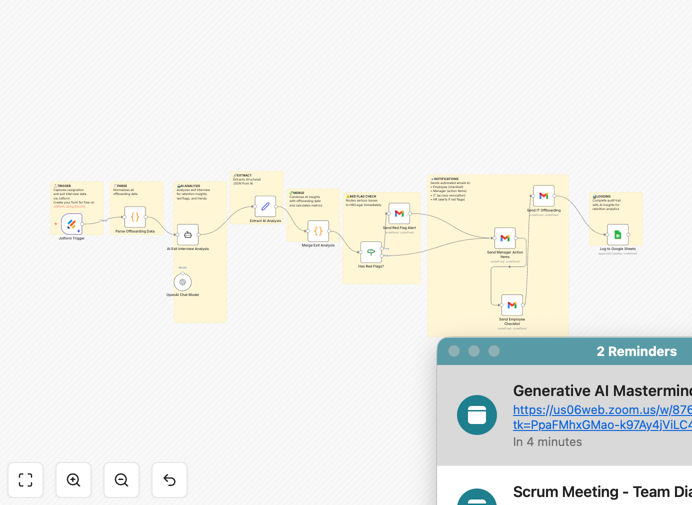
What This Workflow Does
Employee offboarding is often chaotic, insecure, and misses valuable insights. This automation transforms that process into a strategic, secure, and insightful experience. When an employee resigns, the system automatically collects their feedback via Jotform, analyzes it with GPT-4 for sentiment and red flags, coordinates equipment recovery, revokes system access on their last day, and provides HR with actionable retention intelligence.
Instead of manual checklists and missed security steps, you get a consistent, compliant process that protects your company while turning every departure into learning opportunities. The AI identifies preventable turnover patterns, flags management issues needing coaching, and even predicts which employees might return as "boomerangs."
How It Works
1. Exit Interview Collection
When an employee submits their resignation, they receive a comprehensive Jotform exit interview. This captures not just why they're leaving, but also equipment inventory, system access details, and knowledge transfer requirements. The form is triggered automatically from your HR system or manually by HR.
2. AI-Powered Analysis
GPT-4 processes the qualitative feedback through multiple analytical lenses: sentiment analysis, preventability scoring (0-100%), red flag detection for serious issues, manager performance evaluation, and competitive intelligence about where employees are going and why.
3. Automated Task Orchestration
Based on the analysis, the workflow automatically routes tasks: IT receives access revocation schedules, managers get coaching recommendations, facilities receives equipment recovery checklists, and HR leadership gets alerted to systemic issues requiring intervention.
4. Secure Offboarding Execution
On the employee's last day, all system access is automatically revoked according to the schedule. Equipment recovery is tracked with automated follow-ups. Knowledge transfer plans are created and assigned. Everything is logged to Google Sheets for audit trails and compliance.
Who This Is For
This automation is ideal for growing companies (50-5,000 employees) experiencing monthly turnover. Tech companies benefit from secure IP protection when engineers leave. Healthcare organizations ensure HIPAA compliance through automatic access revocation. Financial services firms maintain audit trails for regulatory requirements. Professional services firms prevent costly knowledge drain. Remote-first companies coordinate equipment recovery across locations. Any business that wants to turn departures from security risks into retention opportunities.
What You'll Need
- Jotform account (free tier works) for exit interview forms
- OpenAI API key with GPT-4 access for AI analysis (~$0.20-0.50 per interview)
- Google Sheets for the exit interview database and analytics
- Gmail or email service for automated notifications
- n8n instance (cloud or self-hosted) to run the workflow
- Basic HR process to trigger the workflow when employees resign
Pro tip: Start with a pilot group of 5-10 departures to refine your exit questions and AI prompts before rolling out company-wide. This lets you calibrate the preventability scoring to your specific culture and industry.
Quick Setup Guide
1. Import the template into your n8n instance using the download button above.
2. Create your Jotform exit interview with sections for resignation details, manager ratings, equipment inventory, and open-ended feedback.
3. Connect your OpenAI API key in the AI node settings (GPT-4 provides the best insights).
4. Set up Google Sheets integration by creating a new spreadsheet and updating the sheet ID in the workflow.
5. Configure email notifications with your company's templates for employees, managers, and IT.
6. Test with a simulated resignation to ensure all notifications fire correctly and data flows to your sheets.
7. Train your HR team on interpreting the AI insights and acting on red flags.
Key Benefits
Eliminate security breaches with automated access revocation scheduled for the exact last working day. No more relying on manual IT tickets that get forgotten.
Recover 100% of company equipment through automated tracking and follow-up reminders. The system generates personalized checklists for each employee based on their assigned assets.
Reduce HR coordination time by 75%—from 2+ hours per departure to 30 minutes. All stakeholders receive automated, role-specific notifications with clear action items.
Gain actionable retention insights instead of anecdotal feedback. The AI identifies patterns across departments, calculates preventability scores, and provides data-driven recommendations to reduce turnover.
Maintain complete compliance audit trails with every step documented in Google Sheets. Perfect for regulated industries needing to demonstrate proper offboarding procedures.