n8n AI Automation HubSpot LinkedIn PostgreSQL

Automate Event Follow-ups with GPT-4, LinkedIn & HubSpot

Transform post-event networking from a manual chore into an AI-powered, multi-channel outreach system that builds relationships and drives ROI.

Download Template JSON · n8n compatible · Free
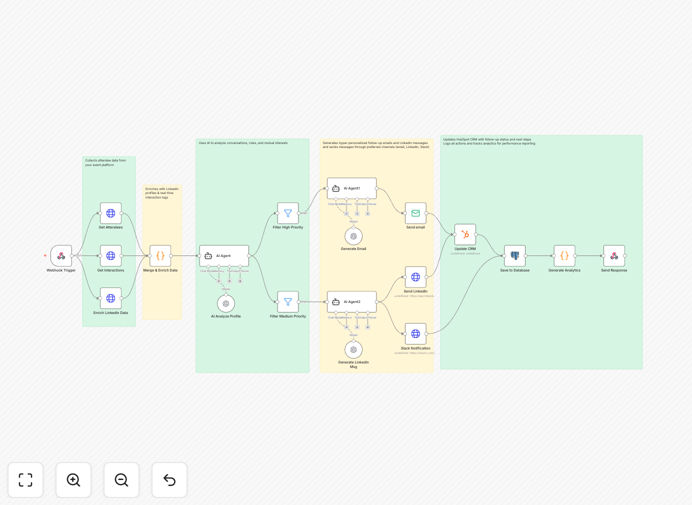
Visual diagram showing the event follow-up automation workflow connecting webhook, AI analysis, and multi-channel outreach

What This Workflow Does

Events are fantastic for networking, but the real work begins afterward. Manual follow-up is time-consuming, inconsistent, and often ineffective. This intelligent n8n workflow solves that by automating the entire post-event engagement process.

Triggered instantly when an event ends, it collects attendee data and interaction logs, enriches profiles with LinkedIn insights, uses GPT-4 to analyze engagement and generate personalized talking points, then executes multi-channel outreach via email and LinkedIn. High-value leads are prioritized, all activities are logged to HubSpot and PostgreSQL, and your team gets real-time Slack notifications. What typically takes 10-15 hours of manual work happens automatically in minutes, with significantly better results.

How It Works

1. Data Collection & Enrichment

A webhook trigger initiates the workflow with event data. The system fetches the attendee list and all interaction logs (Q&A, chats, polls). It then enriches each profile with professional data from LinkedIn via API, creating a complete 360-degree view of each contact.

2. AI Analysis & Prioritization

GPT-4 analyzes the combined dataset—evaluating conversation depth, role relevance, and engagement patterns. It scores each attendee's networking potential and suggests personalized talking points. The workflow then automatically routes leads into High, Medium, and Low priority paths for appropriate follow-up intensity.

3. Personalized Content Generation

Separate AI agents generate tailored content for each channel. One creates professional, context-aware email follow-ups. Another crafts concise, friendly LinkedIn connection messages. Both reference specific interactions and mutual interests identified during the analysis phase.

4. Multi-Channel Outreach & Logging

Messages are sent via SMTP/email service and LinkedIn API. High-priority outreach triggers Slack alerts to your sales team. Simultaneously, all contact details, message content, and engagement status are automatically updated in HubSpot and logged to PostgreSQL for complete analytics and future nurturing.

Who This Is For

This workflow is ideal for marketing teams running webinars, conferences, or trade shows; sales development representatives managing event leads; community managers hosting networking events; and founders/business owners who attend industry events for partnership development. If you host or participate in events where relationship-building is key, this automation will dramatically increase your efficiency and effectiveness.

What You'll Need

  1. An event platform with webhook capabilities and attendee/interaction API access.
  2. LinkedIn Developer App with API access for profile enrichment.
  3. OpenAI API key with GPT-4 access for intelligent analysis.
  4. HubSpot account with API enabled for CRM integration.
  5. PostgreSQL database (or similar) for logging and analytics.
  6. Email service (SendGrid, SMTP, etc.) for sending follow-ups.
  7. Slack workspace (optional) for team notifications.

Pro tip: Start with a small test event to fine-tune your AI prompting and priority scoring before rolling out to major conferences. Adjust the weight given to Q&A participation versus chat engagement based on what correlates with qualified leads in your business.

Quick Setup Guide

  1. Import the downloaded JSON file into your n8n instance.
  2. Configure credentials for all connected services: Event Platform, LinkedIn, OpenAI, HubSpot, PostgreSQL, and your email service.
  3. Test the webhook trigger with a sample event payload containing eventId, eventName, and priority thresholds.
  4. Customize the email and LinkedIn message templates to match your brand voice.
  5. Set up your PostgreSQL table schema to match the workflow's expected structure.
  6. Run a test with a single attendee to verify all connections work, then activate for live events.

Key Benefits

Save 10-15 hours per event on manual follow-up work. What used to take days of tedious copying, pasting, and personalizing now happens automatically while your team focuses on high-value conversations.

Increase response rates by 3-5x with AI-powered personalization. Generic follow-ups get 5-10% responses; personalized, context-aware messages achieve 25-40% engagement by referencing specific interactions and mutual interests.

Never let a high-value lead slip through the cracks. Automated prioritization ensures decision-makers and highly engaged attendees receive immediate, tailored attention while maintaining appropriate follow-up with all contacts.

Complete visibility into event ROI with integrated analytics. Every interaction is logged to your CRM and database, providing clear metrics on response rates, meetings booked, pipeline generated, and deal conversion from each event.

Scalable system that improves with every event. The PostgreSQL logging creates a growing dataset that can be analyzed to refine your scoring algorithms and identify which types of interactions correlate most strongly with qualified opportunities.

Frequently Asked Questions

Common questions about event follow-up automation and integration

The most effective way is to use a multi-channel approach combining AI personalization with CRM integration. Start by collecting attendee data and interaction logs from your event platform. Use AI like GPT-4 to analyze engagement levels and generate personalized talking points.

Then send tailored messages through both email and LinkedIn, while automatically logging all activity to your CRM for tracking and future nurturing. This creates a seamless system that works while you sleep, ensuring timely, relevant follow-ups that convert casual contacts into meaningful business relationships.

AI dramatically improves post-event networking by analyzing conversation context, attendee roles, and interaction depth to generate hyper-relevant follow-up content. Instead of generic 'nice to meet you' messages, AI can reference specific discussion points, suggest mutual interests, and prioritize leads based on engagement potential.

For example, AI can identify that someone asked detailed questions about your pricing tier during a webinar and craft a follow-up that addresses those specific concerns while offering a relevant case study. This creates meaningful connections that feel personal and increase response rates by 3-5x compared to manual outreach.

Use both channels strategically. Email works best for longer-form content, meeting scheduling, and sharing resources. LinkedIn is ideal for connection requests, brief personalized notes, and establishing professional relationships.

The most successful approach sends an email within 24 hours of the event, followed by a LinkedIn connection request 2-3 days later with a different personalized message. This multi-touch approach increases engagement by 40-60% compared to single-channel outreach, as different people prefer different communication channels.

Track ROI by monitoring response rates, meeting bookings, pipeline generation, and deal conversion. Set up your automation to log all interactions in your CRM with proper tagging.

Key metrics to watch: response rate (aim for 25-40%), meeting conversion rate (15-25% of responses), pipeline value generated, and deal close rate. Advanced tracking includes measuring time saved (typically 10-15 hours per event) and comparing manual vs automated outreach effectiveness. Create a dashboard that shows event ROI over time to justify continued investment.

Collect attendee names, companies, job titles, contact information, session attendance, Q&A participation, networking chat logs, poll responses, and booth visit data. The richer your interaction data, the better your AI can personalize follow-ups.

Also track who asked questions, who engaged in side conversations, and what topics generated the most interest. This behavioral data is more valuable than basic demographic information for creating relevant follow-up content. Modern event platforms can export this data via API, making it easy to feed into your automation system.

Follow up within 24-48 hours while the event is still fresh in attendees' minds. The first 24 hours are golden for high-priority leads (decision-makers who engaged deeply). Medium-priority leads should receive follow-ups within 48 hours.

Research shows response rates drop by 60% after 72 hours. Automated workflows can trigger immediately when the event ends, ensuring no lead falls through the cracks due to manual delays. Stagger your outreach slightly—high priority within 4 hours, medium within 24, low within 48—to manage volume while maintaining timeliness.

Yes, absolutely. While this free template provides a solid foundation, every business has unique event formats, CRM systems, and outreach goals. Our team at GrowwStacks specializes in building custom automation solutions that integrate with your specific event platforms, match your brand voice, and align with your sales process.

We can add features like SMS follow-ups, calendar booking, lead scoring algorithms, and custom analytics dashboards. Whether you need integration with proprietary systems, compliance with specific data regulations, or specialized reporting, we can build a solution that fits your exact requirements.

  • Integration with your existing marketing stack
  • Custom lead scoring based on your qualification criteria
  • Brand-aligned messaging templates
  • Advanced analytics and ROI tracking

Need a Custom Event Follow-up Automation?

This free template is a starting point. Our team builds fully tailored automation systems for your specific business needs.