n8n Gmail Google Sheets Event Management

Automate event registration & follow-ups with Gmail reminders & Google Sheets

Streamline your event management with automated registration, confirmation emails, and follow-up reminders

Download Template JSON · n8n compatible · Free
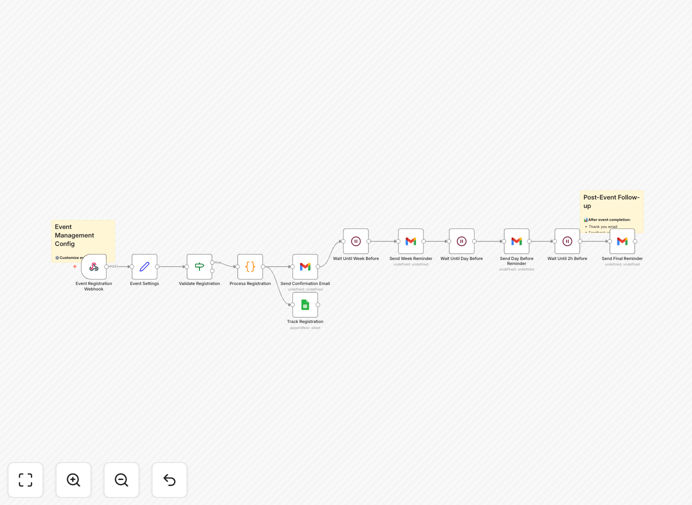
Event registration automation workflow diagram

What This Workflow Does

This automation solution transforms your event management process by handling registration, communication, and follow-ups automatically. It eliminates the manual work of collecting attendee information, sending confirmations, and reminding people about upcoming events.

The system captures registration details through web forms, stores them in Google Sheets, and triggers personalized email sequences. It maintains engagement with attendees from the moment they sign up through post-event follow-up, ensuring professional communication at every stage.

How It Works

1. Registration Capture

Attendees submit their information through your registration form. The system immediately records all details in your designated Google Sheet, creating a centralized attendee database.

2. Instant Confirmation

Upon registration, the workflow triggers a personalized confirmation email via Gmail. This includes event details, joining instructions, and any necessary attachments like calendar invites.

3. Reminder Sequence

The system automatically sends scheduled reminders at strategic intervals before the event. Typical sequences include a 24-hour reminder, a 1-hour reminder, and a "we're starting soon" notification.

4. Post-Event Follow-up

After the event concludes, attendees receive thank-you emails with relevant resources, feedback requests, or information about future events, maintaining the relationship beyond the single interaction.

Who This Is For

This automation is ideal for event organizers, marketers, and business owners who host:

  • Webinars and online workshops
  • Professional conferences and meetups
  • Training sessions and educational programs
  • Networking events and community gatherings

It's particularly valuable for teams managing multiple events or recurring programs where consistency and scalability matter.

What You'll Need

  1. A Google account with access to Gmail and Google Sheets
  2. An n8n account (cloud or self-hosted)
  3. A registration form (can be connected to existing forms like Google Forms or Typeform)
  4. Email templates for confirmation and follow-up messages

Quick Setup Guide

  1. Download the template file and import it into your n8n instance
  2. Connect your Google account credentials in the workflow settings
  3. Configure your Google Sheet ID and tab name for data storage
  4. Customize the email templates with your event details and branding
  5. Set your preferred timing for reminder emails
  6. Test the workflow with sample registrations
  7. Activate the workflow and connect it to your registration form

Key Benefits

Reduce no-shows by 30-40%: Automated reminders keep your event top-of-mind for attendees at critical moments before the event starts.

Save 5-10 hours per event: Eliminate manual data entry, email composition, and follow-up scheduling for each registration.

Improve attendee experience: Professional, timely communication makes participants feel valued and informed throughout the event journey.

Centralized attendee data: All registration information automatically organizes in Google Sheets for easy access and analysis.

Scalable for any event size: The system handles 10 registrations or 10,000 with equal reliability, growing with your needs.

Frequently Asked Questions

Common questions about event registration automation

Automating event registration eliminates manual data entry and follow-up tasks. When attendees register through your form, their details are automatically recorded in Google Sheets and confirmation emails are sent instantly. This reduces administrative workload by 70-80% compared to manual processes, while ensuring no registrations are missed or delayed.

For event teams managing multiple programs simultaneously, the time savings compound significantly. The system handles all repetitive communication tasks consistently, freeing staff to focus on higher-value activities like content development or attendee engagement.

  • No manual copying of attendee data
  • Eliminates email template recreation
  • Automates timing of all follow-ups

Automated registration works well for webinars, workshops, conferences, and networking events. The system handles both free and paid events effectively. For recurring events like weekly meetups or monthly training sessions, automation is particularly valuable as it standardizes the process and maintains consistent communication with attendees.

Hybrid events (combining in-person and virtual components) benefit greatly from automation. The system can segment attendees based on participation type and send location-specific instructions or virtual access links automatically, reducing confusion and support requests.

  • Ideal for events with 50+ attendees
  • Works for single or multi-day events
  • Effective for internal and external events

Automated follow-ups maintain engagement with attendees through timely reminders. The system can send pre-event instructions 24 hours before, last-minute reminders 1 hour before, and post-event thank you emails. This multi-touch approach has been shown to increase attendance rates by 25-40% compared to single confirmation emails.

Strategic timing of reminders matches how people plan their schedules. Early reminders help attendees block time, while last-minute notifications catch those who forgot. Including clear joining instructions in each message reduces technical difficulties that might prevent attendance.

  • Segment reminders by timezone
  • Include speaker highlights to build anticipation
  • Add calendar links to every reminder

Yes, the workflow allows full customization of email templates. You can personalize messages with attendee names, event details, and branded designs. Advanced customization includes conditional content based on registration type or adding calendar invites. The system supports HTML templates for professional-looking communications.

For different event types, you can create multiple template variations. A webinar might emphasize the virtual joining link, while an in-person event highlights venue directions. Dynamic content ensures each attendee receives the most relevant information for their specific registration.

  • Add your logo and brand colors
  • Include speaker bios or agenda items
  • Embed personalized video messages

Essential data includes attendee contact information, registration date, ticket type, and payment status. Advanced tracking can capture referral sources, dietary preferences, or session choices. Google Sheets allows you to create dashboards showing real-time registration numbers, attendance trends, and demographic breakdowns for better event planning.

Consider tracking engagement metrics like email opens and link clicks to identify highly interested attendees. Post-event, add fields for feedback scores or session ratings. This data becomes invaluable for improving future events and understanding your audience's preferences.

  • Track registration source for marketing attribution
  • Record attendance status (joined/didn't join)
  • Capture survey responses automatically

The system uses Google's secure infrastructure for data storage and transmission. You control access permissions to the registration spreadsheet. For sensitive data, you can implement additional security measures like data encryption or restricted API scopes. Regular audits ensure compliance with data protection regulations like GDPR.

When collecting payment information, always use PCI-compliant processors that handle sensitive data directly. The automation only stores payment confirmation details, not actual credit card numbers. For highly confidential events, you can add two-factor authentication to access the registration data.

  • Google's infrastructure meets enterprise security standards
  • Set viewer/editor permissions appropriately
  • Regularly review third-party app access

Yes, the workflow can connect with payment processors like Stripe or PayPal. When attendees complete payment, the system automatically marks them as paid in your spreadsheet and sends payment confirmation. Failed payments trigger follow-up emails. Integration provides real-time revenue tracking and reduces manual reconciliation work.

For complex pricing structures (early bird discounts, group rates), the system can validate coupon codes and apply correct pricing automatically. You can set up automated refund processing and generate revenue reports directly from your registration data for accounting purposes.

  • Supports multiple currency transactions
  • Generates receipts automatically
  • Tracks outstanding invoices

Absolutely. GrowwStacks specializes in building tailored event management automations. Our team can create custom workflows that integrate with your CRM, add complex registration logic, or connect with specialized event platforms. We'll design a system that matches your specific event types, branding, and reporting requirements.

For organizations with unique needs—like member-only events, multi-track conferences, or certification programs—we develop bespoke solutions. Our automations can incorporate approval workflows, waitlist management, session selection, and even badge printing triggers for in-person events.

  • Custom integrations with your existing tools
  • Advanced reporting and analytics
  • Ongoing support and optimization

Need a Custom Event Registration Integration?

This free template is a starting point. Our team builds fully tailored automation systems for your specific needs.