What This Workflow Does
Managing events manually is time-consuming and error-prone. This automation solves that by creating a complete, hands-off system for participant management. From the moment someone registers to when they check in at your venue, every step is handled automatically.
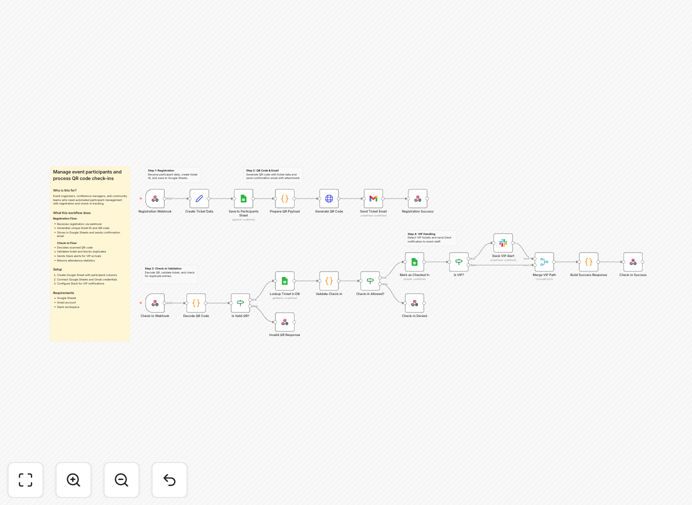
The workflow operates through two synchronized flows. The registration flow captures sign-ups via webhook, generates unique ticket IDs and QR codes, stores everything in Google Sheets, and sends confirmation emails with attachments. The check-in flow scans QR codes at the entrance, validates tickets against your database in real-time, blocks duplicates, sends Slack alerts for VIP arrivals, and provides live attendance statistics.
How It Works
1. Registration Capture & Processing
When a participant submits your registration form, the data arrives via webhook. The workflow generates a unique ticket ID, records all details (name, email, ticket type, timestamp) in a Google Sheet, and creates a personalized QR code containing the ticket information.
2. Ticket Delivery & Confirmation
Using Gmail, the system automatically sends a confirmation email to the attendee with their QR code attached as an image file. The email includes event details and instructions. The Google Sheet is updated to mark the ticket as "issued."
3. Venue Check-in & Validation
At the event, staff scan QR codes using a simple web interface. The workflow decodes the ticket ID, searches the Google Sheet for a match, verifies it hasn't been used before, and records the check-in time. If the ticket is invalid or already used, an immediate error message appears.
4. Team Notifications & Analytics
For VIP or special ticket types, the system sends a real-time Slack notification to your team channel announcing the arrival. The workflow also compiles attendance statistics—total checked in, remaining, no-shows—available through a simple dashboard.
Who This Is For
This template is perfect for event organizers, conference managers, workshop hosts, community leaders, and corporate teams running regular meetings. If you manage any gathering requiring registration and attendance tracking—from free meetups to paid conferences—this automation eliminates administrative overhead.
Marketing teams running webinars, universities organizing seminars, nonprofits hosting fundraisers, and companies managing internal training sessions will find immediate value. The system scales from 50 to 5,000 attendees without additional work.
What You'll Need
- A Google Sheets spreadsheet with columns for Ticket ID, Event ID, Name, Email, Ticket Type, Registered At, Checked In (Yes/No), and Check-in Time.
- Google Workspace account with Sheets and Gmail API access enabled.
- A Slack workspace where you can create an incoming webhook for notifications.
- n8n instance (cloud or self-hosted) to import and run the workflow.
- A registration form that can send data via webhook (Google Forms, Typeform, JotForm, etc.).
Pro tip: Before your event, test the check-in flow with a few sample tickets. This ensures your team is comfortable with the scanning process and that all integrations are working correctly.
Quick Setup Guide
- Download the template using the button above and import it into your n8n instance.
- Create credentials in n8n for Google Sheets (with write access) and Gmail (with send permission).
- Update the Google Sheet node with your actual spreadsheet ID and worksheet name.
- Configure the Slack node with your incoming webhook URL for VIP notifications.
- Update the webhook URLs in your registration form to point to your n8n webhook triggers.
- Activate the workflow and test with a sample registration.
Key Benefits
Eliminate manual data entry completely. Registrations flow directly into your spreadsheet, and check-ins are recorded automatically—saving 5–10 hours per event on administrative tasks.
Provide instant professional communication. Attendees receive confirmation emails with their tickets within seconds of registering, improving their experience and reducing support inquiries.
Prevent fraud and duplicate entries. The system validates every QR code against your database in real-time, ensuring only valid, unused tickets grant entry.
Gain real-time visibility into attendance. Know exactly how many people have arrived, who hasn't shown up, and track VIP attendance—all from a live dashboard.
Scale effortlessly as your events grow. The same system works for 50 or 5,000 attendees without additional setup or manual intervention.