What This Workflow Does
Managing event registrations manually is time-consuming and error-prone. You waste hours copying data from forms to spreadsheets, checking for duplicates, sending confirmation emails, and following up with reminders. This workflow automates the entire process from signup to event day.
It captures form submissions, prevents duplicate entries by checking against existing records, stores clean registration data in Google Sheets, and sends immediate confirmation emails to attendees. If a registration fails, it alerts you immediately. Then, on a scheduled basis, it sends perfectly timed pre-event and event-day reminders, keeping all communication logged to avoid duplicate emails.
This eliminates manual data entry, reduces no-shows with timely reminders, ensures professional communication, and gives you a complete audit trail of all attendee interactions—freeing you to focus on hosting a great event rather than administrative tasks.
How It Works
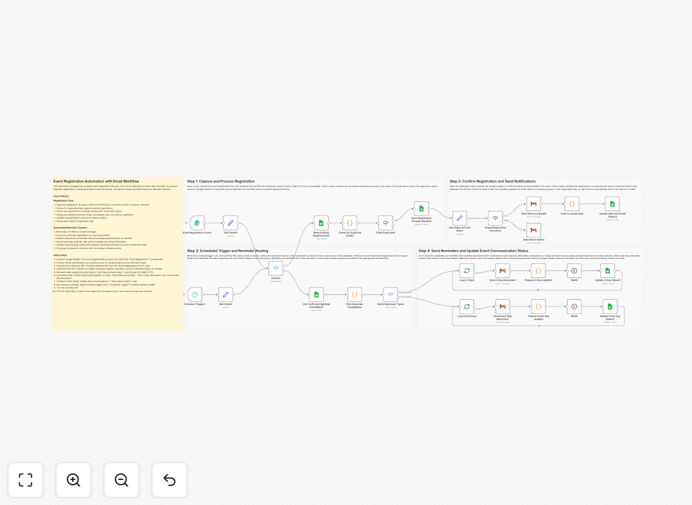
The workflow operates in four logical stages, handling everything from initial registration to final reminders.
1. Capture & Process Registration
When someone submits your event registration form, the workflow triggers. It first normalizes the data (standardizing names, emails, etc.), then reads existing registrations from Google Sheets to check for duplicate email addresses. If a duplicate is found, the workflow stops—preventing double entries. If it's a new registration, the data is appended to your master Google Sheet.
2. Confirm Registration & Send Notifications
Once stored, the registration is marked as "confirmed" and assigned an event date. The workflow then sends a personalized welcome email to the attendee with event details. If anything fails during this process (like the sheet update), an alert email is immediately sent to you, the admin. A JavaScript node confirms email delivery and prepares tracking data, which updates the welcome email status in your sheet.
3. Scheduled Trigger & Reminder Routing
A daily scheduled trigger runs to handle reminders. It retrieves all confirmed registrations from Google Sheets, calculates how many days remain until each person's event, and routes attendees to the appropriate reminder flow—either the "3-day reminder" or "event-day reminder" path.
4. Send Reminders & Update Status
For attendees due for a 3-day reminder, the workflow loops through each, sending a personalized pre-event email with preparation details, then updates the reminder status in Sheets. For event-day reminders, it sends final instructions and check-in information. Delays between emails prevent hitting sending limits, and all communication is tracked to ensure emails are sent only once.
Who This Is For
This automation is ideal for event organizers, conference planners, workshop hosts, webinar producers, community managers, and business owners who run regular events. If you host monthly meetups, quarterly trainings, annual conferences, or any recurring gathering where you need to manage registrations and communicate with attendees, this workflow saves you significant time.
Marketing teams running webinars, educational institutions organizing workshops, nonprofits hosting fundraisers, and agencies managing client events will find immediate value. It's especially useful for solo organizers or small teams who don't have dedicated event management software but want professional, automated attendee communication.
What You'll Need
- n8n instance – either self-hosted or n8n.cloud account
- Google account – for Sheets, Forms, and Gmail integration
- Event registration form – Google Forms or any form that can trigger webhooks
- Google Sheet – to store registration data and communication logs
- Gmail account – to send confirmation and reminder emails
- Email templates – draft confirmation and reminder email content
Pro tip: Create a dedicated Google Sheet with columns for email, name, registration date, event date, confirmation status, 3-day reminder sent, and event-day reminder sent. This structure matches the workflow's data handling and makes reporting easy.
Quick Setup Guide
- Download the template using the button above and import it into your n8n instance.
- Configure Google Sheets node with your spreadsheet ID and worksheet name for registrations.
- Set up Gmail node with your sending email address and create email templates for confirmation and reminders.
- Connect your form trigger – replace the sample webhook with your actual form submission endpoint.
- Adjust reminder timing in the schedule trigger to match your event reminder preferences (3 days before, day-of, etc.).
- Test with a dummy registration to ensure the flow works end-to-end before going live.
- Activate the workflow and share your registration form—the automation will handle everything else.
Key Benefits
Eliminates manual data entry completely. No more copying and pasting form submissions into spreadsheets. The workflow automatically captures and organizes all registration data, saving 2-3 hours per event.
Prevents duplicate registrations automatically. The system checks each submission against existing records and stops duplicates before they enter your database, ensuring clean data and preventing duplicate communications.
Ensures 100% confirmation email delivery. Every registrant receives an immediate, personalized confirmation with event details, creating professional first impressions and reducing "did my registration go through?" support queries.
Reduces no-shows by 30-40% with automated reminders. Perfectly timed pre-event and event-day reminders keep your event top-of-mind for attendees, significantly improving attendance rates without you lifting a finger.
Provides complete communication audit trail. Every email sent is logged in your Google Sheet with timestamps, so you know exactly who received what communication and when—perfect for follow-up and reporting.