GitHub JIRA AI Automation Email DevOps

Automate GitHub & JIRA Release Notes with AI & Email

Free n8n template to automatically generate professional release notes using AI and distribute them via email—saving hours per release cycle.

Download Template JSON · n8n compatible · Free
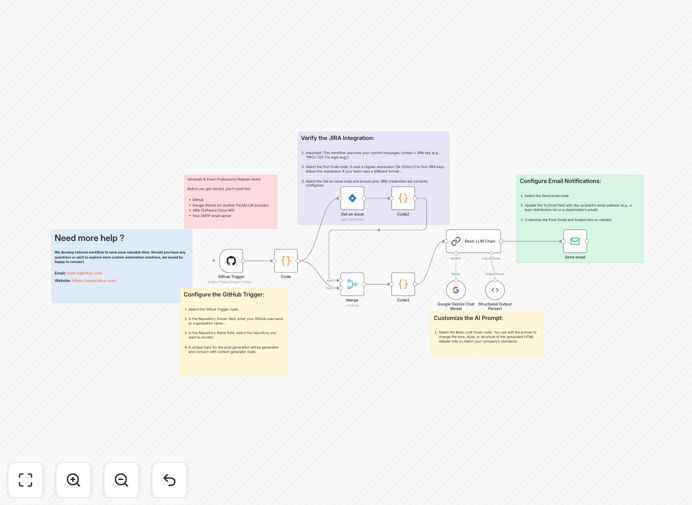
Visual diagram showing GitHub, JIRA, AI, and email integration for automated release notes

What This Workflow Does

This automation solves the tedious, error-prone process of manually writing release notes for software updates. Development teams typically spend 5-10 hours per release compiling commits, checking JIRA tickets, writing summaries, and emailing stakeholders—often under tight deadlines.

The workflow automatically triggers when code is pushed to GitHub, fetches related JIRA tickets using commit message patterns, processes the combined data through Google Gemini AI to generate human-like release notes, and emails them to your team and stakeholders. It creates a complete, end-to-end communication pipeline that ensures every release is documented professionally and distributed consistently.

How It Works

1. GitHub Trigger

The workflow activates automatically when code is pushed to your specified repository. It captures commit messages, authors, timestamps, and branch information as the starting point for release documentation.

2. JIRA Integration

Using regex patterns, the system extracts JIRA ticket keys from commit messages (like "PROJ-123"), then fetches full ticket details including summaries, descriptions, assignees, and status from your JIRA instance.

3. AI Processing

Google Gemini AI analyzes the combined GitHub and JIRA data, grouping related changes, identifying key features versus bug fixes, and writing coherent summaries in your preferred tone and format.

4. Email Distribution

The generated HTML release notes are automatically sent via your SMTP server to predefined distribution lists, ensuring stakeholders receive timely, professional updates without manual intervention.

Who This Is For

This template is ideal for development teams with frequent releases, DevOps engineers managing multiple services, product managers needing consistent stakeholder updates, and agencies delivering regular client work. If your team spends more than 2 hours per week on release documentation, this automation will deliver immediate time savings and quality improvements.

What You'll Need

  1. A GitHub repository with commit messages containing JIRA ticket references
  2. JIRA Cloud or Server instance with API access
  3. Google Gemini API key (or alternative LLM provider)
  4. SMTP email server credentials (Gmail, SendGrid, AWS SES, etc.)
  5. n8n instance (self-hosted or cloud)

Quick Setup Guide

1. Download the template and import it into your n8n instance.

2. Configure credentials for GitHub, JIRA, Google Gemini, and your email server in n8n's credential management.

3. Update the repository owner and name in the GitHub trigger node.

4. Adjust the regex pattern in the Code node if your team uses different JIRA key formats.

5. Customize the AI prompt in the Basic LLM Chain node to match your preferred release note style.

6. Set the recipient email addresses in the Send Email node and activate the workflow.

Key Benefits

Saves 5-10 hours per release cycle by eliminating manual compilation, writing, and distribution of release notes. Developers can focus on coding instead of documentation.

Ensures consistency and completeness across all releases. The automation never forgets to include a commit or ticket and maintains the same professional format every time.

Improves stakeholder communication with timely, well-structured updates that clearly explain what changed and why, building trust and transparency.

Reduces human error in release documentation. Manual processes often miss minor changes or contain inconsistent formatting that confuses readers.

Scalable across multiple projects and teams. Once configured, the same automation pattern can be duplicated for different repositories with minimal adjustments.

Frequently Asked Questions

Common questions about release notes automation and integration

Automating release notes saves development teams 5-10 hours per release cycle, ensures consistency, and eliminates human error. Manual release notes are often delayed, inconsistent, or miss key updates, leading to poor stakeholder communication.

Automation ensures every release is documented professionally and sent on time, building trust with stakeholders who rely on accurate updates about software changes.

AI transforms raw commit data and JIRA tickets into human-readable, well-structured summaries. It identifies patterns, groups related changes, and writes in a consistent tone that matches your brand.

This creates professional release notes that would take a developer 2-3 hours to write manually, done in seconds. The AI can also highlight breaking changes, security updates, and performance improvements that might be overlooked.

GitHub provides commit details while JIRA adds business context like ticket types, priorities, and assignees. The automation cross-references commit messages with JIRA keys to create comprehensive notes that show both technical changes and business impact.

This gives stakeholders complete visibility into what changed and why, connecting code modifications to specific features, bug reports, or customer requests tracked in your project management system.

Development teams with frequent releases, DevOps teams managing multiple services, product teams needing stakeholder updates, and agencies delivering client work.

Any team spending more than 2 hours per week on release documentation can save significant time and improve communication quality with automation. The system scales from weekly sprints to daily deployments without additional effort.

Yes, the workflow pattern works with any tool that has an API. You can adapt it for Asana, Trello, Linear, or ClickUp by changing the integration nodes.

The core process remains the same: trigger on code changes, fetch related task data, generate summaries with AI, and distribute via email or other channels. n8n's extensive integration library makes switching tools straightforward.

Automated generation is more reliable for consistency and completeness. It never forgets to include a commit or ticket, maintains the same format every time, and works immediately after code deployment.

Human writers might skip minor changes or write inconsistently. The AI ensures professional quality with every release, though we recommend reviewing the first few automated notes to fine-tune the prompt for your specific needs.

Yes, GrowwStacks specializes in custom automation solutions for software teams. We can build tailored release note systems that integrate with your specific tools, follow your brand guidelines, include custom approval workflows, and distribute through your preferred channels like Slack, Teams, or internal wikis.

Our team handles the entire implementation, from initial consultation to deployment and training, ensuring the automation fits perfectly into your existing development workflow.

  • Multi-channel distribution (Slack, Teams, email)
  • Custom approval workflows before sending
  • Integration with your internal style guides
  • Advanced filtering for different stakeholder groups

Need a Custom Release Notes Automation?

This free template is a starting point. Our team builds fully tailored automation systems for your specific business needs.