GitLab API Integration DevOps n8n

Automate GitLab Merge Requests with APIs

Streamline your code review process by automating merge request approvals and merges using GitLab's API

Download Template JSON · n8n compatible · Free
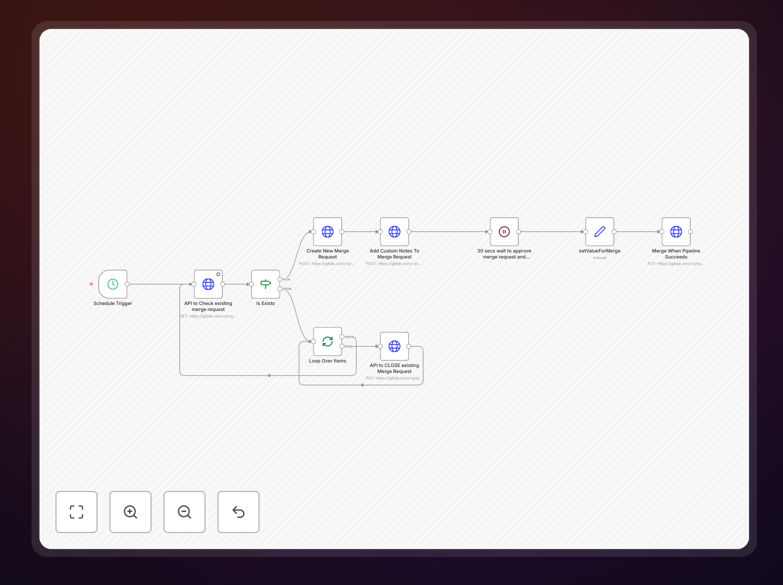
GitLab merge request automation workflow diagram showing API integration steps

What This Workflow Does

This automation template solves the time-consuming manual process of managing GitLab merge requests. It automatically handles the entire merge request lifecycle - from creation through approval to merging - using GitLab's API through n8n.

By implementing this workflow, development teams can ensure consistent merge processes, reduce human error in approvals, and accelerate code deployment cycles. The automation checks all necessary conditions (approvals, pipeline status, etc.) before executing merges, maintaining code quality while eliminating bottlenecks.

How It Works

1. Trigger Setup

The workflow can be triggered by GitLab webhooks for new merge requests, on a schedule, or manually. Webhook triggers provide real-time response to merge request activity.

2. Merge Request Validation

The automation checks the merge request status, required approvals, pipeline results, and other configured conditions through GitLab API calls before proceeding.

3. Conditional Processing

Based on validation results, the workflow either proceeds to merge, waits for additional requirements, or notifies team members of issues needing attention.

4. Automated Merge Execution

When all conditions are met, the workflow executes the merge via GitLab API and confirms completion through your preferred notification channel.

Pro tip: Use n8n's error handling to automatically retry failed merges after fixes are pushed or notify the right team members when manual intervention is needed.

Who This Is For

This template is ideal for:

  • Development teams using GitLab for version control
  • DevOps engineers managing CI/CD pipelines
  • Engineering managers overseeing code review processes
  • Teams wanting to enforce consistent merge policies
  • Organizations looking to reduce manual work in their Git workflows

What You'll Need

  1. A GitLab account with API access
  2. A personal access token with API permissions
  3. n8n instance (cloud or self-hosted)
  4. Basic understanding of GitLab merge request workflows

Quick Setup Guide

  1. Download the template JSON file
  2. Import into your n8n instance
  3. Configure your GitLab API credentials
  4. Set your project-specific parameters (branch names, approval rules, etc.)
  5. Test with a sample merge request
  6. Deploy to production

Key Benefits

Faster code reviews: Automated merges eliminate waiting for manual approvals when all conditions are met.

Reduced errors: Consistent application of merge policies prevents human oversight in approvals.

Improved visibility: Automated notifications keep teams informed about merge status.

Scalable processes: Handles increasing merge request volume without additional staffing.

Customizable workflows: Easily adapt to your team's specific GitLab setup and policies.

Frequently Asked Questions

Common questions about GitLab automation and API integration

Automating GitLab merge requests reduces manual work, ensures consistent processes, speeds up code reviews, and eliminates human error in approval workflows.

Teams report 30-50% faster merge cycles and significantly reduced frustration from manual approval bottlenecks. Automation also creates an audit trail of all merge activities.

When properly configured with token security and permission scopes, API automation is highly secure. Always use least-privilege access tokens.

Best practices include:

  • Using project-specific tokens with minimal permissions
  • Rotating tokens regularly
  • Storing tokens securely in n8n credentials
  • Auditing API access logs

Common checks include required approvals, passing CI/CD pipelines, no merge conflicts, successful code reviews, and specific branch protection rules.

The n8n workflow can evaluate any condition available through GitLab's API, and you can add custom logic like checking Jira ticket status or Slack approvals before merging.

Yes, n8n allows complete customization of approval logic, including multi-level approvals, time-based delays, and conditional merging.

You can modify the template to:

  • Require approvals from specific team members
  • Add automated code quality checks
  • Integrate with external approval systems
  • Create escalation paths for stalled reviews

This provides more flexibility than GitLab's built-in feature, allowing custom logic, integration with other tools, and complex approval workflows.

Key advantages include:

  • Custom conditions beyond basic approvals
  • Integration with your full toolchain
  • Detailed logging and notifications
  • Ability to modify workflow without code changes

The workflow can notify relevant team members, retry after fixes, or trigger rollback procedures based on your configured error handling.

Typical failure scenarios include merge conflicts, failed pipelines, or missing approvals - the workflow can be customized to handle each case appropriately with notifications and next steps.

Yes, n8n can connect merge request automation with Slack, Jira, monitoring tools, and your entire DevOps stack.

Common integrations include:

  • Slack notifications for merge status
  • Jira ticket transitions on merge
  • Security scanning tools approval gates
  • Incident management system alerts

Yes, our team builds tailored GitLab automation solutions for complex workflows, enterprise security requirements, and custom integrations.

We specialize in:

  • Enterprise-grade GitLab automation
  • Custom approval logic and security checks
  • Integration with proprietary systems
  • Compliance-ready audit trails

Need a Custom GitLab Automation?

This free template is a starting point. Our team builds fully tailored automation systems for your specific business needs.