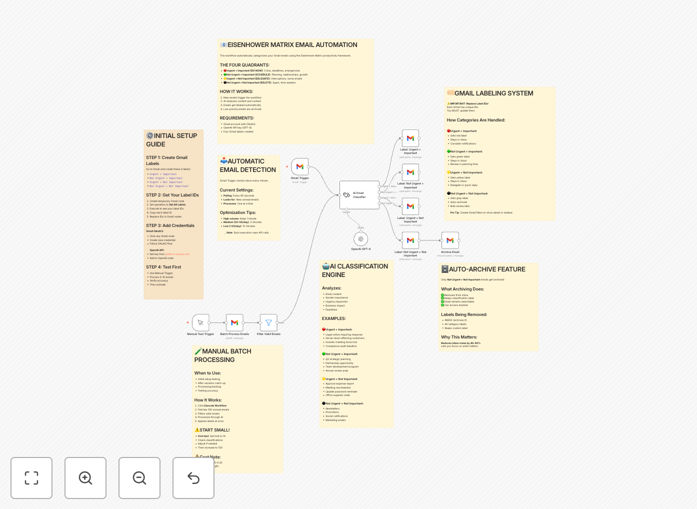
What This Workflow Does
This automation solves the universal problem of email overload by applying the Eisenhower Matrix framework to automatically categorize incoming Gmail messages. The workflow uses GPT-4.1-mini to analyze each email's content and urgency, then assigns it to one of four quadrants: Urgent/Important, Not Urgent/Important, Urgent/Not Important, or Not Urgent/Not Important.
For busy professionals receiving hundreds of emails daily, this system eliminates the mental overhead of manual triage. Instead of wasting time deciding what to do with each message, you get pre-sorted emails with clear action recommendations based on proven time management principles.
How It Works
1. New Email Trigger
The workflow monitors your Gmail inbox for new messages. When an email arrives, it extracts the sender, subject, and body content for processing.
2. AI Analysis
GPT-4.1-mini evaluates the email content against Eisenhower Matrix criteria. The AI considers factors like deadlines, requests for action, relationship importance, and content tone to determine urgency and importance.
3. Classification
Based on the AI assessment, the email is assigned to one of four categories with corresponding labels and priority levels. The system can also apply Gmail labels, move messages to folders, or trigger follow-up actions.
4. Notification & Organization
You receive a summarized view of classified emails through your preferred notification channel (Slack, email digest, etc.), allowing you to focus on high-priority messages first.
Who This Is For
This workflow is ideal for executives, managers, entrepreneurs, and knowledge workers who:
- Receive 50+ emails daily
- Struggle with email prioritization
- Want to implement time management systems
- Need to reduce cognitive load from constant context switching
What You'll Need
- An n8n instance (cloud or self-hosted)
- Gmail account with API access
- OpenAI API key for GPT-4.1-mini access
- Optional: Notification platform (Slack, Teams, etc.) for alerts
Quick Setup Guide
- Download the JSON template file
- Import into your n8n instance
- Connect your Gmail and OpenAI accounts
- Configure your preferred Eisenhower Matrix labels/folders
- Test with sample emails and adjust AI prompt as needed
- Activate the workflow
Key Benefits
Save 1-2 hours daily by eliminating manual email sorting and reducing decision fatigue about what to handle first.
Improve response times by 40% for critical messages by automatically surfacing urgent/important communications.
Reduce stress and overwhelm with a systematic approach to email management based on proven productivity principles.
Pro tip: Combine this with calendar blocking to schedule focused time for each Eisenhower quadrant - deep work for Important/Not Urgent, quick responses for Urgent/Important.