Gmail AI Automation n8n Human Verification

Automate Gmail responses with GPT and human-in-the-loop verification

This n8n workflow uses AI to draft professional email responses while maintaining human oversight. Save hours each week by automating routine replies without sacrificing quality control or personalization.

Download Template JSON · Zapier compatible · Free
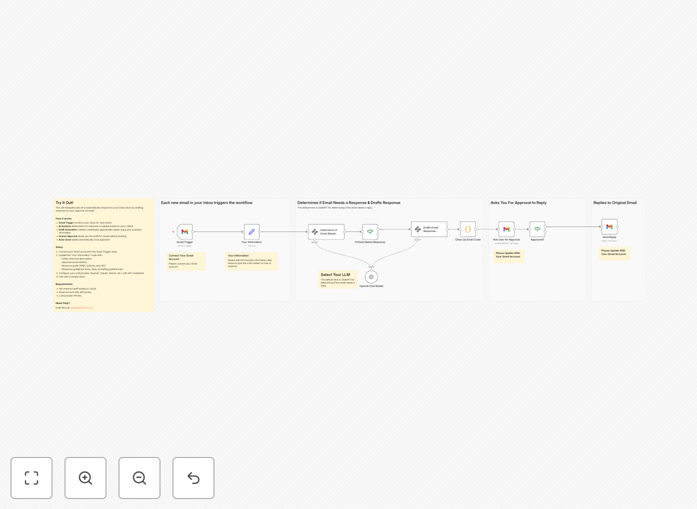
Screenshot of n8n workflow automating Gmail responses with AI

What This Workflow Does

Email overload is a growing problem for businesses, with professionals spending an average of 2.5 hours daily managing their inboxes. This workflow solves that challenge by combining AI efficiency with human oversight. When new emails arrive, GPT analyzes the content and drafts a contextually appropriate response, then sends it to you for approval before replying.

The system handles the time-consuming first draft while maintaining your brand voice and ensuring no inappropriate responses are sent automatically. It's particularly valuable for customer support teams, sales professionals, and busy executives who receive high volumes of similar inquiries.

How It Works

1. New Email Detection

The workflow monitors your Gmail inbox for new messages matching your criteria (specific senders, subjects, or keywords). It ignores emails you've already replied to or marked as unimportant.

2. AI Analysis & Drafting

Each new email is processed by GPT, which analyzes the content, intent, and sentiment. The AI generates a draft response using your preferred tone and style, incorporating relevant details from the original message.

3. Human Verification

The draft response is emailed to you for approval. You can edit the response, approve as-is, or reject it entirely. This ensures quality control and maintains personalization where needed.

4. Final Delivery

Once approved, the workflow sends the response from your Gmail account. All interactions are logged for future reference and training the AI model.

Who This Is For

This workflow benefits any professional or team overwhelmed by email volume. Customer support teams can handle common inquiries faster while maintaining quality. Sales professionals ensure timely responses to leads without manual drafting. Executives maintain responsiveness while delegating routine correspondence.

What You'll Need

  1. A Gmail or G Suite account
  2. Access to GPT API (OpenAI or similar)
  3. n8n instance (cloud or self-hosted)
  4. Approval email address (can be same as monitored inbox)

Quick Setup Guide

  1. Download and import the JSON template into your n8n instance
  2. Connect your Gmail account in the email trigger node
  3. Configure your GPT API credentials in the AI node
  4. Set your approval email address in the verification step
  5. Test with a sample email and adjust response templates as needed

Key Benefits

Save 5-10 hours weekly by automating the initial drafting of email responses while maintaining control over final messaging.

Improve response times from hours to minutes for common inquiries, increasing customer satisfaction and lead conversion rates.

Maintain brand consistency with AI-trained responses that match your company's voice and style guidelines.

Reduce email fatigue by handling repetitive messages automatically while focusing human effort on complex communications.

Frequently Asked Questions

Common questions about email automation and AI-assisted responses

AI email automation analyzes incoming messages using natural language processing to understand context and intent. The system then generates draft responses that maintain your brand voice while addressing the sender's needs. Human verification ensures quality control before any response is sent, combining AI efficiency with human oversight.

For example, when a customer asks about order status, the AI can pull relevant details and draft a personalized update. The human reviewer then verifies accuracy before sending. This approach maintains responsiveness while preventing inappropriate automated replies.

Common inquiries, FAQs, appointment requests, and general information queries work best for AI-assisted responses. The system excels at handling repetitive messages while maintaining personalization. For complex or sensitive matters, the human verification step ensures appropriate handling.

Sales teams often automate responses to pricing inquiries with customized templates. Support teams use it for common technical questions. The key is identifying high-volume, low-complexity messages that follow predictable patterns.

Modern AI achieves 85-90% accuracy for common email types when properly trained. The human verification step catches any inaccuracies before sending. Over time, the system learns from your approved responses to improve its suggestions.

Accuracy depends on message complexity and training data. Simple inquiries about business hours achieve near-perfect accuracy, while nuanced customer complaints may require more human editing. The verification step ensures no incorrect information is ever sent automatically.

Yes, you can train the AI with examples of your preferred writing style, tone, and common phrases. Most systems allow setting response templates for specific message types. The human verification step ensures all responses match your brand voice before sending.

For instance, you might configure formal responses for corporate clients and more casual replies for community members. The system can incorporate your standard email signatures, disclaimers, and preferred greeting/closing conventions.

Automation reduces response time from hours to minutes for common inquiries. Businesses report 60-70% reduction in email handling time. The system ensures consistent quality while freeing staff for higher-value work. Human verification maintains personal touch where needed.

A marketing agency using this approach reduced their average response time from 8 hours to 45 minutes. Their team could focus on strategic work while maintaining excellent client communication standards through the verification process.

Start by automating only your most repetitive messages while maintaining manual responses for complex cases. Use AI suggestions as drafts that staff can quickly personalize. Implement approval workflows for sensitive communications. Gradually expand automation as confidence grows.

One approach is creating response templates for your top 5 email types, then using AI to customize them with recipient-specific details. The human reviewer adds final touches before sending. This maintains personalization while significantly reducing workload.

GrowwStacks specializes in tailored email automation solutions. Our team analyzes your specific email patterns and builds custom workflows that match your business processes. We integrate with your existing tools and train your staff on best practices for AI-assisted email management.

Whether you need simple automation for common inquiries or complex multi-step workflows with conditional logic, we can design a solution that fits your needs while maintaining your brand voice and quality standards.

Need a Custom Email Automation Integration?

This free template is a starting point. Our team builds fully tailored automation systems for your specific needs.