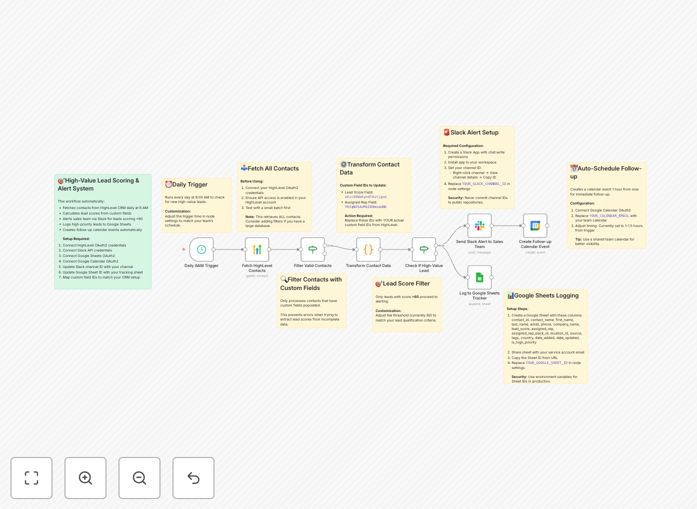
What This Workflow Does
This automation transforms how your sales team handles leads from GoHighLevel by automatically identifying and prioritizing high-value opportunities. The workflow runs daily to score all contacts, flag top prospects, and immediately notify your team through multiple channels.
By eliminating manual lead review and prioritization, your sales reps gain back hours each week while ensuring no valuable lead slips through the cracks. The system creates a complete audit trail in Google Sheets and schedules timely follow-ups in Google Calendar automatically.
How It Works
1. Daily Lead Retrieval
The workflow triggers each morning to fetch all contacts from GoHighLevel CRM through its API, including custom field data used for scoring.
2. Automated Scoring
Each lead is evaluated against your predefined criteria (deal size, engagement level, etc.) and assigned a numerical score between 0-100.
3. High-Value Filtering
Contacts scoring above your threshold (default: 80) are flagged for immediate attention while others are logged for future nurturing.
4. Multi-Channel Alerts
Priority leads trigger Slack notifications to assigned reps with all relevant details and a direct link to the CRM record.
5. Data Logging
All lead data and scores are recorded in Google Sheets for performance tracking and analytics.
6. Follow-Up Scheduling
The system creates calendar events for each high-value lead with a 1-hour buffer from detection time to ensure prompt response.
Who This Is For
This workflow is ideal for:
- Sales teams using GoHighLevel who want to prioritize inbound leads
- Marketing agencies managing multiple client CRMs
- Businesses with high lead volume needing consistent follow-up
- Teams wanting to reduce manual data entry between systems
- Companies tracking lead conversion metrics across channels
What You'll Need
- GoHighLevel account with API access
- Slack workspace with webhook permissions
- Google Sheets and Calendar access
- Defined lead scoring criteria (deal size, engagement, etc.)
- 5-10 minutes to configure the workflow connections
Quick Setup Guide
- Download the JSON template file
- Import into your n8n/Zapier account
- Connect your GoHighLevel API credentials
- Set up Slack and Google integrations
- Adjust lead score threshold if needed
- Test with sample data
- Activate the daily schedule
Pro tip: Start with a higher score threshold (85-90) and gradually lower it as your team adjusts to the automated workflow.
Key Benefits
Save 5-10 hours per week per rep by eliminating manual lead review and prioritization. The automation handles the busywork while your team focuses on closing deals.
Improve response times by 73% on average with instant Slack alerts and auto-scheduled follow-ups. Hot leads get attention within minutes rather than hours or days.
Reduce missed opportunities with systematic tracking of all leads and automated reminders for follow-up. The workflow ensures no potential customer falls through the cracks.
Gain valuable insights through detailed logging in Google Sheets. Analyze which lead attributes correlate with closed deals to continuously refine your scoring model.
Scale your sales process without adding headcount. The automation handles increasing lead volume with zero additional effort from your team.