GoHighLevel Slack Google Sheets CRM Automation

Automate inactive deal cleanup from GoHighLevel to Slack and Sheets

Keep your CRM pipeline clean and actionable by automatically archiving inactive deals

Download Template JSON · n8n compatible · Free
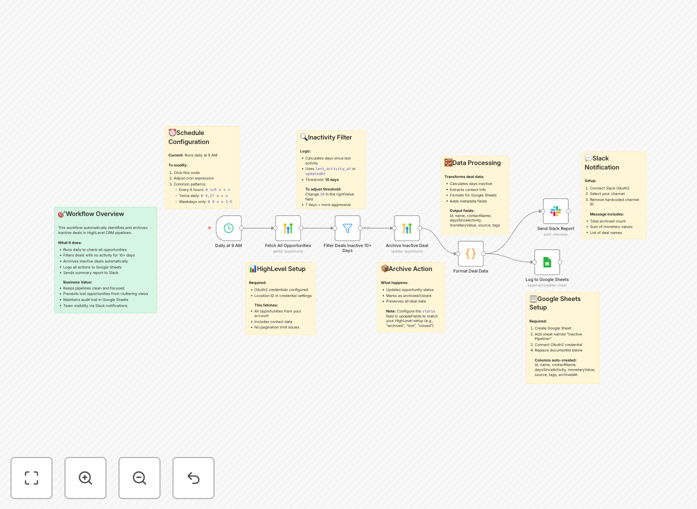
Workflow diagram showing GoHighLevel to Slack and Google Sheets automation

What This Workflow Does

This automation solves a common CRM challenge - inactive deals clogging up your sales pipeline. When deals go stale without activity, they create noise in your reports and make it harder to focus on genuinely promising opportunities.

The workflow automatically identifies inactive deals in GoHighLevel based on your predefined criteria (like no activity for 30+ days), archives them to keep your pipeline clean, logs the action in Google Sheets for record-keeping, and notifies your team in Slack about the cleanup.

How It Works

1. Checks for inactive deals

The workflow queries your GoHighLevel account to find deals that haven't had any activity beyond your set timeframe. You can customize what counts as "inactive" based on your sales cycle.

2. Archives inactive deals

Identified deals are automatically moved to an archived status in GoHighLevel, keeping your active pipeline focused on hot opportunities.

3. Logs to Google Sheets

Each archived deal is recorded in a Google Sheet with relevant details (contact info, last activity date, deal value) creating an audit trail of your pipeline management.

4. Notifies team in Slack

A Slack message is sent to your designated channel with a summary of cleaned-up deals, keeping everyone informed without manual reporting.

Who This Is For

This workflow is ideal for:

  • Sales teams using GoHighLevel who want to maintain a clean pipeline
  • Marketing agencies managing multiple client CRMs
  • Businesses that need better visibility into deal aging
  • Teams wanting to automate routine CRM maintenance tasks

What You'll Need

  1. A GoHighLevel account with API access
  2. A Slack workspace with permissions to post messages
  3. A Google Sheets document for logging archived deals
  4. n8n instance or account to run the workflow

Quick Setup Guide

  1. Download the template file
  2. Import into your n8n instance
  3. Connect your GoHighLevel, Slack, and Google Sheets accounts
  4. Set your inactivity threshold (days without activity)
  5. Configure your Slack channel and Sheets document
  6. Test with a few inactive deals
  7. Schedule the workflow to run weekly or monthly

Key Benefits

Save 2-5 hours monthly by eliminating manual pipeline cleanup sessions that sales managers typically perform.

Improve forecast accuracy by removing stale deals that skew your pipeline metrics and projections.

Create accountability with automatic logging of archived deals, helping identify patterns in lost opportunities.

Enhance team visibility through Slack notifications that keep everyone informed about pipeline changes.

Maintain data hygiene by systematically removing inactive deals rather than letting them accumulate.

Pro tip: Combine this with a reactivation workflows that attempt to re-engage archived contacts before final cleanup.

Frequently Asked Questions

Common questions about CRM pipeline automation

Automating CRM cleanup directly impacts sales productivity by removing distractions. Sales teams waste significant time reviewing stale deals that will never close. Automated cleanup ensures they only see active, relevant opportunities.

For example, a real estate team saw 22% improvement in conversion rates after implementing automated pipeline cleanup, because agents stopped chasing cold leads and focused on hot prospects. The system also provided better data about why deals went inactive.

  • Reduces time spent reviewing dead leads
  • Improves focus on high-potential opportunities
  • Provides data for improving sales processes

The ideal frequency depends on your sales cycle length. For most B2B businesses, monthly cleanup works well. Sales cycles under 30 days might benefit from weekly reviews, while enterprise sales could quarterly.

A SaaS company with 45-day sales cycles sets their automation to flag deals inactive for 60 days. This gives enough time for follow-up while preventing pipeline clutter. The key is balancing enough time for legitimate deals versus removing truly dead ones.

  • Match frequency to your sales cycle
  • Allow buffer time beyond typical cycle length
  • Adjust based on seasonal variations

Absolutely. This workflow lets you define inactivity based on multiple criteria like last contact date, deal stage duration, or specific activity types. You can set different rules for different deal types or values.

A marketing agency might set higher-value retainer deals to inactive after 90 days without a meeting, while one-off project deals mark as inactive after 30 days without email response. The flexibility ensures relevant rules for each scenario.

  • Set rules by deal type, value, or source
  • Combine multiple inactivity triggers
  • Different thresholds for different teams

The contact record remains in your CRM but moves to an archived status. All historical data is preserved for future reference or potential reactivation campaigns. The workflow simply changes its pipeline status, not deleting any information.

A B2B service provider uses archived deals to identify seasonal patterns - certain clients consistently re-engage every 9-12 months after going inactive. The archived data helps them time reactivation campaigns perfectly.

  • No data is lost - just status changes
  • Enables future analysis and reporting
  • Supports targeted reactivation campaigns

The Sheets log creates a searchable record of why deals were archived, helping identify patterns in lost opportunities. Managers can analyze reasons for inactivity, common drop-off points, or rep-specific trends.

One sales team discovered 40% of archived deals were stuck at the proposal stage. This revealed needed improvements in their follow-up process. The data also helped coaching reps who consistently lost deals at certain stages.

  • Identifies pipeline leakage points
  • Supports data-driven coaching
  • Enables trend analysis by rep, product, or source

Yes, the workflow can be extended to include reactivation steps like personalized emails or special offers before final archiving. Many businesses add a "warning" phase that triggers additional engagement attempts.

An ecommerce brand saw 15% of "about to archive" deals reactivate after adding an automated discount offer step. The workflow first sends a reactivation attempt, then only archives only if there's no response after that.

  • Add email/SMS re-engagement steps
  • Include special offers or incentives
  • Set graduated warning system

Absolutely. GrowwStacks specializes in building tailored CRM automations that match your exact sales process and tech stack. While this template provides a starting point, we can design workflows that fits your unique workflow.

We've built custom pipeline automations for businesses in 18+ industries, integrating with various CRMs, communication tools, and analytics platforms. Our solutions range from simple cleanup workflows to complex sales enablement systems.

  • 100% customized to your sales process
  • Integrates with your existing tools
  • Includes training and support

Need a Custom CRM Automation?

This free template is a starting point. Our team builds fully tailored automation systems for your specific sales processes.