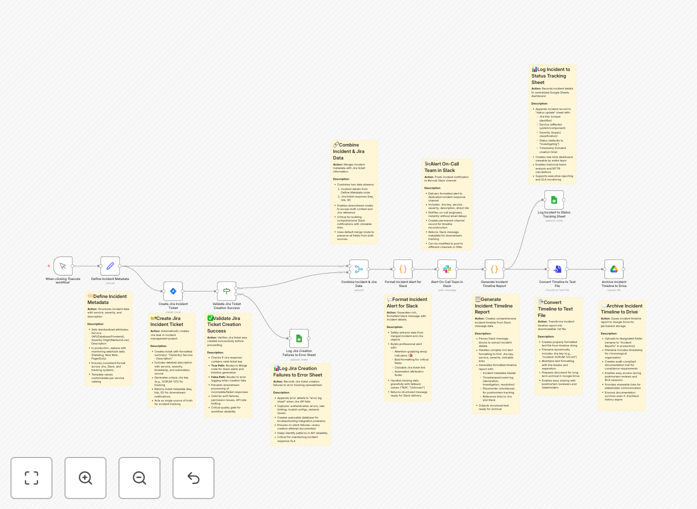
What This Workflow Does
When a production incident occurs—a server outage, a critical bug, or a security alert—every minute of delay costs your business money and reputation. Manual incident response is slow, error-prone, and leaves gaps in documentation. This automation solves that by creating a seamless, auditable pipeline from detection to resolution.
The workflow transforms a single incident report into coordinated actions across your essential tools. It ensures the right people are notified instantly, a formal tracking ticket is created, status is logged for real-time visibility, and a detailed timeline is archived for compliance—all without human intervention. This turns chaotic firefighting into a structured, repeatable process.
How It Works
1. Trigger & Define Metadata
The process starts manually or can be triggered by a monitoring alert. Key incident details—affected service, severity level (P1-P4), and a clear description—are captured upfront. This standardized data ensures consistency across all downstream systems.
2. Create Jira Ticket & Validate
The workflow automatically creates a Jira issue with all incident metadata, assigning it to the appropriate project and team. It then validates the ticket creation was successful. If it fails, the error is logged to a dedicated Google Sheet for immediate troubleshooting.
3. Alert the On-Call Team via Slack
A formatted, actionable message is posted to your designated Slack channel (e.g., #oncall). It includes the Jira ticket key, a direct link, severity, and description, enabling engineers to jump into action immediately from their communication hub.
4. Generate & Archive Timeline Report
The Slack message content is parsed to build a structured incident timeline. This report is converted into a text file and uploaded to a specified folder in Google Drive, creating a permanent, timestamped record that survives chat history limits.
5. Log to Central Status Sheet
Finally, key incident data—Jira key, service, severity, status, and timestamps—is appended to a master Google Sheet. This becomes a live dashboard for management visibility and long-term trend analysis of your incident response performance.
Pro tip: Use this workflow as the backbone of your ITIL or SRE practice. Define different severity levels to trigger specific escalation paths—for example, P1 incidents could also page key personnel via SMS or create a Zoom war room automatically.
Who This Is For
This template is ideal for DevOps teams, Site Reliability Engineers (SREs), IT operations managers, and tech startups managing cloud infrastructure or SaaS products. It's perfect for organizations that need to demonstrate compliance (SOC 2, ISO 27001) with auditable incident logs, or any team tired of juggling multiple tabs and missing critical alerts during an outage.
What You'll Need
- A Jira Cloud or Server instance with API access (Project Key and credentials).
- A Slack workspace with permissions to post to a channel (like #oncall or #incidents).
- A Google Sheets spreadsheet set up for status logging and error tracking.
- A Google Drive folder for archiving incident timeline reports.
- An n8n instance (cloud or self-hosted) to import and run the workflow.
Quick Setup Guide
Get this automation running in your environment in under 30 minutes.
- Download the template using the button above and import the JSON file into your n8n instance.
- Configure credentials in n8n for Jira, Slack, and Google Services (Sheets & Drive).
- Update node settings: Specify your Jira project key, Slack channel ID, and the URLs/IDs for your Google Sheet and Drive folder.
- Test with a mock incident: Use the Manual Trigger node to simulate a low-severity issue and verify tickets, alerts, and logs are created correctly.
- Activate the workflow and consider setting it to trigger from a webhook connected to your monitoring tools (like Datadog, PagerDuty, or Prometheus).
Key Benefits
Reduce Mean Time to Resolution (MTTR) by up to 70%. Eliminate the manual back-and-forth of creating tickets, typing Slack alerts, and updating status pages. The entire coordination happens in seconds, letting engineers focus on solving the problem.
Create an immutable audit trail for compliance. Every incident is automatically documented in Google Drive with a full timeline, satisfying regulatory requirements for incident reporting and providing clear material for post-mortem analysis.
Improve team communication and visibility. With Slack alerts containing direct Jira links and a live status sheet, everyone from engineers to executives has real-time, consistent information, eliminating confusion and duplicate work.
Scale your incident management without adding headcount. As your systems and team grow, this automated pipeline handles increased volume effortlessly, ensuring process consistency and preventing alert fatigue.
Turn incident data into operational intelligence. The centralized Google Sheet log becomes a valuable dataset for analyzing incident frequency, identifying recurring issues, and measuring team performance over time.