What This Workflow Does
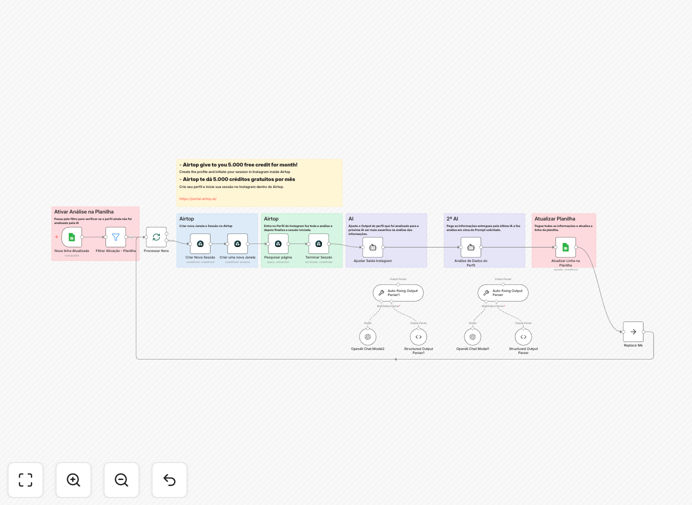
Manually analyzing dozens of Instagram profiles for competitor research, influencer vetting, or market analysis is incredibly time-consuming and inconsistent. This automation solves that by creating a seamless pipeline that detects new profiles in Google Sheets, scrapes their public data using Airtop, processes and refines the information with OpenAI's GPT-4o, and delivers structured, actionable insights back to your spreadsheet.
It transforms hours of manual work into a fully automated, reliable process. You get consistent, AI-powered analysis on engagement patterns, content themes, audience signals, and strategic recommendations—all updated automatically without any copy-paste or manual intervention.
How It Works
The workflow is intelligently split into two clear parts for manageability and scalability.
Part 1: Profile Capture & Data Extraction
The automation is triggered when a new Instagram username is added or updated in your designated Google Sheet. It first checks if the profile requires analysis, then uses Airtop to create a browser session, navigate to the profile, and scrape public data like bio, follower count, recent posts, and engagement metrics.
Part 2: AI Analysis & Results Delivery
The raw scraped data is cleaned and structured, then sent to OpenAI. A first AI pass extracts and validates key metrics. A second, deeper AI analysis layer interprets the data, identifying trends, assessing audience alignment, and generating business insights. All final results are written back into your Google Sheets dashboard.
Who This Is For
This template is a game-changer for digital marketing agencies managing multiple client competitors, social media managers researching influencers, sales teams prospecting on Instagram, brand managers conducting market analysis, and content creators understanding their niche. Any business that needs scalable, intelligent Instagram intelligence will benefit.
What You'll Need
- An n8n instance (Cloud or Self-hosted).
- A Google Sheets document to act as your trigger and dashboard.
- An Airtop account (offers 5,000 free credits monthly) for reliable Instagram scraping.
- An OpenAI API key with access to GPT-4o for advanced analysis.
- Basic familiarity with connecting APIs in n8n.
Pro tip: Use Airtop's free tier strategically. Their 5,000 monthly credits are ample for analyzing hundreds of profiles if you optimize the scraping logic to only collect essential data points.
Quick Setup Guide
- Import the template: Download the JSON file above and import it into your n8n workspace.
- Connect Google Sheets: Set up the Google Sheets trigger node with your spreadsheet URL and the correct worksheet.
- Configure Airtop: Add your Airtop credentials in the respective node. Ensure you have an active session setup in the Airtop portal.
- Add OpenAI API Key: Insert your key in the OpenAI nodes. You may adjust the AI prompts to tailor the analysis to your specific criteria.
- Test and activate: Add a test Instagram handle to your sheet and activate the workflow. Verify data flows to the AI and back to Sheets correctly.
Key Benefits
Eliminate 10+ hours of manual research per week. This automation handles the tedious data collection and initial analysis, freeing your team for strategy and decision-making.
Gain consistent, unbiased insights. AI applies the same evaluation framework to every profile, removing human inconsistency and fatigue from the analysis process.
Scale your intelligence operations effortlessly. From analyzing ten profiles to ten thousand, the workflow handles the volume without additional effort on your part.
Centralize all intelligence in one living dashboard. Google Sheets becomes a real-time, searchable database of Instagram insights for your entire team.
Future-proof your process. The modular n8n workflow allows you to easily add new data sources or adjust AI analysis criteria as your needs evolve.