Jotform Xero Slack Email Automation Invoice Processing

Automate Invoice Generation & Delivery with Jotform, Xero & AI

Free n8n template that creates invoices, checks customers in Xero, emails PDFs, and notifies your team—all from a form submission.

Download Template JSON · n8n compatible · Free
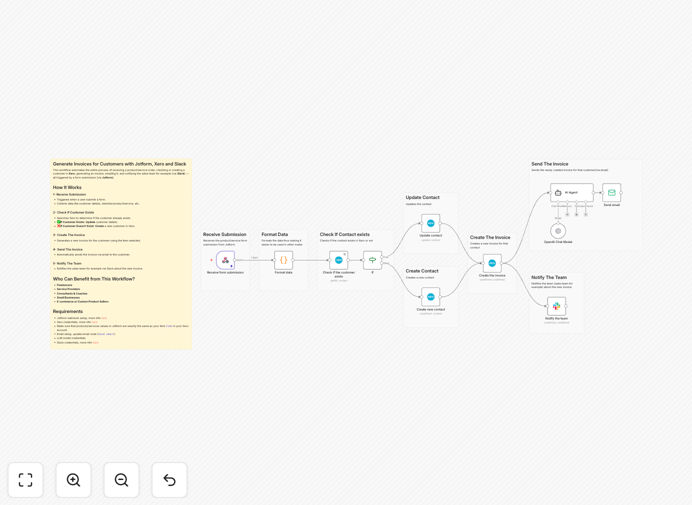
Visual diagram of automated invoice workflow connecting Jotform, Xero, email, and Slack

What This Workflow Does

Manual invoicing is a time‑sink for freelancers, service providers, and small businesses. Every order form submission means copying client details into your accounting software, generating an invoice, emailing it, and notifying your team—a process that can take 15–20 minutes per transaction.

This automation eliminates all that manual work. It connects Jotform (or any form tool) directly to Xero, checks if the customer already exists, creates or updates their record, generates a professional invoice with the selected product/service, emails the PDF to the client, and sends a Slack notification to your sales or admin team. The entire cycle completes in seconds, with zero human intervention.

How It Works

1. Receive Form Submission

The workflow triggers instantly when a customer submits an order form via Jotform. It captures all relevant data: customer name, email, selected product/service, quantity, and any custom notes.

2. Check Customer in Xero

It searches your Xero contacts to see if this customer already exists. If they do, it updates their record with the new order details. If not, it creates a new customer profile automatically.

3. Create the Invoice

Using the product/service code from the form (which must match your Xero item codes), the workflow generates a complete invoice in Xero with correct pricing, taxes, and terms.

4. Send Invoice via Email

The invoice PDF is attached to a personalized email and sent directly to the customer. You can customize the email template with your branding and messaging.

5. Notify Your Team on Slack

A message is posted to a designated Slack channel (e.g., #new‑invoices) with customer details, invoice number, and amount, keeping your team informed in real‑time.

Who This Is For

This template is ideal for freelancers (designers, developers, consultants), service providers (coaches, agencies, trainers), small businesses selling products or services online, and e‑commerce sellers who need custom invoicing beyond standard cart platforms. If you bill clients based on forms, proposals, or custom orders, this automation will save you hours each week.

What You'll Need

  1. Jotform webhook – configured to send form data to the workflow.
  2. Xero account with API credentials (more info in n8n docs).
  3. Product/service codes in Xero that exactly match the values in your Jotform form.
  4. Email service (like Gmail, SMTP, or SendGrid) configured in the Send Email node.
  5. Slack workspace with a channel for notifications and app credentials.
  6. LLM model access (optional, for enhancing email content or data validation).

Pro tip: Before going live, test the workflow with a dummy form submission and a test customer in Xero. Verify that the invoice fields map correctly and the email sends to a test address.

Quick Setup Guide

  1. Download the template using the button above.
  2. Import the JSON file into your n8n instance.
  3. Configure the Jotform webhook trigger with your form’s submission URL.
  4. Set up credentials for Xero, your email service, and Slack.
  5. Map the form fields to the corresponding Xero customer and invoice fields.
  6. Update the email template with your company details and tone.
  7. Activate the workflow and submit a test form to see the magic.

Key Benefits

Eliminate manual data entry – No more copying client details from forms to Xero. The workflow transfers data flawlessly, reducing errors and saving 10–15 minutes per invoice.

Instant professional billing – Invoices are generated and emailed within seconds of form submission, improving cash flow and client perception.

Automatic customer management – The system intelligently checks for existing customers, preventing duplicate records and keeping your Xero contacts clean.

Team transparency – Slack notifications ensure everyone knows when a new invoice is issued, enabling quick follow‑ups if needed.

Scalable process – As your business grows, this automation handles hundreds of invoices per month without additional staff time.

Frequently Asked Questions

Common questions about invoice automation and integration

The most efficient way is to connect your order forms (like Jotform) directly to your accounting software (like Xero) using an automation platform. This eliminates manual data entry, reduces errors, and ensures invoices are sent instantly. You can also add AI to personalize messages or check customer details.

For example, a consulting firm can set up a proposal form that, when signed, automatically creates an invoice in Xero with the agreed fee, sends it to the client, and logs the event in their CRM—all without the admin team touching a spreadsheet.

Automating invoices saves 2–4 hours per week by removing manual steps: copying client details from forms, creating invoices in accounting software, sending emails, and updating your team. The workflow runs in the background, letting you focus on client work while ensuring professional, timely billing.

Consider a freelance designer who bills by project. Instead of switching between their proposal tool, Xero, and email for each client, the automation does it all after the client submits the project approval form. That’s 15 minutes saved per invoice, which adds up quickly over a month.

Yes, that's a key feature of smart invoice automation. The workflow can search your customer database (e.g., in Xero) using details from the order form. If the customer exists, it updates their record; if not, it creates a new contact. This prevents duplicates and keeps your books clean.

This logic is especially valuable for businesses with repeat clients. The system recognizes returning customers, applies their historical payment terms, and maintains a single source of truth—no more “John Smith” and “John S.” as two separate contacts.

Integrating Jotform with Xero automates the entire quote‑to‑cash cycle. Benefits include: zero manual data entry between systems, instant invoice creation upon form submission, accurate customer records, automated email delivery with PDF attachments, and real‑time notifications to your sales or admin team.

Beyond time savings, this integration reduces billing errors (like wrong amounts or client details), speeds up payment cycles because invoices go out immediately, and provides a seamless client experience from inquiry to invoice.

AI can enhance invoice workflows by analyzing customer data for segmentation, generating personalized email content, checking for discrepancies in order details, or even suggesting optimal payment terms based on history. It adds a layer of intelligence beyond simple data transfer, improving customer experience.

For instance, an AI model could review the client’s past payment behavior and recommend adding a gentle reminder for slow payers, or tailor the email tone (formal vs. friendly) based on the client’s industry.

  • Personalize email body text for each client segment
  • Flag unusual order amounts for manual review
  • Suggest dynamic payment terms based on client history

No, with modern automation platforms like n8n, you can set up a complete billing system without writing code. Using pre‑built connectors for Jotform, Xero, email, and Slack, you can visually design the workflow logic. Most setups take 1–2 hours with a template, and maintenance is minimal.

The key is starting with a proven template (like this one) and adjusting the field mappings to match your specific form and accounting setup. You don’t need developer skills—just an understanding of your business process and the willingness to connect a few apps.

Common mistakes include: not mapping form fields correctly to accounting software items, forgetting to handle existing vs. new customer logic, skipping email template personalization, and not testing with sample data first. Also, ensure your product/service codes match exactly between systems to avoid errors.

Always run a few test transactions with real‑world data before going live. Check that invoice amounts are correct, emails arrive with proper attachments, and customer records are created/updated as expected. A small upfront testing investment prevents headaches later.

  • Test with both new and existing customer scenarios
  • Verify tax calculations and invoice totals
  • Confirm email deliverability and formatting

Yes, GrowwStacks specializes in building custom automation solutions tailored to your specific billing processes, software stack, and business rules. We can integrate your unique forms, CRM, accounting tools, and notification channels into a robust, hands‑free system that scales with you.

Whether you need multi‑currency invoicing, approval workflows for large quotes, integration with niche industry software, or advanced reporting dashboards, our team can design and implement a solution that fits your exact needs. Book a free consultation to discuss your project.

Need a Custom Invoice Automation?

This free template is a starting point. Our team builds fully tailored automation systems for your specific business needs.