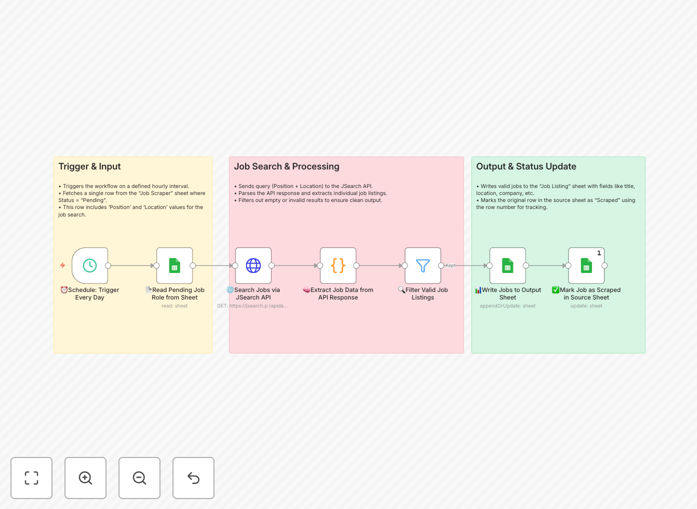
What This Workflow Does
Recruiters, hiring managers, and talent sourcers spend countless hours manually searching across LinkedIn, Indeed, and niche job boards. This repetitive process is not only time-consuming but also inconsistent—you might miss great candidates simply because you didn't check at the right time.
This automation solves that by turning your Google Sheet into a powerful job search command center. You define what you're looking for (job title, location, keywords), and the workflow queries the JSearch API—a comprehensive job search engine—to fetch live listings. It then cleans, structures, and saves the results back into your spreadsheet, marked with a status so you never process the same listing twice.
Think of it as your 24/7 recruitment assistant that never sleeps, constantly building your candidate pipeline while you focus on engaging with people.
How It Works
The workflow runs on a schedule you set (daily, hourly, etc.) and follows a clear, logical process.
Step 1: Read Search Criteria
The automation starts by checking your "Job Scraper" Google Sheet for any rows marked "Pending." Each row contains specific search parameters like "Position" (e.g., "Senior Python Developer") and "Location" (e.g., "Remote USA"). This allows non-technical team members to simply add a new row to trigger a search.
Step 2: Query JSearch API
Using the criteria from the sheet, the workflow sends a request to the JSearch API. This API aggregates millions of listings from thousands of sources, returning a rich set of data including job title, company, location, salary estimates, and job description.
Step 3: Process & Filter Results
The raw API response is parsed, and each job listing is extracted. The workflow can filter out irrelevant entries—for example, excluding internships if you're looking for senior roles, or removing duplicate postings. This ensures only clean, relevant data moves forward.
Step 4: Write Results & Update Status
Valid job listings are written to a separate "Job Listings" tab in your spreadsheet, with all key fields neatly organized. Crucially, the original "Pending" row in the source sheet is updated to "Scraped," preventing the same search from running again. This creates a reliable audit trail.
Who This Is For
This template delivers immediate value for several roles and scenarios:
- Recruitment Agencies: Manage multiple client searches simultaneously without increasing headcount.
- In-House Talent Acquisition Teams: Proactively build pipelines for hard-to-fill roles before a req is officially opened.
- Startups & SMBs: Access powerful sourcing tools without the cost of enterprise recruitment software.
- Executive Search Consultants: Continuously monitor the market for specific C-level or niche technical positions.
- HR Managers: Provide hiring managers with a curated, up-to-date list of market talent to inform compensation and strategy.
What You'll Need
- A Google Sheets document with two sheets: one for "Search Criteria" (with columns like Position, Location, Status) and one for "Job Listings" output.
- A JSearch API key (you can get a free tier from RapidAPI).
- An n8n instance (you can use the free, self-hosted version or n8n.cloud).
- Google Service Account credentials (to allow n8n to read/write to your Sheets securely).
Pro tip: Start with broad searches to gauge volume, then refine your criteria. For example, first search "Software Engineer," then add filters for "Senior" and specific technologies. This helps you understand the market before narrowing down.
Quick Setup Guide
You can have this automation running in under 15 minutes.
- Download the template using the button above and import it into your n8n workspace.
- Create your Google Sheets with the required column structure as shown in the template notes.
- Configure the Google Sheets node by adding your Service Account JSON credentials and specifying your Sheet ID.
- Add your JSearch API key to the HTTP Request node's headers.
- Set the schedule trigger to your preferred frequency (e.g., every 24 hours).
- Test the workflow by adding a "Pending" row to your Search Criteria sheet and executing the workflow once manually.
Key Benefits
Save 5–10 hours per week per recruiter. Eliminate the daily ritual of manually checking multiple job boards. The automation works in the background, compiling results for you to review in a single, organized location.
Improve candidate quality through consistency. Manual searches are prone to fatigue and inconsistency. An automated search applies the same criteria every time, ensuring you don't miss potential matches due to human error or time constraints.
Build a valuable, searchable talent database. Over time, your output sheet becomes a historical database of candidates and market trends. You can analyze which roles are plentiful or scarce, track salary ranges, and identify companies that are actively hiring.
Scale your sourcing efforts without scaling cost. Searching for 10 roles takes the same effort as searching for 1. Simply add more rows to your criteria sheet. This allows small teams to compete with larger organizations in sourcing speed and coverage.
Gain a competitive edge in tight talent markets. By being notified of new listings faster than your competitors, you can be the first to reach out to top candidates, significantly increasing your response and engagement rates.