LinkedIn Google Sheets AI Hiring Automation

Automate Job Search with LinkedIn, Google Sheets & AI

Stop manually hunting for jobs. This workflow pulls fresh roles, scores fit against your resume, drafts cover letters, and logs everything automatically.

Download Template JSON · n8n compatible · Free
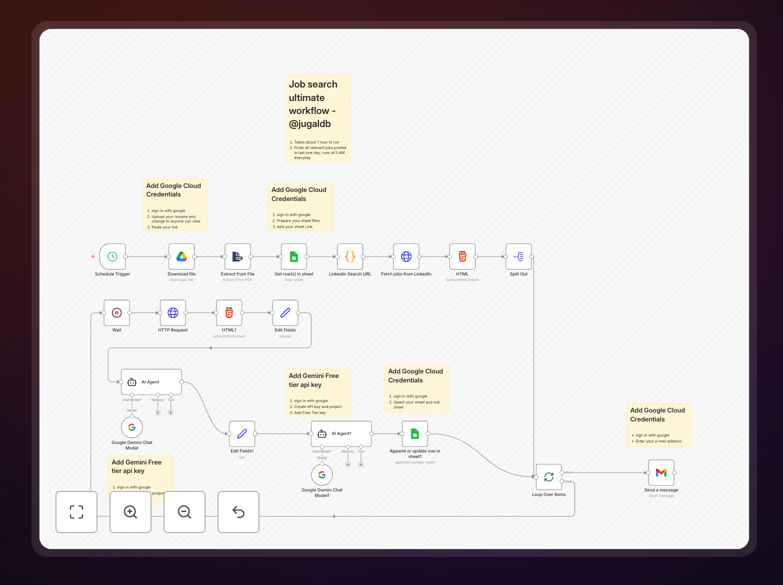
Visualization of automated job search workflow connecting LinkedIn, AI analysis, and Google Sheets

What This Workflow Does

Job searching is time-consuming and inefficient when done manually. Most applicants waste hours scrolling through irrelevant listings, then more hours crafting generic applications that get ignored. The secret to landing interviews at top companies like Google, Apple, and Amazon is personalized, timely applications that directly address what each hiring team needs.

This automation transforms your job search from a reactive chore into a proactive system. It continuously monitors LinkedIn and other job boards for new postings that match your skills, automatically scores each role against your resume, generates a tailored cover letter using AI, and organizes everything in a Google Sheets tracker. Instead of "I'll apply later," you get a daily shortlist of high-signal opportunities with ready-to-send application materials.

Pro tip: Personalization increases callback rates by 3-5x. Recruiters immediately notice when your application speaks directly to their job description rather than sending the same generic resume everywhere.

How It Works

The workflow operates on a scheduled basis (daily or weekly) to ensure you never miss relevant opportunities while avoiding application burnout.

Step 1: Job Discovery & Collection

The system searches LinkedIn and configured job boards using your predefined criteria (job titles, locations, companies, keywords). It extracts complete job details including description, requirements, company information, and application links.

Step 2: AI-Powered Fit Scoring

Each job posting is analyzed against your resume using AI. The system scores the match based on skills alignment, experience requirements, and cultural fit, ranking opportunities from "perfect match" to "maybe later."

Step 3: Automated Cover Letter Drafting

For high-scoring roles, AI generates a personalized cover letter that references specific requirements from the job description and connects them to relevant experiences from your resume, creating immediate alignment.

Step 4: Centralized Tracking & Notification

All processed jobs—with their scores, cover letters, and metadata—are logged in Google Sheets. You receive a notification with the top 3-5 opportunities worth applying to immediately.

Who This Is For

This automation benefits anyone actively job searching or considering a career move. It's particularly valuable for:

  • Active job seekers who want to maximize application quality and response rates
  • Passive candidates open to opportunities but lacking time to search regularly
  • Career changers needing to identify roles where transferable skills are valued
  • Recruitment agencies managing multiple candidates and needing to match them efficiently with openings
  • Recent graduates applying to numerous entry-level positions while managing other commitments

What You'll Need

  1. n8n instance (cloud or self-hosted) with workflow execution capabilities
  2. LinkedIn account or access to job board APIs you want to monitor
  3. Google Sheets document for tracking applications and results
  4. AI service access (OpenAI, Anthropic, or similar) for scoring and content generation
  5. Your resume in text format for the system to reference during matching
  6. Notification channel (email, Slack, Telegram) to receive daily opportunity alerts

Quick Setup Guide

Get your automated job search system running in under 30 minutes:

  1. Download and import the template JSON file into your n8n instance
  2. Configure job sources by adding your LinkedIn credentials or job board API keys
  3. Set your search criteria including job titles, locations, companies, and keywords
  4. Connect Google Sheets and specify the spreadsheet where applications should be logged
  5. Add AI credentials and paste your resume text into the designated node
  6. Set the schedule (recommended: daily at 9 AM) and test with a manual trigger
  7. Review first results in your Google Sheet and adjust scoring thresholds as needed

Pro tip: Start with broad search criteria, then refine based on the quality of matches you receive. The system learns what constitutes a "good fit" based on your application decisions over time.

Key Benefits

Save 10+ hours weekly by eliminating manual job searching, reading descriptions, and drafting cover letters from scratch. That's 40+ hours monthly redirected toward interview preparation or skill development.

Increase callback rates 3-5x through personalized applications that demonstrate immediate understanding of each role's specific requirements rather than sending generic materials.

Never miss ideal opportunities with continuous monitoring that applies within hours of posting—critical for competitive roles where early applicants have significant advantage.

Make data-driven decisions with complete tracking of which companies, job titles, and application strategies yield the best results for future optimization.

Reduce search burnout by transforming an overwhelming, open-ended process into a manageable system with clear daily tasks and measurable progress.

Frequently Asked Questions

Common questions about job search automation and integration

Automation improves job search success by ensuring you apply to the most relevant roles quickly. It eliminates manual searching, scores job postings against your resume, and drafts tailored cover letters, which significantly increases callback rates from recruiters who see immediate alignment with their needs.

For example, instead of spending 30 minutes reading a job description and another 45 minutes crafting a cover letter, the system does this in seconds for multiple roles simultaneously. This allows you to maintain application volume while dramatically improving quality—the perfect combination for landing interviews.

Integrating LinkedIn with Google Sheets creates a centralized, searchable database of all job opportunities. You can track application status, company details, and follow-up dates in one place, turning a chaotic search into a structured pipeline that you can manage and analyze over time.

This integration enables powerful analytics like which companies respond fastest, which job titles yield the most interviews, and how long your average application-to-callback timeline is. These insights help you optimize your search strategy based on data rather than intuition.

AI analyzes the job description and your resume to generate a personalized cover letter that highlights relevant skills and experiences. It mirrors the language and priorities of the employer, creating a tailored application that feels custom-written for each role, saving hours of manual drafting.

The AI doesn't just insert keywords—it understands context. For a project management role emphasizing Agile methodology, it will highlight your Scrum experience and specific project outcomes. For a marketing role focused on growth, it will emphasize your campaign ROI and audience expansion achievements.

Track application submission rate, callback percentage, interview conversion rate, and time-to-application. Automation helps capture these metrics automatically, allowing you to identify which job sources, companies, or resume versions yield the best results and optimize your strategy accordingly.

For instance, you might discover that applications submitted within 4 hours of posting have a 40% higher callback rate. Or that certain keywords in your cover letter correlate with more interview invitations. This data-driven approach transforms job searching from guesswork to strategic optimization.

Prioritize jobs based on fit score (skills match), company alignment (values, industry), and application deadline. Automation can score each listing against your criteria and flag high-priority opportunities, ensuring you focus your energy on roles with the highest probability of success.

The system can be configured to alert you immediately for "perfect match" roles (90%+ fit score) while batching "good matches" (70-89%) for weekly review. This ensures you never miss dream opportunities while efficiently managing the rest of your pipeline.

Follow up 7-10 days after application with a polite email referencing specific aspects of the role. Automation can schedule and send personalized follow-ups based on application date, ensuring timely communication without manual tracking while maintaining a professional, persistent presence.

The automated follow-up can include a brief reminder of your unique qualifications for the role and express continued enthusiasm. This simple step can move your application from the "maybe" pile to the "interview" list when hiring managers are deciding between similarly qualified candidates.

Yes, GrowwStacks specializes in building custom job search and recruitment automation systems. We can create tailored workflows that integrate with your specific ATS, CRM, communication tools, and internal processes to streamline hiring for companies or optimize job hunting for individuals.

Our team works with you to understand your unique requirements—whether you're an individual seeking a career change, a recruitment agency managing multiple clients, or a company wanting to automate candidate sourcing. We build solutions that save time, improve match quality, and deliver measurable results.

  • Integration with your existing tools (Greenhouse, Lever, Bullhorn, etc.)
  • Custom scoring algorithms based on your specific hiring criteria
  • Multi-channel notification and reporting systems
  • Ongoing optimization based on performance analytics

Need a Custom Job Search Automation?

This free template is a starting point. Our team builds fully tailored automation systems for your specific business needs.