What This Workflow Does
Manual lead generation is one of the most time-consuming tasks for sales teams. Searching for businesses, visiting their websites, extracting contact details, and logging them into a spreadsheet eats up hours every day. This automation workflow eliminates that manual grind.
It acts as a powerful scraping agent that takes a simple search query (like "dentists in New York"), scours both Google Search and Google Maps for relevant businesses, visits their websites to extract email addresses, phone numbers, and social media links, and compiles an enriched lead list directly into Google Sheets. The system runs continuously, ensuring your sales pipeline is always filled with fresh, qualified prospects without manual effort.
Pro tip: This workflow is particularly powerful for local service providers, B2B sales teams targeting specific industries, and agencies that need to continuously find new clients in specific geographic areas.
How It Works
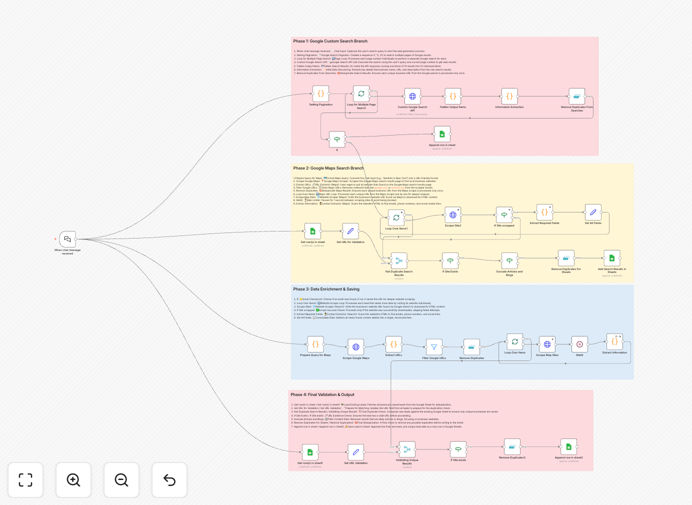
Step 1: Chat Query Initiation
The workflow starts when a user enters a search query into a chat interface. This could be "marketing agencies in Chicago" or "plumbers near Seattle". The query defines the target audience and geographic scope.
Step 2: Multi-Source Search Execution
The system simultaneously queries the Google Custom Search API (for comprehensive web results across multiple pages) and scrapes Google Maps (for local businesses with physical locations). This dual approach ensures maximum coverage.
Step 3: Website Scraping & Contact Extraction
For each unique business website found, the workflow visits the URL and scrapes the raw HTML content. Custom code then parses this content to find and extract valuable contact information—email addresses, phone numbers, and social media links.
Step 4: Deduplication & Logging
Before saving, the workflow checks your Google Sheet to ensure the lead doesn't already exist. All unique, newly enriched leads are appended as clean rows with business name, primary email, contact number, URL, description, social links, and the original search query for tracking.
Who This Is For
This automation is ideal for Sales Development Representatives (SDRs) who need to fill their pipelines efficiently, local marketing agencies targeting businesses in specific areas, business development teams expanding into new markets, freelancers and consultants seeking clients, and market researchers gathering business data.
If your business relies on finding and contacting other businesses based on location, industry, or service offering, this workflow can dramatically scale your prospecting capabilities.
What You'll Need
- An active n8n account (Cloud or self-hosted) with the official n8n LangChain integration installed for the chat trigger.
- Google Custom Search API credentials including an API Key and Search Engine ID (cx) from a Google Cloud Project.
- A Google Sheets account with a pre-made sheet containing columns for Business Name, Primary Email, Contact Number, URL, Description, Socials, and Search Query.
- Basic understanding of n8n workflow configuration to connect credentials and customize search parameters.
Quick Setup Guide
- Import the downloaded JSON template into your n8n instance.
- Configure the "When chat message received" node by obtaining its Direct URL or Embed code for your chat interface.
- In the "Custom Google Search API" HTTP Request node, replace placeholder values with your actual API Key and Search Engine ID.
- Connect your Google Sheets credentials in all Sheets nodes (Append row, Get rows) and specify your target spreadsheet Document ID and Sheet Name.
- Activate the workflow, open the chat URL, and enter your first search query to start generating leads.
Key Benefits
Save 10-20 hours per week per salesperson. Manual lead generation typically consumes 2-3 hours daily. This automation performs those tasks continuously, freeing your team to focus on closing deals instead of finding them.
Ensure consistent lead flow. The system runs automatically, delivering dozens of qualified leads daily without human intervention, preventing pipeline droughts during busy periods.
Improve lead data quality. Automated extraction captures consistent contact information formats and includes website context that manual note-taking often misses.
Centralize lead management. All leads land in Google Sheets—a familiar, accessible platform that's easy to share with teams, integrate with other tools, and analyze for trends.
Scale prospecting without scaling hours. Multiply your outreach capacity by searching multiple locations, industries, and keywords simultaneously without increasing workload.