What This Workflow Does
Manual meeting scheduling is one of the biggest time-wasters in sales. When a new lead comes in, sales reps spend valuable time checking calendars, calculating timezone differences, sending back-and-forth emails, and often lose momentum. This workflow solves that problem completely.
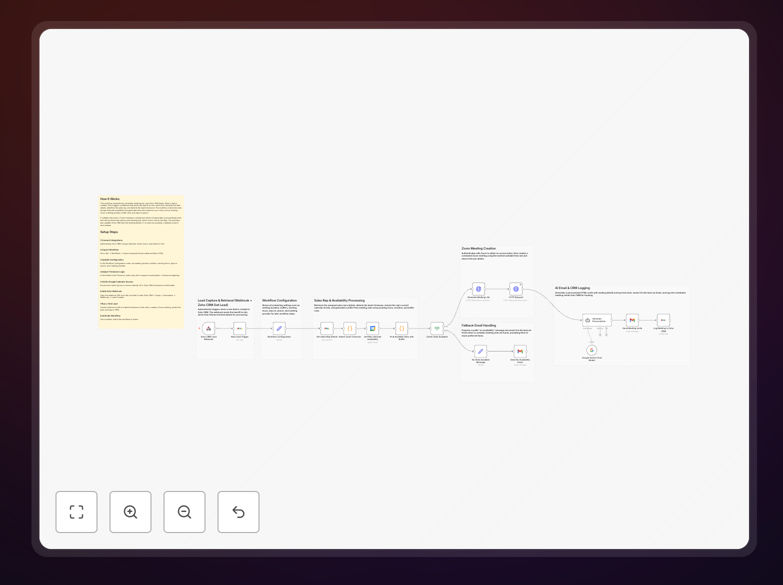
The automation triggers whenever a new lead is created in Zoho CRM. It immediately fetches the lead's details, detects their timezone based on location data, checks the assigned sales rep's real-time Google Calendar availability, generates conflict-free meeting slots, creates a Zoom meeting, and sends a professionally crafted AI-generated invitation email—all within minutes of lead creation.
If no suitable time slots are available in the next few days, the system sends a thoughtful fallback message to keep the lead engaged without cluttering your CRM with incomplete activities. This ensures every lead receives immediate, personalized attention while freeing your sales team to focus on selling rather than scheduling.
How It Works
1. Lead Capture & Trigger
When a new lead is created in Zoho CRM, a webhook instantly notifies the n8n workflow. The system immediately retrieves complete lead information including email, company, location, and assigned sales representative.
2. Timezone Detection & Mapping
The workflow analyzes the lead's country and state information to determine their local timezone. This critical step ensures all proposed meeting times are presented in the lead's local time, eliminating confusion and increasing acceptance rates.
3. Calendar Availability Check
The system connects to the assigned sales rep's Google Calendar and scans for existing events, busy times, and out-of-office blocks. It respects configured working hours, buffer times between meetings, and your preferred meeting duration settings.
4. Intelligent Slot Generation
Based on availability, the workflow generates valid meeting time slots for the next configured number of days. It prioritizes sooner rather than later slots and ensures no double-booking occurs.
5. Meeting Creation & Notification
When slots are available, the system authenticates with Zoom, creates a meeting with proper details, then uses Gemini AI to generate a personalized, professional invitation email that references the lead's specific context and sends it immediately.
6. CRM Activity Logging
All successful meeting creations are automatically logged as activities in Zoho CRM with complete details—meeting time, Zoom link, and email sent timestamp—providing full visibility for sales managers.
Who This Is For
This automation is ideal for sales teams managing inbound leads, SaaS companies offering demos, agencies booking consultation calls, and any business struggling with timezone-based scheduling. It's particularly valuable for:
Sales teams with high lead volume who can't manually schedule every inquiry. Global companies dealing with multiple timezones. Startups wanting to appear more professional and responsive. CRM managers seeking to automate lead qualification processes. Business development reps who spend hours each week on scheduling logistics.
What You'll Need
- n8n instance (cloud or self-hosted) with workflow execution capabilities
- Zoho CRM account with API access and webhook configuration permissions
- Google Calendar access for the sales representatives who will be scheduled
- Gmail or SMTP service for sending invitation emails
- Zoom account with API access for meeting creation (can be substituted with Google Meet or other video platforms)
- Google Gemini AI API key for generating personalized email content
- Lead data that includes email addresses and location information for timezone detection
Pro tip: Before implementing, audit your current lead-to-meeting conversion time. Most teams see this drop from 2-3 days to under 30 minutes with automation, which becomes a powerful ROI metric to share with stakeholders.
Quick Setup Guide
- Import the workflow into your n8n instance using the downloaded JSON file.
- Configure credentials for Zoho CRM, Google Calendar, Gmail, Zoom, and Gemini AI in n8n's credential management.
- Adjust workflow settings including meeting duration, buffer times, working hours, and days to look ahead for availability.
- Test the email recipient field to ensure it dynamically pulls from the lead's email address in Zoho CRM.
- Set up the webhook in Zoho CRM under Automation → Webhooks, pointing to your n8n webhook URL for new lead creation events.
- Run a test with a sample lead to verify timezone detection, calendar checking, meeting creation, and email delivery.
- Activate the workflow and monitor initial executions to ensure everything runs smoothly.
Key Benefits
Reduce response time from days to minutes. Leads receive meeting invitations while their interest is highest, dramatically improving conversion rates. The immediate professional response also creates positive first impressions that differentiate your business.
Eliminate scheduling errors and timezone confusion. Automated timezone detection ensures meetings are proposed at appropriate local times, reducing no-shows and rescheduling requests that waste sales rep time and frustrate prospects.
Free up 5-10 hours per sales rep weekly. By removing manual scheduling tasks, your sales team can focus on actual selling conversations, strategy, and relationship building rather than administrative back-and-forth.
Ensure no lead falls through the cracks. Every new lead automatically triggers the scheduling process, creating consistent follow-up that doesn't depend on individual rep discipline or memory during busy periods.
Gain valuable analytics on scheduling performance. With all activities logged in CRM, you can track metrics like average time to first meeting, scheduling success rates by timezone, and which reps have the fastest response times.