What This Workflow Does
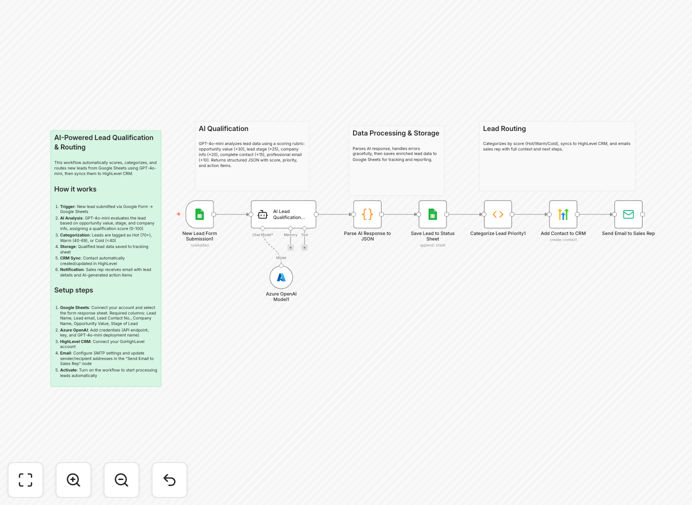
This automation transforms your manual lead qualification process into an efficient, AI-powered system. It monitors a Google Sheet for new form submissions, analyzes each lead using GPT-4o-mini, and routes qualified leads to your HighLevel CRM with priority scoring.
The workflow eliminates hours of manual review by automatically categorizing leads as Hot, Warm, or Cold based on AI analysis of company details, opportunity value, and lead stage. Sales teams receive instant email notifications with all relevant lead information and AI-generated action items.
How It Works
1. New Lead Detection
The workflow triggers when a new row is added to your Google Sheet containing lead information. It extracts all relevant lead details including contact information, company name, and opportunity value.
2. AI-Powered Qualification
An Azure OpenAI node analyzes the lead details using GPT-4o-mini to generate a quality score and recommended next steps. The AI considers factors like company size, industry, and deal potential.
3. Data Processing
The AI's response is parsed into clean JSON format, extracting the quality score, category (Hot/Warm/Cold), and specific action items for the sales team.
4. CRM Integration
The lead is automatically created or updated in HighLevel CRM with all collected information and the AI-generated score. Custom fields track the qualification details.
5. Sales Notification
An email is sent to the assigned sales rep with the lead details, priority level, and AI-generated action items - all formatted for easy reading and follow-up.
Who This Is For
This automation is ideal for:
- Sales teams receiving high volumes of inbound leads
- Marketing agencies managing multiple client pipelines
- Startups needing efficient lead processing without hiring additional staff
- Businesses using HighLevel CRM wanting to enhance their lead qualification
- Teams that want data-driven lead scoring without complex CRM setups
What You'll Need
- An n8n instance (cloud or self-hosted)
- Google Sheet with lead form submissions
- Azure OpenAI access with GPT-4o-mini deployment
- HighLevel CRM account
- SMTP email credentials for notifications
Quick Setup Guide
- Import the workflow JSON into your n8n instance
- Connect your Google Sheets account and specify your leads sheet
- Configure the Azure OpenAI node with your API credentials
- Set up the HighLevel CRM OAuth connection
- Enter your SMTP email settings in the email node
- Test with sample lead data and adjust scoring thresholds as needed
Pro tip: Customize the AI prompt in the Function node to better match your ideal customer profile and qualification criteria.
Key Benefits
Save 10+ hours per week by eliminating manual lead review and data entry. The automation handles the initial qualification so your team can focus on closing deals.
Improve conversion rates with consistent, objective lead scoring. The AI evaluates each lead the same way, removing human bias from the qualification process.
Get real-time alerts when high-quality leads come in. Sales reps receive immediate notifications with all the information they need to follow up effectively.
Centralize lead data in both Google Sheets and your CRM. The workflow maintains a complete record of all lead interactions and qualification details.
Fully customizable to your specific business rules. Adjust scoring thresholds, CRM fields, and notification templates to match your sales process.