What This Workflow Does
Manual lead qualification is time-consuming and inconsistent. Sales teams spend hours calling leads, taking notes, and following up—often missing opportunities due to delayed responses. This automation solves that by creating a 24/7 AI phone agent that qualifies leads instantly.
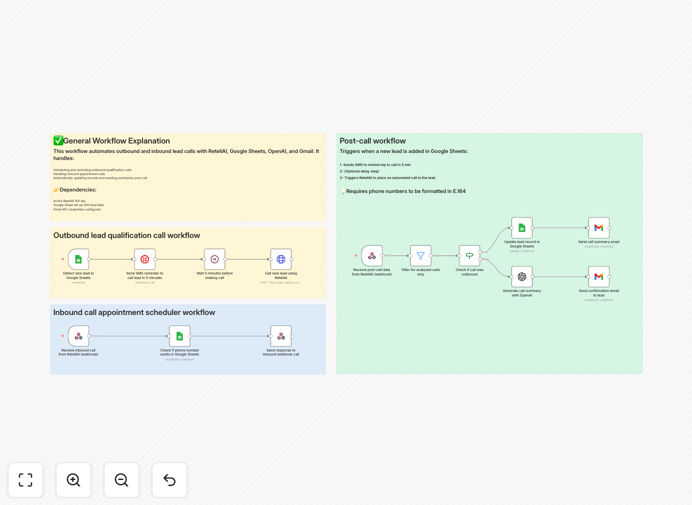
The workflow connects three powerful tools: RetellAI for voice conversations, OpenAI GPT for intelligent analysis, and Google Sheets for centralized data management. When a new lead arrives, the system automatically calls them, asks qualifying questions, logs the conversation, and sends a summary to your team—all without human intervention.
Beyond outbound calls, it also handles inbound inquiries. When someone calls your business number, the AI agent answers, qualifies them, checks if they're in your system, and either schedules an appointment or routes them appropriately. This creates a seamless experience for both your team and potential customers.
How It Works
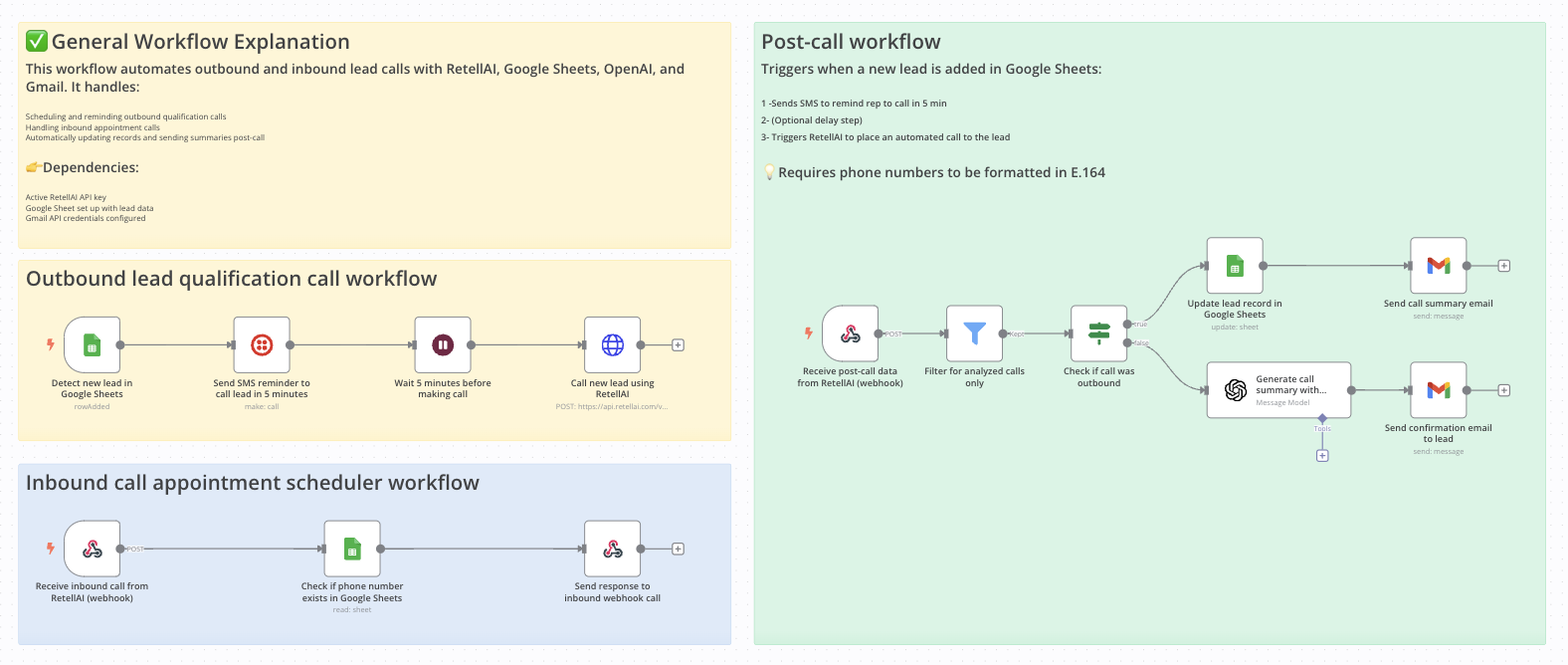
The automation operates through three synchronized processes that handle the entire lead qualification lifecycle.
1. Outbound Lead Qualification
When a new lead is added to your Google Sheet, the workflow triggers immediately. It sends an SMS reminder to your sales rep, waits 5 minutes (configurable), then initiates an automated call via RetellAI. The AI agent follows your script to ask qualifying questions and determine lead interest.
2. Inbound Call Handling
When someone calls your business number, RetellAI receives the call and passes it to this workflow. The system checks if the caller's number exists in your Google Sheets database, then responds with appropriate messaging—either welcoming existing contacts or collecting new lead information.
3. Post-Call Processing
After each call, RetellAI sends conversation data back to the workflow. The system filters for analyzed calls, updates the lead's record in Google Sheets, uses OpenAI to generate a concise summary, and emails that summary to your team inbox for immediate follow-up.
Pro tip: Customize the OpenAI prompt to extract specific insights from conversations—like urgency level, budget mentions, or competitor references—that help prioritize follow-up actions.
Who This Is For
This automation is ideal for sales teams, call centers, real estate agencies, service providers, and any business handling moderate to high lead volumes. If your team spends more than 10 hours per week on initial lead qualification calls, this workflow will save significant time.
E-commerce businesses can use it for order status checks and FAQ handling. Retail stores can share hours and directions. Restaurants can take reservations. Service providers can book consultations. Essentially, any local business that receives customer calls can implement this to provide 24/7 support without staffing overhead.
The workflow particularly benefits companies already using Google Sheets for lead tracking and those with distributed teams who need consistent qualification processes across locations or time zones.
What You'll Need
- RetellAI API key – Sign up for RetellAI, create an agent, and set up webhook URLs for call events.
- Twilio phone number – Purchase a number through Twilio and link it to your RetellAI agent for making/receiving calls.
- Google Sheet with phone column – Your lead spreadsheet must include a column for phone numbers (labeled "Phone" or similar).
- Gmail account – Connected and authorized in n8n for sending call summaries.
- OpenAI API key – Added to your n8n environment variables or credentials for generating conversation summaries.
Quick Setup Guide
Follow these steps to implement this automation in your n8n instance:
- Import the template – Download the JSON file and import it into your n8n workspace using the "Import from File" option.
- Configure Google Sheets – Update the Google Sheets node with your spreadsheet ID and range where leads are stored.
- Add API credentials – Set up credentials for RetellAI, OpenAI, and Gmail in n8n's credentials management.
- Test the webhook – Activate the webhook node and copy its URL to your RetellAI agent settings as the call event webhook.
- Customize messaging – Edit the SMS reminder text and OpenAI prompt to match your brand voice and qualification criteria.
- Run a test call – Add a test lead to your sheet and verify the entire flow works from call initiation to summary email.
Implementation note: Start with a small test group of leads before scaling to your entire database. This lets you refine conversation scripts and identify any integration issues with minimal risk.
Key Benefits
Reduce qualification time by 80%. What previously took 15 minutes per lead (calling, note-taking, data entry) now happens automatically in the background, freeing sales reps for higher-value conversations.
Improve response time to under 5 minutes. Leads receive immediate contact when added to your system, dramatically increasing engagement rates compared to manual follow-up that might take hours or days.
Ensure consistent qualification criteria. Every lead gets asked the same questions in the same way, eliminating human variability and ensuring fair, standardized evaluation across your pipeline.
Create searchable conversation records. All call summaries are logged in Google Sheets with timestamps, scores, and key insights—creating a valuable database for sales analysis and training.
Provide 24/7 availability without staffing costs. The AI agent handles calls outside business hours, on weekends, and during holidays, capturing leads that would otherwise be missed.