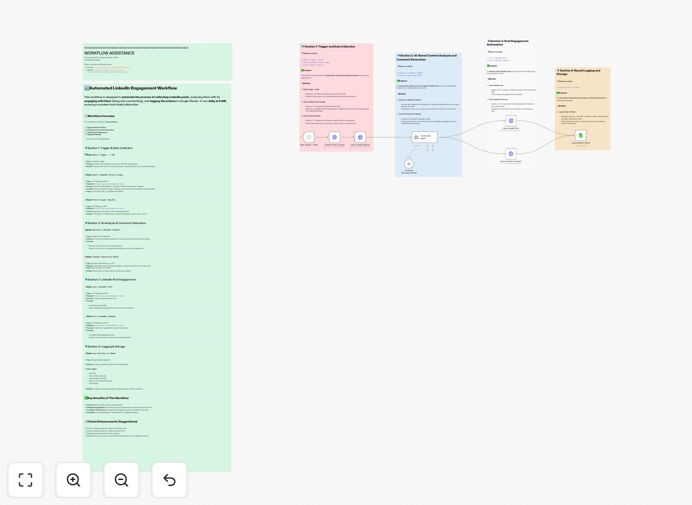
What This Workflow Does
Manual LinkedIn networking is time-consuming and inconsistent. Professionals spend hours each week scrolling through feeds, crafting comments, and trying to remember who they've engaged with—only to see minimal results from their efforts.
This automation solves that problem by creating a systematic approach to LinkedIn engagement. It intelligently discovers relevant content from target profiles, generates human-like comments using AI, and maintains a complete record of all interactions. Instead of random networking, you build strategic relationships while saving 5-10 hours weekly.
The workflow transforms LinkedIn from a time drain into a predictable lead generation and networking engine. It ensures you're consistently visible to your target audience while providing data to refine your approach over time.
How It Works
1. Content Discovery & Scraping
The workflow begins by connecting to Phantombuster to scrape LinkedIn posts from your predefined target profiles or search criteria. It identifies recent, relevant content that aligns with your networking goals and extracts key metadata for analysis.
2. AI-Powered Comment Generation
Each discovered post is sent to OpenAI's GPT model, which analyzes the content and generates a thoughtful, contextual comment. The AI maintains a professional tone while ensuring each response adds value to the conversation, avoiding generic or spammy replies.
3. Automated Engagement
The workflow then automatically likes the selected posts and posts the AI-generated comments. This dual approach increases your visibility while demonstrating genuine interest in the content, significantly improving connection acceptance rates.
4. Comprehensive Activity Tracking
Every interaction—post URL, comment text, timestamp, and profile information—is logged to a Google Sheets spreadsheet. This creates a searchable database of your networking activities, enabling performance analysis and follow-up planning.
Who This Is For
This automation is ideal for sales professionals, recruiters, marketers, entrepreneurs, and anyone who uses LinkedIn for business development. If you need to build your professional network, generate leads, or establish thought leadership without spending hours daily on manual engagement, this workflow provides the systematic approach you need.
It's particularly valuable for consultants, agency owners, and B2B service providers who rely on LinkedIn for client acquisition. The tracking component makes it easy to demonstrate networking activities to teams or managers, while the AI component ensures consistent quality in all interactions.
Pro tip: Start with a small list of high-value target profiles rather than casting a wide net. Quality engagement with 10 ideal prospects is more valuable than superficial interactions with 100 random connections.
What You'll Need
- Phantombuster Account: API key and configured LinkedIn scraping agents with your target profile URLs or search parameters.
- OpenAI API Access: GPT model access with an API key for generating intelligent, contextual comments.
- Google Sheets: A Google account with a prepared spreadsheet for tracking interactions (the workflow will create columns automatically).
- n8n Instance: Either n8n.cloud or a self-hosted n8n installation where you can import and run the workflow.
- LinkedIn Account: A professional LinkedIn account that you'll use for engagement (consider using a dedicated business account if scaling significantly).
Quick Setup Guide
Follow these steps to get your LinkedIn automation running in under 30 minutes:
- Download the template using the button above and import it into your n8n instance.
- Configure Phantombuster credentials in the HTTP Request node, adding your API key and adjusting the target profile parameters.
- Add your OpenAI API key to the AI node, selecting your preferred GPT model and setting appropriate parameters for comment generation.
- Connect Google Sheets by authenticating with your Google account and specifying the spreadsheet ID where interactions should be logged.
- Test with a single profile first to ensure everything works correctly before scaling to multiple targets.
- Set the schedule trigger to run daily or weekly based on your networking goals and LinkedIn's recommended limits.
Important: Always review LinkedIn's terms of service and automation policies. This workflow is designed for ethical, value-adding engagement that respects platform limits and maintains authentic professional interactions.
Key Benefits
Save 5-10 hours weekly by automating repetitive LinkedIn networking tasks. What used to require daily manual effort now runs systematically in the background, freeing you for higher-value activities.
Improve engagement quality with AI-generated comments that are contextual and professional. The AI analyzes post content to craft responses that demonstrate genuine understanding and add to the conversation.
Build consistent visibility with regular, strategic interactions. Unlike sporadic manual efforts, this automation ensures you're consistently engaging with your target audience, building recognition and trust over time.
Track and measure ROI through comprehensive Google Sheets logging. Every interaction is recorded, allowing you to analyze what works, identify your most engaged prospects, and refine your strategy based on data.
Scale strategically without sacrificing personalization. The workflow allows you to engage with more prospects while maintaining quality interactions, helping you build a larger professional network efficiently.