Typeform Google Drive OpenAI Marketing Agencies

Automate marketing agency client onboarding: Typeform to GDrive + OpenAI research

Streamline your client intake process with automated data collection, organization, and AI-powered research

Download Template JSON · n8n compatible · Free
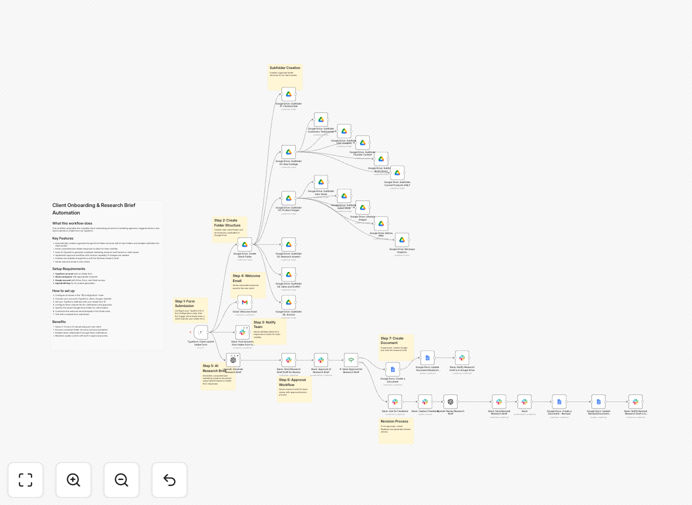
Marketing agency client onboarding automation workflow diagram

What This Workflow Does

This automation transforms the chaotic client onboarding process into a streamlined, efficient system for marketing agencies. When a new client submits your Typeform onboarding questionnaire, the workflow automatically organizes their responses in Google Drive while simultaneously conducting AI-powered research about their business and industry.

The system eliminates manual data entry, reduces errors, and ensures every client file contains consistent, well-organized information. By the time your team meets the client, you'll already have their completed questionnaire, preliminary research, and properly structured folders - giving you more time to focus on strategy rather than administrative setup.

How It Works

1. Typeform submission triggers the workflow

When a potential client completes your agency's onboarding Typeform, the workflow automatically captures all their responses. This includes contact information, business details, project requirements, and any uploaded files or documents.

2. Data validation and processing

The system checks for complete responses, formats information consistently, and flags any missing critical details that might require follow-up. This ensures your team never receives incomplete client information.

3. Google Drive folder creation

A dedicated client folder is created in your agency's Google Drive with a standardized structure. Subfolders are generated for contracts, assets, research, and deliverables based on your agency's preferred organization system.

4. AI-powered research initiation

Using the client's business information from the Typeform, OpenAI analyzes their industry, competitors, and market positioning. The system generates a preliminary research report that's saved directly to the client's folder.

5. Team notification and next steps

The workflow notifies your account team via email or Slack and creates any necessary tasks in your project management system. The entire onboarding package is ready before your first strategy call.

Who This Is For

This workflow is ideal for marketing agencies, digital service providers, and freelancers who onboard multiple clients each month. It's particularly valuable for:

  • Digital marketing agencies managing 5+ concurrent clients
  • SEO specialists who need thorough client research
  • Content marketing teams requiring organized client assets
  • Freelancers looking to professionalize their onboarding
  • Growth consultants who want data-driven first impressions

What You'll Need

  1. An active Typeform account with your client onboarding form
  2. Google Workspace account with Drive access
  3. OpenAI API access (GPT-4 recommended)
  4. n8n instance (cloud or self-hosted)
  5. Basic understanding of n8n workflows

Quick Setup Guide

  1. Download the JSON template file
  2. Import into your n8n instance
  3. Connect your Typeform, Google Drive, and OpenAI accounts
  4. Configure folder structure in Google Drive
  5. Set your research parameters in the OpenAI node
  6. Test with a sample Typeform submission
  7. Activate the workflow for live use

Key Benefits

Save 5-10 hours per client onboarding by eliminating manual data entry, file organization, and preliminary research tasks.

Improve client first impressions with consistently organized materials and informed initial conversations powered by AI research.

Reduce onboarding errors through automated data validation and standardized folder structures for every client.

Scale your agency operations by handling more clients without proportional increases in administrative work.

Enhance service quality with AI-generated insights that help you ask better questions during discovery calls.

Pro tip: Customize your Typeform with conditional questions that trigger different research paths in the AI component. For example, ecommerce clients might get competitor price analysis while service businesses receive local SEO opportunity reports.

Frequently Asked Questions

Common questions about marketing agency onboarding automation

Automation transforms client onboarding by eliminating manual data entry, reducing errors, and speeding up the process. When a new client submits a Typeform, the system automatically organizes their information in Google Drive and initiates AI-powered research. This ensures consistency, saves 5-10 hours per client, and allows your team to focus on strategy rather than administrative tasks.

The automated workflow creates a standardized experience for every client while allowing customization where needed. Agencies report faster project kickoffs and more productive initial meetings since all background research is completed before the first call.

  • Reduces onboarding time by 60-80%
  • Ensures no client details are missed
  • Creates audit-ready documentation

Effective onboarding collects business goals, target audience details, current marketing performance, and brand guidelines. The Typeform should gather contact information, project scope, budget, timelines, and any existing assets. AI research can then supplement this with competitive analysis and industry trends. Structured data collection ensures you have everything needed to kickstart campaigns without back-and-forth emails.

Include questions about their unique value proposition, key competitors, and success metrics. This information feeds directly into your strategy development and helps the AI generate more relevant research. For creative agencies, collect brand colors, fonts, and style preferences upfront.

  • Prioritize information needed for contract drafting
  • Include file upload fields for brand assets
  • Ask about communication preferences

AI research automatically analyzes the client's industry, competitors, and market positioning based on their onboarding responses. It generates insights that would normally take hours of manual research, providing immediate value during initial strategy discussions. This positions your agency as more knowledgeable and prepared, while uncovering opportunities the client may not have considered.

The system can identify content gaps, SEO opportunities, and competitive weaknesses before your first meeting. For example, it might flag that all competitors lack video content or have poor mobile experiences - insights you can use to shape your proposed strategy.

  • Provides data-driven talking points
  • Identifies quick-win opportunities
  • Benchmarks against industry standards

Secure automation requires encrypted data transfer between Typeform, Google Drive, and AI tools. Client information should be stored in restricted-access folders with proper permission controls. The workflow should exclude sensitive data from AI processing unless explicitly authorized. Regular audits ensure compliance with data protection regulations like GDPR for international clients.

Implement two-factor authentication for all connected accounts and consider using a dedicated service account for automation rather than personal credentials. For highly sensitive clients, you might maintain certain manual steps while automating less critical portions of the workflow.

  • Review access permissions quarterly
  • Anonymize data sent to AI tools when possible
  • Document your data handling procedures

Yes, the workflow can extend to CRM systems like HubSpot, project management tools like Asana, and accounting software like QuickBooks. Additional triggers can notify team members via Slack or create tasks in ClickUp. The modular design allows adding steps for contract signing, invoice generation, or resource allocation based on your agency's tech stack.

Common integrations include adding new clients to your email marketing system (with permission), creating project templates in your PM tool, or syncing deadlines with your team calendar. The workflow becomes your central onboarding hub that connects all your business systems.

  • Add CRM integration in 15-30 minutes
  • Connect to your proposal software
  • Automate team assignment based on services

Agencies report saving 5-15 hours per client with automated onboarding. Eliminating manual data entry saves 2-3 hours, while automated document organization saves another 1-2 hours. AI research replaces 3-8 hours of manual competitive analysis. The biggest savings come from reduced email threads and faster project kickoffs, allowing teams to handle more clients without sacrificing quality.

For an agency onboarding 10 clients monthly, this translates to 50-150 hours saved - essentially adding 1-3 full-time employees' worth of capacity. The time savings compound as you scale, with many agencies reporting they can handle 20-30% more clients with the same team size.

  • Reduces onboarding labor by 70%+
  • Speeds up revenue recognition
  • Improves team morale by eliminating busywork

Absolutely. GrowwStacks specializes in tailored onboarding systems for marketing agencies. We'll analyze your current process, identify automation opportunities, and build a solution that integrates with your specific tools and workflows. Custom automations can include unique research parameters, client segmentation rules, and branded deliverable templates to match your agency's service offerings.

Our team works with you to design an onboarding flow that reflects your agency's brand and values while maximizing efficiency. We handle the technical implementation so you can focus on client relationships and service delivery.

  • Free consultation to assess your needs
  • 2-4 week implementation timeline
  • Ongoing support and optimization

Need a Custom Client Onboarding Integration?

This free template is a starting point. Our team builds fully tailored automation systems for your specific needs.